Document an Officer’s Position and Specimen Signature in One Professional Certificate
When an organization needs to confirm who currently holds a particular corporate office and provide an example of that person’s signature, having both pieces of information in one document can be useful. This Certificate of Incumbency with Specimen Signatures Template is designed to present those details in a clear, professional, and easy-to-check format.
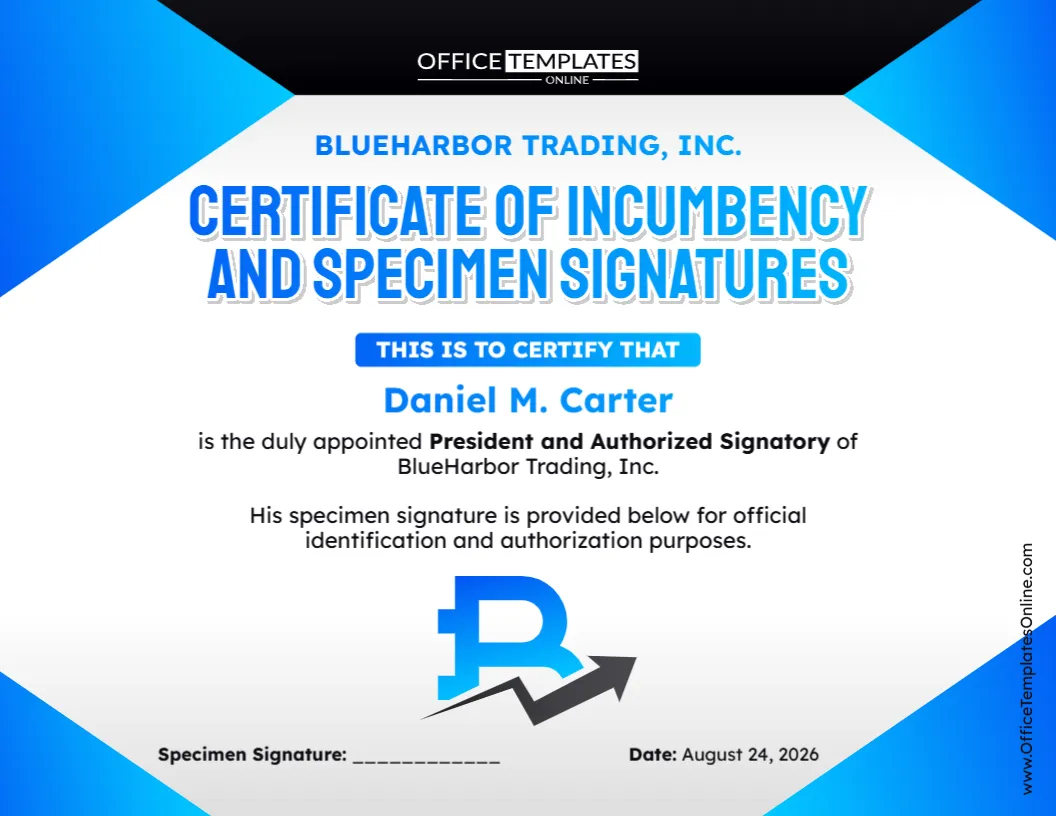
The template combines an incumbency statement with a dedicated specimen signature field. In the sample design, it certifies that the named individual is the duly appointed President and Authorized Signatory of the company and provides space for that person’s specimen signature for identification and authorization purposes.
You can customize the entire template using our online browser-based editor. No login is required. Replace the sample company and officer information, update the position and certification wording, enter the correct date, and make other available changes. When your certificate is ready, download the finished version in PDF, PNG, or JPG format.
What Is a Certificate of Incumbency with a Specimen Signature?
A Certificate of Incumbency is generally used to identify or confirm individuals who currently hold specified positions within a company or organization. Depending on why the document is being prepared, it may contain officer names, titles, information about signing authority, and specimen signatures.
A specimen signature is simply an example of a person’s signature kept or presented for comparison or identification. Including it with incumbency information can make it easier for a recipient to see both who holds the stated position and what that individual’s signature looks like.
This template brings those two elements together on a single certificate.
Its sample wording confirms that the named person is a duly appointed company officer and authorized signatory. It then states that the individual’s specimen signature is provided below for identification and authorization purposes.
Because the wording is editable, you can adapt it when a different title, role, or statement is appropriate.
What Information Can You Add to This Template?
The certificate has been intentionally kept focused so that the essential information can be found without searching through a long document.
You can personalize important details such as:
- Company or organization name
- Name of the incumbent officer
- Corporate position or office held
- Authorized signatory designation, when applicable
- Incumbency certification statement
- Specimen signature
- Certificate date
The sample design uses a President and Authorized Signatory as an example, but that does not mean the template must always be used for a president. Where appropriate, the editable content can be changed to reflect the actual office or role that needs to be documented.
Why Include a Specimen Signature?
A regular incumbency certificate may establish that a named individual currently holds a particular corporate office. Adding a specimen signature provides another useful piece of reference information.
The recipient can see an example of the signature associated with the named individual rather than relying only on a typed name and title.
This may be useful when a business, financial institution, professional adviser, transaction participant, or another authorized recipient has specifically requested evidence of an officer’s current position together with a signature sample.
However, including a specimen signature does not automatically prove that every document carrying a similar signature is valid or authorized. Signing powers and verification requirements depend on the organization, transaction, and procedures involved.
A Layout That Makes Key Details Easy to Find
The visual hierarchy of this template has been designed to make the certificate understandable at a glance.
The large “Certificate of Incumbency and Specimen Signatures” heading clearly explains the document’s purpose. Directly underneath, a prominent certification section draws attention to the name of the individual whose position is being confirmed.
The officer’s title and company name follow naturally, while a short statement explains why the specimen signature is included.
At the bottom, separate Specimen Signature and Date fields provide clearly defined spaces for completing the certificate.
The blue, white, and black corporate design creates a modern appearance without distracting from the information in the document. Bold typography is used for important details, while the open central area keeps the certificate readable.
Customize It Online Without Creating an Account
You do not need complicated design software to personalize this certificate.
Open the template in our easy-to-use online editor and make your changes directly in your browser. There is no login required to customize it, so you can begin editing right away.
Replace the sample business name with your company’s name. Enter the correct officer’s full name and title. Review the authorized signatory wording and keep, remove, or modify it according to your actual requirements. You can also update the date and other editable elements before completing the document.
The pre-designed format takes care of the visual structure, allowing you to concentrate on getting the information right.
How to Prepare Your Customized Certificate
Begin by replacing all sample information. Enter the company name exactly as you want it to appear and add the full name of the person whose incumbency is being certified.
Next, check the corporate title. If the person serves as President, Secretary, Treasurer, Chief Executive Officer, or another officer, make sure the title accurately reflects the company’s records.
Review any reference to “Authorized Signatory” separately. A person’s corporate title and their authority to sign for a company are related issues, but they should not automatically be treated as identical. Keep this designation only when it accurately applies to the person and intended use.
Then enter the appropriate date and complete the specimen signature section as required.
Finally, proofread the certificate before downloading it. Check names, spelling, company details, titles, dates, and certification language carefully.
Understanding the “Authorized Signatory” Wording
The sample certificate identifies the incumbent as both President and Authorized Signatory. This makes the design suitable as a starting point where both the person’s office and signing status need to be stated.
However, you should not assume that someone is authorized to sign every type of document simply because they hold a particular corporate title.
Signing authority can depend on corporate governing documents, resolutions, delegations, account mandates, contractual arrangements, applicable law, or other internal requirements.
For that reason, modify the template so that it states only the authority that can properly be certified.
Situations Where This Type of Certificate May Be Requested
There are various circumstances in which an organization may be asked to provide information about current officers or authorized signatories.
For example, an incumbency certificate with specimen signatures may be relevant when dealing with certain banking arrangements, business transactions, account administration, financing procedures, due diligence requests, contracts, or verification processes.
The exact requirements can differ substantially from one recipient to another.
One organization might need a certificate for a single officer, while another could require a list of several directors or officers and a separate specimen signature for each. A recipient may also request additional certification, supporting resolutions, company seals, notarization, or other documentation.
It is therefore wise to obtain the recipient’s requirements before preparing the final certificate.
Protect Specimen Signatures and Personal Information
A specimen signature deserves careful handling because it is identifying information associated with a particular individual.
Only include a signature when there is a legitimate reason to do so, and share the completed certificate only with the people or organizations that need it. Consider how the finished file will be stored, transmitted, and retained, particularly when it will be sent electronically.
You may also want to confirm whether the requesting organization actually needs a visible specimen signature before distributing a copy.
Download as PDF, PNG, or JPG
Once you have personalized the certificate and checked every detail, you can download your completed design in the format that works best for you.
PDF is a convenient choice when the certificate needs to be printed, archived, emailed, or submitted as a document.
PNG provides an image-based version that can be useful when image quality is important.
JPG offers a widely supported image format for convenient digital use and sharing.
Having all three options means you can customize the certificate once and choose the most suitable output for your intended workflow.
A Useful Checklist Before Finalizing the Certificate
Before downloading or submitting the document, make sure:
- the company’s name is accurate;
- the incumbent’s full name is spelled correctly;
- the stated corporate office is current;
- any authorized signatory statement is accurate;
- the specimen signature belongs to the person identified;
- the date is correct;
- no placeholder names or sample details remain; and
- the document contains any additional information required by its intended recipient.
Taking a few minutes to verify these details can help produce a more reliable and professional final document.
Create a Certificate That Fits Your Organization
This Certificate of Incumbency with Specimen Signatures Template gives you the convenience of a ready-made certificate while allowing you to personalize the information for your organization.
Rather than arranging headings, certification text, signature fields, and dates yourself, start with an existing professional design. Add the correct company and officer information, adapt the wording where necessary, provide the required specimen signature, and check the completed document.
Everything can be customized online with no login required. When you are finished, download your personalized certificate in PDF, PNG, or JPG format.
Important: This template is a customizable document resource and does not constitute legal advice. Incumbency, signing authority, signature certification, notarization, and other requirements can vary by organization, jurisdiction, transaction, and recipient. Before using the certificate for an official or legally significant purpose, confirm the required wording, signatures, supporting documentation, and approval procedures with the requesting organization or an appropriately qualified professional.