Bold Red Rows for Acts of Empathy and Helping
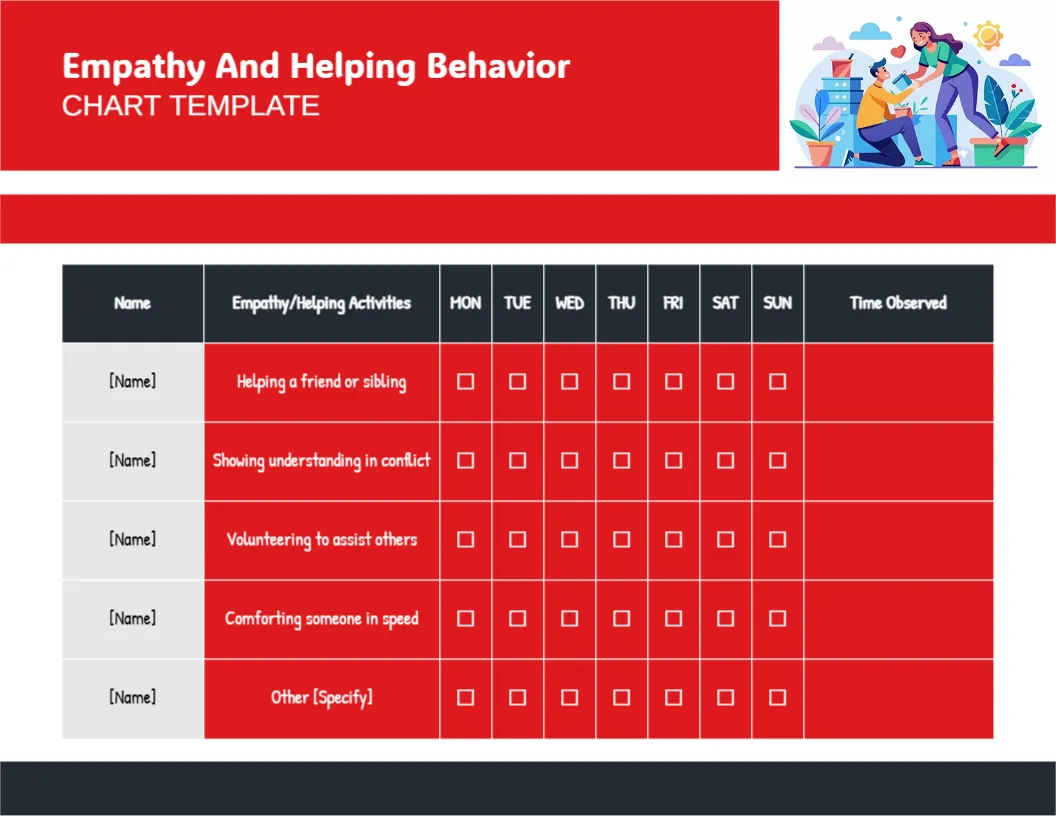
A wide red header carries Empathy And Helping Behavior in white with CHART TEMPLATE below it, beside a colourful illustration of one person kneeling to help another among plants and a sunny sky. A dark header row reads Name, Empathy/Helping Activities, Monday to Sunday and Time Observed. Each activity cell is bright red with white handwritten text: Helping a friend or sibling, Showing understanding in conflict, Volunteering to assist others, Comforting someone and Other.
Red Activity Column
The chart is 11 x 8.5 inches, landscape. The red activity cells make the helpful behaviours stand out, while the name and tick columns stay white and grey.
A Typo in the Comforting Row
The fourth row reads Comforting someone in speed, which should be Comforting someone in need. Retype it before printing. The header also prints CHART TEMPLATE, which you can shorten to CHART. Type each child’s name over the [Name] placeholders.
Setting Up the Empathy Chart
- Fix speed to need.
- Shorten the header.
- Type names.
- Tick when kindness is seen.
- Note the time.
Noticing Small Acts
Empathy often shows in small moments, like sharing a snack or checking on a crying friend. Ticking those moments tells children that kindness matters as much as grades. Over a few weeks, children start pointing out their own kind acts.
Talking About Feelings
When you tick a box, name the feeling: You saw she was sad and helped. Naming feelings builds emotional vocabulary.
Classroom Kindness Projects
Teachers can use the chart during a kindness week, with each pupil aiming to tick every row once.
Printing the Red Cells
Bright red uses ink. White text on red stays readable in colour, but black and white copies may look dark, so test first. Print one copy in colour for the wall and others in black and white.
Siblings and Friends
The first row mentions siblings, so the chart works at home too. Praise older children who help younger ones.
Using the Empathy Chart
Celebrate the week’s kind acts on Sunday.
Step by Step Editing of the Empathy Helping Red Rows Design
- On the empathy helping red rows design, click the main headline and type your own words, keeping a similar length.
- Retype every name, date and contact line on the empathy helping red rows design, checking each against a trusted source.
- Search the empathy helping red rows design for the words Lorem and Company so that no placeholder remains.
- Click any logo or photo on the empathy helping red rows design, choose Replace Image and resize the new picture to fit.
- Zoom the empathy helping red rows design to full size and read each line aloud before you save it.
- Keep a clean master of the empathy helping red rows design without private details, so later versions start tidy.
Also worth a look: kindness and sharing chart. Next to try is the sibling cooperation chart. Have a look at the anger management chart. The rest of the series around the empathy helping red rows design is in behavior chart templates.