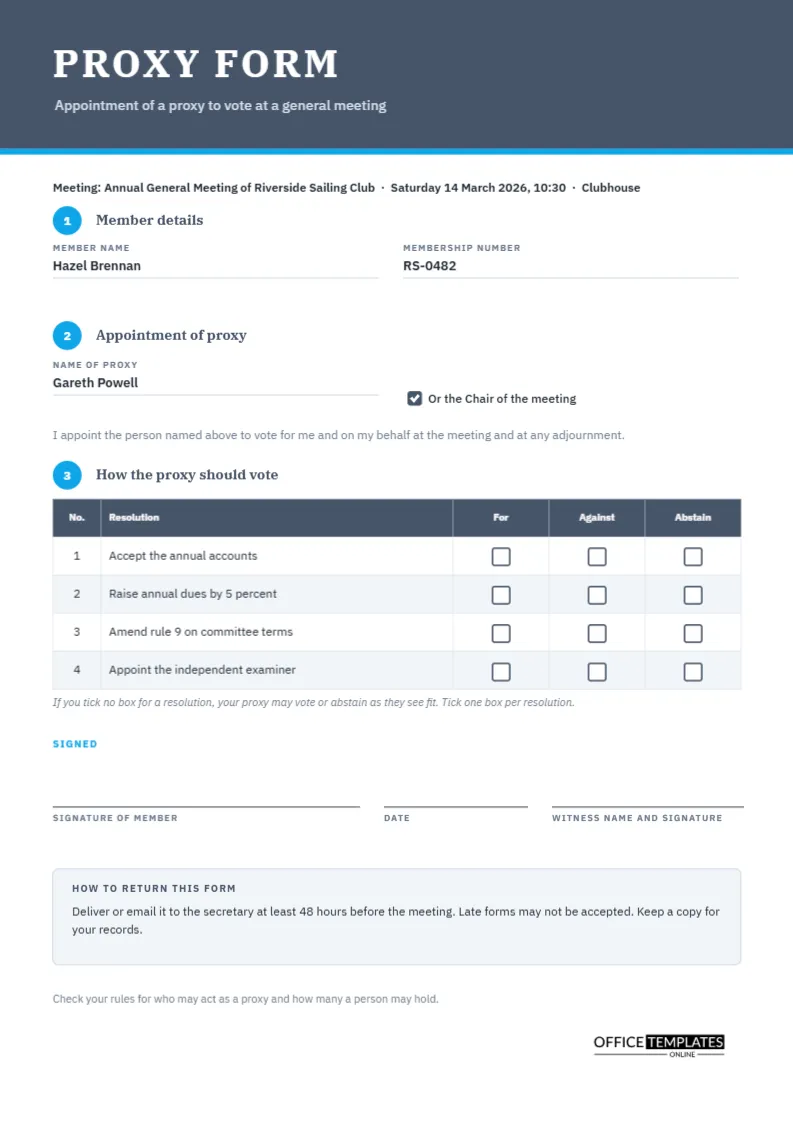
Not every member can come to a general meeting, and a proxy form is the way they stay part of it. The form lets a member appoint another person, or the chair, to attend and vote on their behalf, and it can tell that person how to vote on each resolution. The form is a small legal instrument, so it should be clear, complete, and easy to fill in. This template follows the three steps a member must take, and it provides empty tick boxes for the voting instructions.
Three Numbered Steps
A slate header carries the words PROXY FORM in IBM Plex Serif, with a bright blue line underneath. Below it, three blue circles numbered one to three introduce the sections: member details, appointment of proxy, and how the proxy should vote. Numbered steps help members who rarely fill in forms, and they reduce mistakes such as signing without choosing a proxy.
Step One: Who Is Appointing
The first section has two fields: member name and membership number. In the sample, a member called Hazel Brennan has number RS-0482. A membership number helps the secretary verify the form quickly against the register. Some organisations also ask for an address or a signature at this point, so add fields if your rules require them.
Step Two: Who Will Vote
The second section asks for the name of the proxy and offers a checkbox for the chair of the meeting. A short sentence below it says that the member appoints the named person to vote for them and on their behalf at the meeting and at any adjournment. Including adjournments means the form still works if the meeting is postponed. The sample names Gareth Powell as proxy.
What a Proxy Can and Cannot Do
| Question | Common answer | Check your rules |
|---|---|---|
| Can a proxy speak at the meeting? | Often yes | Yes, it varies |
| Can a proxy vote as they choose? | Only if no instruction is given | Yes |
| Must a proxy be a member? | Often yes in clubs, not always in companies | Yes |
| How many proxies may one person hold? | Often limited | Yes |
Step Three: The Voting Table
A four-row table lists the resolutions with three columns, For, Against, and Abstain, each holding an empty square box. The member ticks one box per resolution. In the sample, the resolutions are accepting the accounts, raising dues, amending a rule, and appointing an examiner. The empty boxes sit centred in each cell and are drawn as small outlined squares, so a pen mark is easy to see.
Instructions Versus Discretion
A note beneath the table says that if no box is ticked, the proxy may vote or abstain as they see fit. This is a common rule, but it varies, so check yours. Some organisations insist on explicit instructions, and others default to the chair’s discretion. State the rule clearly on the form, as this page does.
Signature, Date and Witness
Three lines at the bottom carry the member’s signature, the date and the name and signature of a witness. Whether a witness is needed depends on your rules, so delete the line if not. A date is essential, because it tells the secretary whether the form arrived before any deadline.
How to Return the Form
A grey box explains how and when to return the form: deliver or email it to the secretary at least forty-eight hours before the meeting, and keep a copy. Late forms may not be accepted. Make sure the deadline matches the one in your notice of meeting, because conflicting dates cause disputes.
Checking Proxies Before the Meeting
- Match each form to the membership register.
- Check the signature and date.
- Confirm that the proxy is allowed to act, and that no limit on the number of proxies is exceeded.
- Record the votes the proxy has been instructed to cast.
- Give the chair a summary before the meeting starts.
Keeping Proxies With the Minutes
File all proxy forms with the minutes of the meeting. They are part of the record of how each resolution was carried. If votes are challenged later, the forms provide evidence of the instructions given.
Editing the Form
Retype the meeting description at the top and the four resolutions. The voting boxes are small shapes placed over the table cells, so if you add rows, move them or copy and paste to match. The table is a real Table object with Edit Table Data and Add Row.
Printing the Proxy Form
A4 portrait. Print one per member, or provide the PDF for members to print at home. Use plain white paper that takes ink well.
Explaining Proxies to Members Who Have Never Used One
Many members have never appointed a proxy and worry about doing it wrong. Add a plain sentence to the cover email: tick one box for each resolution, sign and date the form, and return it by the deadline. A short example, such as ticking For on resolution one, means your proxy will vote yes, and removes doubt. Clear instructions reduce the number of spoiled forms the secretary must deal with.
Handling Errors and Unclear Forms
Forms are sometimes incomplete: no date, two boxes ticked, or an illegible name. Agree beforehand how the secretary will treat them, and apply the same rule to everyone. A common approach is to contact the member before the meeting and ask them to correct the form, and to treat unresolved forms as invalid for the affected resolution only.
Revoking or Replacing a Proxy
A member who appoints a proxy may change their mind and attend in person. Many rules allow this, and the member’s own vote then replaces the proxy’s. If a member submits a second form, the later one usually counts. Record any change in a short note on the original form, and tell the chair before the meeting begins.
Proxy Questions
Is this form legally sufficient?
It is a layout. Rules for proxies differ, so check your governing documents.
Can I use it for a company meeting?
As a starting point, yes, though company law sets its own requirements.