An internship report is the bridge between your degree and your first job. Universities ask for one to award credit, and it usually goes to two readers: a faculty supervisor who grades it and a workplace supervisor who may sign it. The cover has to look professional to both. This one does it with an image every intern knows: the ID badge on a lanyard, complete with your photo, your job title, and your host company’s logo. The rest of the page lists exactly what academic programs require: host organisation, department, both supervisors, duration, and hours.
Your Badge on Day One
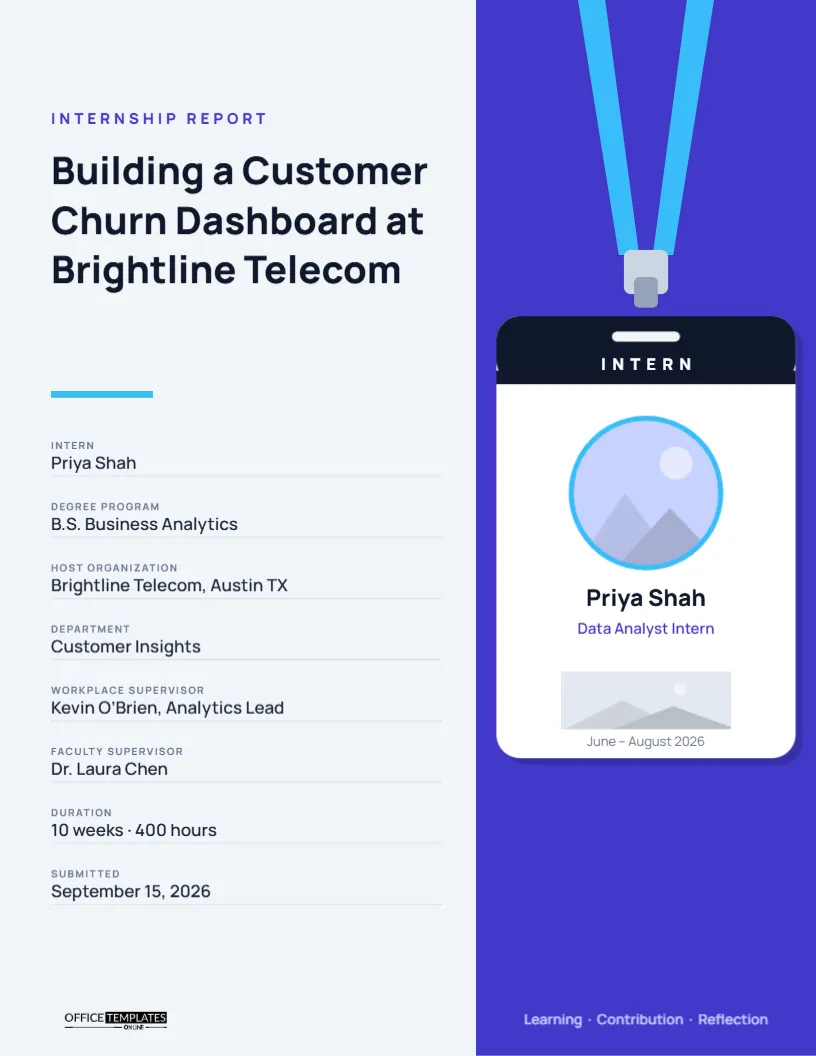
The page is a pale slate grey with a tall indigo panel on the right. From the top of that panel, two sky-blue lanyard straps run down to a grey clip. Hanging from the clip is a white ID badge with rounded corners and a soft shadow. A navy band across the top of the badge reads INTERN in white capitals. Below it, a round photo slot with a sky-blue ring holds your picture, then your name, Priya Shah, in bold, your role, Data Analyst Intern, in indigo, a rectangular slot for the company logo, and the dates, June – August 2026. On the left side of the page, an indigo label reads Internship Report; the title, Building a Customer Churn Dashboard at Brightline Telecom, is set in heavy Manrope, a short sky-blue rule follows, and eight details run down the page. The logo sits at the bottom left, and a line at the bottom of the indigo panel reads Learning · Contribution · Reflection.
Two Image Slots on the Badge
The badge has two places for pictures, both editable with Replace Image:
- Your photo: click the round slot and upload a professional headshot. A plain background and good light work best; the circle crops it neatly and keeps the ring.
- Company logo: click the grey rectangle below your role and upload the host organisation’s logo. A horizontal logo fits best. Ask your supervisor for an official file, or use the one from the company’s press page, and confirm they are happy for it to appear on your report.
If you prefer not to use a photo, upload a simple graphic of your initials into the circle instead, or delete the slot and move your name up.
Eight Details Universities Ask For
| Field | Sample | Why it is needed |
|---|---|---|
| Intern | Priya Shah | Identifies the student |
| Degree program | B.S. | |
| Business Analytics | Links the internship to your studies | |
| Host organization | Brightline Telecom, Austin, TX | Where the internship took place |
| Department | Customer Insights | Your team or unit |
| Workplace supervisor | Kevin O’Brien, Analytics Lead | Who oversaw your daily work |
| Faculty supervisor | Dr. Laura Chen | Who grades the report |
| Duration | 10 weeks · 400 hours | Credit is often based on hours |
| Submitted | September 15, 2026 | Report deadline |
Report Titles That Name Your Contribution
Many students title their report Internship Report at [Company]. That is acceptable, but a title that names your main project is far stronger, both for grading and for your portfolio. Building a Customer Churn Dashboard at Brightline Telecom tells the reader what you delivered. Other examples: Redesigning the Volunteer Onboarding Process at Harbor Food Bank, Testing a Payment API Integration at Finlo, Supporting Patient Education Materials at Cedar Valley Clinic. If your internship had no single project, name the main area of work instead.
A Structure That Satisfies Both Readers
Internship reports usually include an introduction to the organisation, a description of your role and tasks, one or two projects in detail with results, the skills you developed, links to your coursework, challenges and how you handled them, and a reflection on your career goals. The footer line on the indigo panel, Learning · Contribution · Reflection, sums up those three threads. Your faculty supervisor will look for reflection and links to theory; your workplace supervisor will look for accurate descriptions of the work. Write for both.
Confidential Information
Companies often have confidential data and plans. Before writing, ask your workplace supervisor what you may include. Replace real figures with percentages or ranges, remove client names, and never include internal screenshots without permission. Some universities let you submit a confidential report seen only by faculty; ask if you need that. Getting your supervisor to review the report before submission protects you and keeps the relationship strong for future references.
Recolouring the Lanyard and Panel
The indigo panel can match the host company’s brand colour, which makes the report feel tailored to them. Change the panel colour, then change the lanyard straps and the photo ring to a lighter accent. The navy band at the top of the badge can match the company colour too. The lanyard and clip are a group, and the badge body is another; move them together if you reposition the badge.
Co-op Terms and Work Placements
The design works equally for co-op work terms, placement year reports in the UK, practicum reports in social work or education, and apprenticeship logs. Change Intern on the badge to Co-op Student, Placement Student, or Trainee, and update the label at the top of the page. For multiple terms, add the term number to the title, such as Work Term 2 Report.
Printing the Badge Cover
The page is US Letter, 8.5 x 11 inches. The indigo panel prints best on a laser printer; the photo will look sharpest if you upload a high-resolution image. Download as a PDF for submission, and keep a copy for your portfolio. Many students also download the badge area as a PNG to use on a LinkedIn post about their internship.
Internship Report FAQ
Do I need my supervisor’s signature on the cover?
Some programs require a signed approval page. Add it after the cover; the cover itself does not need a signature.
What if my internship was remote?
Write the company’s location and add Remote after it, such as Brightline Telecom, Austin, TX (Remote).
Can I use this for a volunteer placement?
Yes. Change Intern on the badge to Volunteer and the details to match.