Show Exactly Who Is Authorized to Sign a Lease for the Company
A commercial lease can create important financial and operational obligations for a business. Before a lease is signed, a landlord, property manager, lender, legal adviser, or another interested party may want confirmation that the person signing for the company actually has authority to do so.
This Lease Execution Incumbency Certificate Template provides a clear, property-focused way to document that authority.
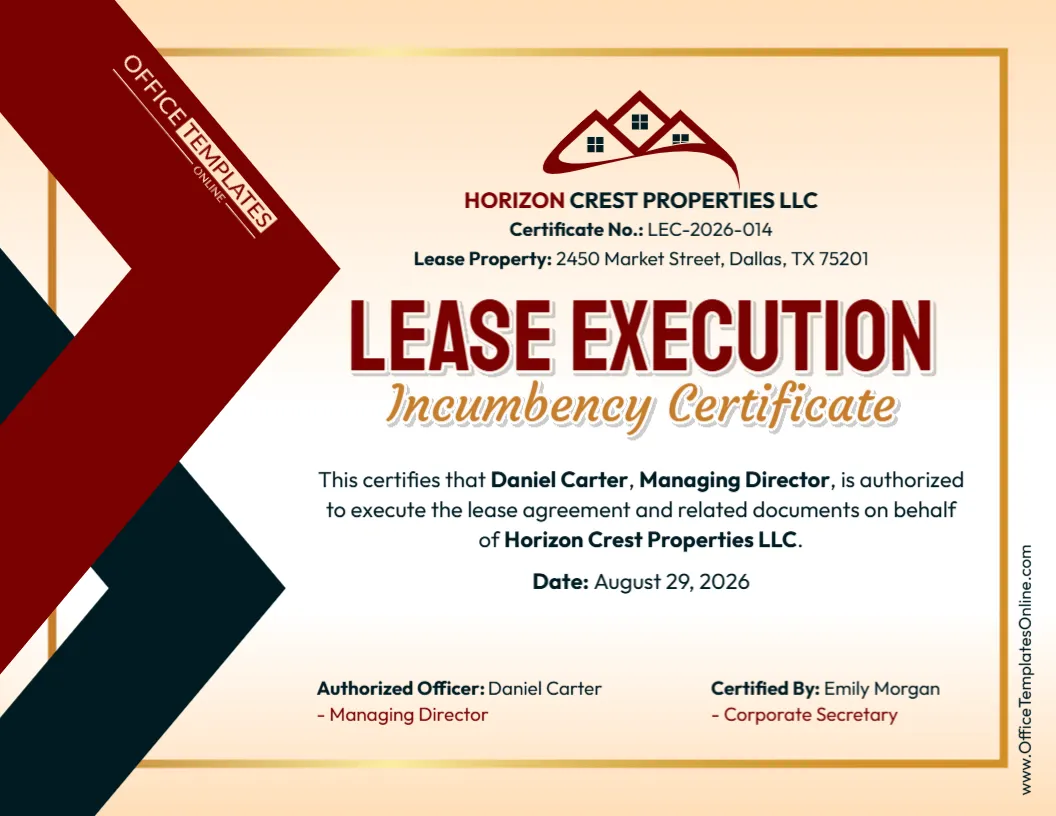
Unlike a general incumbency certificate, this design can connect an authorized officer with a specific lease property. It includes dedicated areas for the company name, certificate number, property address, authorized officer, corporate position, lease execution authority, certificate date, and certifying person.
You can customize the template online directly in your browser without logging in. Replace the sample company, property, officer, title, certificate number, date, and certification information with your own details. Once completed, download your personalized certificate as a PDF, PNG, or JPG.
What Is a Lease Execution Incumbency Certificate?
A Lease Execution Incumbency Certificate is a corporate certificate that can be used to confirm the identity and position of a current officer who is authorized to execute a lease or related documents on behalf of a company.
In simple terms, it can answer three practical questions:
Who is signing?
What position does that person currently hold?
Does that person have the stated authority to execute the lease for the company?
This can be useful when the person signing the lease is acting for a corporation, LLC, or another business entity rather than signing as an individual tenant.
The certificate provides a convenient record of the stated authority, but it does not create that authority by itself.
A Property-Specific Certificate Rather Than a Generic One
One of the most useful features of this template is the Lease Property field near the top.
The sample design identifies a complete street address, making it easy to associate the certificate with a particular property.
This is especially helpful when a company leases more than one location.
Instead of creating a general statement that an officer can sign leases everywhere, you can prepare a certificate specifically connected to the property involved in the current transaction.
The finished document can therefore bring together:
Company + Lease Property + Authorized Officer + Signing Authority
That makes its purpose immediately recognizable.
Information Already Organized for You
The design contains several distinct fields rather than putting every detail into one long paragraph.
You can personalize the certificate with information such as:
- Company’s legal name
- Certificate number
- Address or description of the lease property
- Authorized officer’s full name
- Officer’s corporate title
- Statement of authority to execute the lease
- Authority concerning related documents
- Certificate date
- Authorized officer information
- Name of the person certifying the certificate
- Certifying person’s corporate position
If the recipient needs additional details, the editable design can be adapted accordingly.
The sample information should always be replaced with accurate information for the actual company and lease.
Why the Lease Property Field Is Important
A company’s authority structure does not always treat every lease in the same way.
An officer might have general authority to sign routine leases up to a certain value. Another lease might require special approval because of its duration, rent obligations, size, location, or other terms.
By identifying the specific lease property, this certificate can be made much more precise.
For example, if the officer has been authorized only to execute the lease for a particular office, warehouse, retail location, or other property, the certificate can show that location rather than implying authority over all company leases.
Use the property address or description that matches the lease documentation.
The Certificate Number Gives You Another Reference Point
This design also includes a dedicated Certificate No. field.
A certificate number can help distinguish one certificate from another, particularly if your organization maintains multiple incumbency certificates or property-related records.
You might use an internal numbering system that helps connect the certificate with a particular transaction or company record.
The example certificate number is only a placeholder.
Replace it with your own reference if your organization uses certificate numbering. If a certificate number is unnecessary for your situation, customize the field according to your needs rather than retaining a sample number that has no meaning in your records.
Lease Authority Should Be Confirmed Before the Certificate Is Prepared
The sample certificate states that the named Managing Director is authorized to execute the lease agreement and related documents on behalf of the company.
That statement should not be used automatically.
Before completing the certificate, confirm that the named individual actually has the authority being described.
A company’s lease-signing authority might come from governing documents, a board resolution, member or manager approval, a delegation of authority, internal signing policies, or another valid corporate authorization.
The certificate should reflect that underlying authority.
Typing someone’s name into the template does not give that person permission to sign a lease.
“Related Documents” Can Be Broader Than It Sounds
The phrase “lease agreement and related documents” is convenient, but it can cover more than the main lease.
Depending on the transaction, related documents could potentially include amendments, exhibits, addenda, guaranties, certificates, acknowledgments, notices, or other papers associated with the leasing arrangement.
If the officer is authorized only to sign the principal lease, consider whether the wording should be narrower.
If the authorization genuinely covers the lease and specified related documents, you can keep or customize the broader statement.
The important thing is to make the certificate match the actual scope of authority.
Identify the Correct Legal Entity
Commercial leasing can involve several business names.
A company may operate under a recognizable brand while the actual tenant named in the lease is a corporation, LLC, subsidiary, or another legal entity.
Use the legal company name appropriate to the lease.
For example, if the lease identifies Horizon Crest Properties LLC as the relevant entity, the certificate should not casually substitute a shortened trade name unless there is a specific reason to do so.
Compare the company name in the certificate with the lease and the organization’s official records.
Even small differences in entity names can create confusion when transaction documents are reviewed together.
Confirm the Officer’s Current Position
An incumbency certificate concerns current officeholders.
Before entering the officer’s name, verify that the person still holds the position shown.
The sample certificate uses the title Managing Director, but your company might use a President, Chief Executive Officer, Manager, Director, Vice President, Chief Financial Officer, or another authorized position.
Replace the sample title with the correct one.
Also remember that being a current officer does not automatically establish lease-signing authority. Current position and signing power should both be checked.
Authorized Officer and Certifying Person Are Shown Separately
This template makes a useful distinction in the lower section.
On one side, it identifies the Authorized Officer. On the other, it identifies the person who Certified By the certificate.
In the sample design, the authorized officer is the Managing Director, while the certifying person is the Corporate Secretary.
Keeping these roles separate can make the certificate easier to understand.
The authorized officer is the individual whose authority to execute the lease is being confirmed.
The certifying person is the individual responsible for certifying the relevant corporate information, where that arrangement is appropriate.
Your organization may use different roles, so both sections are editable.
Customize It Online in a Simple Workflow
You do not have to recreate the certificate in a desktop publishing program or spend time formatting a document manually.
Open the template in the online browser editor and personalize the existing design.
No login is required to edit it.
A simple preparation process can be:
- Enter the correct legal company name.
- Add or replace the certificate number.
- Enter the lease property address.
- Replace the sample authorized officer.
- Add the officer’s correct corporate title.
- Review the lease execution statement.
- Narrow or expand the wording only as appropriate.
- Enter the correct certificate date.
- Update the Authorized Officer section.
- Replace the sample certifying person and title.
- Proofread the complete certificate.
- Download your finished version.
The ready-made layout handles the visual organization while you concentrate on the actual lease information.
Match the Property Address to the Lease
When using a property-specific certificate, consistency is particularly helpful.
Check the property address against the lease agreement.
Make sure the street number, street name, city, state or province, postal code, and other applicable details are accurate.
If the lease concerns only a particular suite, floor, unit, or portion of a property, determine whether that information should also appear.
You do not necessarily need to reproduce a lengthy legal property description on the certificate. The goal is to identify the lease property clearly enough for the intended purpose.
If the recipient has specified exactly how the premises should be described, follow those instructions.
Consider Whether the Officer’s Authority Has Limits
Lease-signing authority can sometimes be subject to internal limits.
For example, an officer may be able to approve leases only:
- Up to a specified rent or financial commitment
- For a maximum lease term
- Within a particular business division
- For certain types of property
- After approval by the board or another officer
- Together with a second authorized signer
If such limitations apply, avoid wording that suggests the officer has unrestricted power.
You can customize the certificate to reflect the actual authorization or make the certificate specific to the particular lease for which approval has already been obtained.
This Certificate Is Not the Lease Agreement
A Lease Execution Incumbency Certificate and a commercial lease perform very different jobs.
The lease agreement contains the actual terms governing the property relationship. Those terms can include rent, term, permitted use, maintenance responsibilities, insurance, renewal rights, default provisions, and many other matters.
The incumbency certificate does not establish those lease terms.
Its purpose is much narrower: it helps document who currently holds the relevant company position and who has the stated authority to execute the lease or related documents.
The certificate should therefore support the lease rather than attempt to replace it.
It Does Not Grant Lease-Signing Authority Either
A professional certificate design can make information easy to present, but the template itself has no power to authorize a corporate officer.
If Daniel Carter—or any other person—is entered as the authorized officer, that does not make the statement true simply because it appears on the certificate.
The authority must come from the company’s real governance and authorization structure.
Depending on the organization, that could include operating agreements, bylaws, resolutions, written consents, appointment records, or delegated signing authority.
Use the certificate to document existing authority, not to manufacture it.
Board, Member, or Manager Approval May Be Relevant
The approval process can differ according to the type of business entity and the significance of the lease.
A corporation may have one approval structure, while an LLC may use managers or members according to its governing documents.
A major lease can also be treated differently from an ordinary operational lease.
If a resolution or written consent authorizes the officer to execute the lease, compare that authorization with the certificate before finalizing it.
For example, if approval is limited to the lease for one specific property, the certificate should not imply that the officer has general authority to sign every lease for the company.
Keep the Date Current
The template provides a clearly labeled Date field.
That date helps establish when the company is certifying the officer’s incumbency and authority.
This can matter if the lease process takes time.
An officer could change roles between the initial negotiation and final execution. The company could also modify its signing policies or approve a different representative.
Before issuing the certificate, verify the officer’s status and authority using current information.
If an older certificate is being reused, do more than simply change the date—recheck the underlying facts.
Where This Certificate May Be Useful
A Lease Execution Incumbency Certificate may be useful when a third party wants a clear record of the person authorized to execute a lease for a business entity.
Depending on the circumstances, the recipient could be a landlord, tenant, property manager, lender, title-related professional, lawyer, transaction coordinator, or another party involved in the leasing process.
It may also be maintained internally as part of the organization’s property or transaction records.
However, not every lease requires an incumbency certificate.
If the other party has supplied its own authorized-signatory certificate or requested specific corporate documentation, follow those requirements.
Does the Certificate Need a Signature?
The answer depends on how the certificate will be used.
The design identifies an authorized officer and a certifying person, but the recipient may have particular requirements regarding signatures.
It may request a handwritten signature, electronic signature, corporate certification, or another execution method.
Do not assume that typing a person’s name into the design is equivalent to completing a required signature.
Determine the actual signing requirements before treating the certificate as final.
What About a Corporate Seal or Notarization?
Neither should be added automatically.
Some organizations may use a corporate seal when certifying company documents, while others do not. Likewise, a particular recipient may request notarization, but that does not mean every Lease Execution Incumbency Certificate must be notarized.
If notarization is required, it must be completed through the proper notarial process.
Adding a decorative seal or notary-style graphic in the editor does not make the document officially sealed, certified, or notarized.
Check the recipient’s instructions before completing any formal execution steps.
Download as PDF, PNG, or JPG
Once you have customized and reviewed the certificate, you can download it as a PDF, PNG, or JPG.
A PDF is often practical for printing, electronic sharing, transaction records, or keeping the certificate with the lease documentation.
A PNG or JPG provides an image version when that format better suits your needs.
If the certificate will be submitted through a property-management system, electronic signing platform, lender portal, or another online service, check which formats that system accepts.
Before You Send It: Match These Five Things
A useful final check is to compare the certificate with the documents supporting it.
Make sure the company name matches the tenant or other relevant legal entity.
Make sure the lease property matches the premises identified in the lease.
Make sure the authorized officer currently holds the stated position.
Make sure the authority statement agrees with the company’s actual authorization.
Finally, make sure the certifying person and certificate date are correct.
If all five line up, the certificate will provide a much clearer and more reliable record than one created simply by replacing sample names.
Connect the Property, Officer, and Signing Authority in One Certificate
The Lease Execution Incumbency Certificate Template is particularly useful because it does more than identify a company officer. It connects that officer with a specific lease property and a stated authority to execute the lease and related documents.
Its organized layout provides room for the company name, certificate number, property address, officer, title, authority statement, date, authorized-officer details, and certifying person—all in one professional certificate.
Customize the template online without creating an account or logging in, replace the sample details with accurate lease and corporate information, and download the finished certificate as a PDF, PNG, or JPG.
The template provides a convenient format for documenting existing authority. It does not itself create a lease, approve a lease transaction, appoint an officer, or grant signing authority, and it does not replace any corporate approvals, signatures, notarization, or other documentation required for the particular lease.