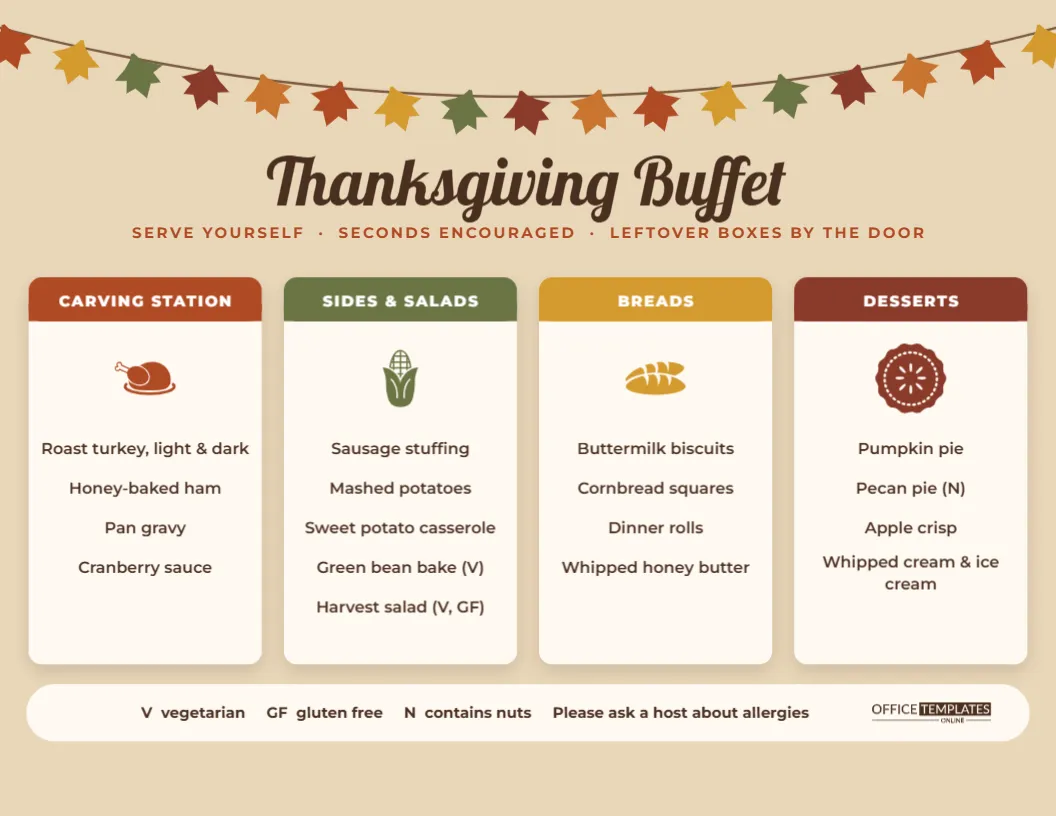
A buffet is the most practical way to feed a crowd at Thanksgiving. Guests serve themselves, nobody waits for plates to be passed, and the cook gets to sit down. The one thing a buffet needs is good signage, so people know what is in each dish and where to find it. This Thanksgiving Buffet Menu lays your spread out exactly the way a buffet line works, station by station.
The Layout, Left to Right Like a Buffet Line
The page is US Letter in landscape, 11 x 8.5 inches, on a warm kraft-paper background. Across the very top hangs a garland: a thin brown string with seventeen autumn leaves dangling from it in rust, mustard, olive, and copper, each tilted slightly differently. Below it, Thanksgiving Buffet is written in Lobster, a bold retro script, in deep brown, and a line of spaced rust capitals reads SERVE YOURSELF · SECONDS ENCOURAGED · LEFTOVER BOXES BY THE DOOR.
The heart of the menu is a row of four white cards with rounded corners and soft shadows, one per station. Each card has a coloured tab across the top with the station name in white, a small icon underneath, then the dishes listed one per line. A long white pill along the bottom holds the allergen key and the brand mark.
Station One: the Carving Station Card
The first card has a rust tab and a roast turkey icon. Its sample list is roast turkey (light and dark), honey-baked ham, pan gravy, and cranberry sauce. The carving station is usually where the queue forms, so it goes first on the menu, mirroring the order most hosts set out their table: meat first, then everything that goes with it.
If someone is carving to order, add their name on the card (Uncle Ray is carving), and guests will know who to ask for a drumstick.
Station Two: the Sides and Salads Card
The olive-green card with the corn icon carries the biggest list: sausage stuffing, mashed potatoes, sweet potato casserole, a green bean bake marked (V), and a harvest salad marked (V, GF). Sides are where dietary needs matter most, because vegetarians and people avoiding gluten usually build their whole plate from them. Marking each dish takes a few characters and saves a lot of questions.
Station Three: the Breads Card
The mustard card with a bread icon lists buttermilk biscuits, cornbread squares, dinner rolls, and whipped honey butter. Breads get their own station so the butter and the basket do not end up in the gravy. If your bread is gluten-free or homemade by a particular guest, say so here.
Station Four: the Desserts Card
The deep red card with a pie icon finishes the line: pumpkin pie, pecan pie (marked N for nuts), apple crisp, and whipped cream and ice cream. Some hosts set desserts out later; you can still print this card now and simply put it out when the pies arrive.
The Allergen Key at the Bottom
The white pill along the bottom explains the codes used on the cards: V for vegetarian, GF for gluten-free, and N for contains nuts, plus a polite note to ask a host about allergies. Add your own codes if you need them, such as DF for dairy-free or VG for vegan. Keep codes consistent across all four cards so guests can scan.
Editing the Station Cards
Every station name and dish is an editable text box. Click a line to replace it. The four station icons are editable vectors tinted to match their tabs; select one to change its colour, or swap it for a different icon in the Elements panel. If you have only three stations, delete one card and space the others evenly; if you have five, shrink the cards slightly and add a fifth by copying the tab, card, icon and text of an existing one.
The leaf garland is one grouped object, so it moves and recolours as a unit. Change the leaf colours to burgundy and gold for an evening buffet, or remove the garland and use a plain border for a more corporate look.
Practical Notes for Using a Buffet Menu
- Print two copies. One for each end of the buffet table, or one at the table and one by the drinks.
- Frame it. An 11 x 8.5 frame or a clear acrylic stand keeps the menu dry and upright.
- Cut it into labels. Print an extra copy, cut out each station card, fold the bottom under, and stand it in front of that station’s dishes.
- Use it for planning. Fill in the cards a week early as a checklist of what still needs to be cooked or bought.
- Post a photo. A PNG of the menu in the family group chat on the day tells late arrivals what they have to look forward to.
Printing the Landscape Menu
Download the PDF and print on Letter paper in landscape. The kraft background prints evenly on most printers; if your printer leaves a white edge, it frames the menu nicely, and nobody will notice. A matte card stock gives a better result than copy paper if the menu will stand on the table all afternoon. At this size, the dish names are easy to read from a step away, which is exactly what a buffet needs.
Buffet Menu Questions
Can I use this for a church, school or office buffet?
Yes. It suits any group meal. Swap the subtitle for your organisation’s name, and use the allergen key generously, since you will not know every guest’s needs.
Can I add prices?
For a café or catering event, add prices to the right of each dish, or put a single price per plate in the subtitle line.
Does it work in portrait?
The four-card row is designed for landscape. For portrait, stack the cards in a two-by-two grid and make the title larger.
A buffet runs itself when guests can see what is where. Fill in your four stations, mark the allergens, and spend the meal at the table instead of answering questions about the stuffing.