Keep Students and Families in the Loop With One Friendly Newsletter
Keeping families informed is an important part of classroom communication, but writing and formatting a new update every time can take valuable time. This Teacher Newsletter Template gives you a ready-made, visually organized format for sharing classroom news without having to design a newsletter from scratch.
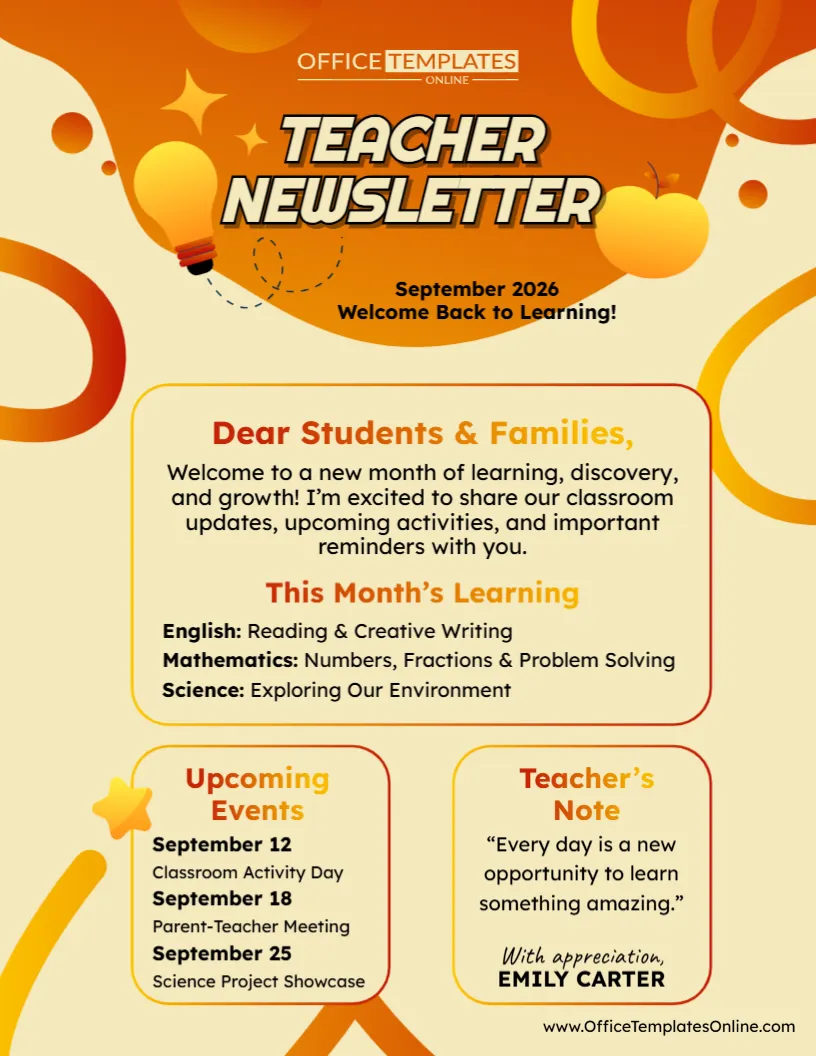
The template brings together the information families often need most: a welcome message, current learning topics, upcoming events, important dates, and a personal note from the teacher. Each type of information has its own clearly defined space, making the newsletter easy to scan.
The sample design is set up as a monthly newsletter for September 2026, but the content is fully customizable. Change the month, rewrite the message, update subjects and lessons, add your own events, and sign the newsletter with your name.
Everything can be personalized through the online browser-based editor with no login required. When your newsletter is complete, download it as a PDF, PNG, or JPG for printing or digital use.
Everything Families Need, Organized on One Page
A classroom newsletter works best when parents and students can quickly find the information that matters to them. This template avoids a long wall of text by dividing the page into several easy-to-recognize sections.
The sample newsletter includes:
- Month and year
- A short welcome or newsletter theme
- Greeting for students and families
- Classroom update
- “This Month’s Learning” section
- Subjects and learning topics
- Upcoming events
- Important dates
- Teacher’s note
- Teacher name or signature
You can use these sections as they are or adapt their content to match the way you communicate with your students and families.
Start With a Warm Message to Students and Families
The main content area begins with “Dear Students & Families,” followed by a short welcome message.
This space is useful for setting the tone of your newsletter. Instead of jumping immediately into dates and reminders, you can briefly tell families what is happening in class and what they can expect during the coming weeks.
For a beginning-of-year newsletter, you might welcome everyone back to school. Later in the year, you could mention a new unit, celebrate recent progress, introduce a classroom theme, or remind families about an especially busy month.
The message does not need to be long. A short and friendly introduction can provide useful context for everything that follows.
Share What Students Are Learning This Month
The “This Month’s Learning” section is one of the most practical parts of this teacher newsletter.
The sample shows separate learning topics for English, Mathematics, and Science, giving families a quick overview of what students are working on in class.
Replace these examples with your actual curriculum topics. Depending on your classroom, you might include:
- Reading and writing skills
- Mathematics concepts
- Science units
- Social studies topics
- Vocabulary
- Art or music activities
- Computer or technology skills
- Current projects
- Test or assessment preparation
- Learning goals for the month
You are not limited to the subjects shown in the example. Customize the section to match your grade level, course, and teaching responsibilities.
Turn Important Dates Into an Easy-to-Read Events List
School calendars can become busy quickly. Field trips, projects, meetings, activities, assessments, and celebrations can all compete for attention.
The Upcoming Events box provides a dedicated place for important dates.
The sample includes dates for a classroom activity day, parent-teacher meeting, and science project showcase. Replace these with the events that apply to your class.
You could use this section for:
- Parent-teacher conferences
- Tests and quizzes
- Project deadlines
- Field trips
- Classroom celebrations
- School assemblies
- Picture day
- Holidays and breaks
- Sports or activity days
- Student presentations
- Special theme days
- Assignment due dates
Placing the date before each event makes the section easy to scan, especially for parents who are checking the newsletter quickly.
Add a Personal Teacher’s Note
Not every part of a classroom newsletter needs to be an announcement.
The Teacher’s Note section gives you room for a short personal message, reminder, encouraging thought, or classroom motto. In the sample design, this space contains the positive message:
“Every day is a new opportunity to learn something amazing.”
You can keep the original wording or replace it with something that reflects your classroom.
This area could also be used to thank families for their support, congratulate students on their progress, share a quick reminder, or end the newsletter with an encouraging message.
Adding your name underneath helps make the newsletter feel like direct communication from the teacher rather than a generic school notice.
Update the Newsletter for a New Month
Although the sample is designed for September, this template can easily become a monthly teacher newsletter.
Change the month and update the information whenever you prepare the next edition. For example, your October version could introduce new learning topics and events, while the December newsletter could focus on end-of-term activities and holiday schedules.
A reusable structure can also help keep classroom communication consistent. Families become familiar with where to look for learning updates, dates, and teacher notes each time they receive a new newsletter.
Customize the Newsletter Online – No Login Required
You do not need desktop publishing software or advanced design skills to personalize this template.
Open the Teacher Newsletter Template in the browser-based online editor and replace the sample content with your own classroom information. No login is required, so you can begin customizing without creating an account.
Depending on your needs, you can update elements such as:
- Newsletter month and year
- Main heading or theme
- Student and family greeting
- Introductory message
- Subjects
- Learning topics
- Dates and events
- Teacher’s note
- Teacher name
- Other editable text and design elements
The existing layout handles the visual organization, allowing you to concentrate on making sure your classroom information is accurate and useful.
A Cheerful School-Themed Design
This newsletter uses warm orange, yellow, cream, and red tones to create an energetic but friendly appearance.
School-inspired illustrations—including a light bulb and apple—add visual interest to the header. Rounded content boxes separate the main classroom update from the upcoming events and teacher note, helping readers distinguish one type of information from another.
The large “Teacher Newsletter” title clearly identifies the document, while the month and welcome message appear directly underneath.
The overall design is colorful enough to feel engaging while keeping the actual classroom information at the center of the page.
Useful for Different Grades and Teaching Roles
The newsletter is not restricted to the example subjects or a particular grade.
Elementary teachers can use it to provide an overview of several subjects. Middle and high school teachers can adapt the learning section around one course and use the remaining space for assignments, assessments, or upcoming topics.
It can also be adapted by tutors, learning centers, after-school programs, special education teachers, enrichment programs, and other educators who regularly communicate updates to students and families.
Because the wording is customizable, you decide what each section needs to communicate.
Monthly, Weekly, or Occasional – Use the Schedule That Works for You
Despite the monthly example, you do not necessarily have to publish the newsletter once a month.
The template could be adapted into a weekly classroom newsletter, a beginning-of-term update, or an occasional bulletin when there is important information to share.
For a weekly version, replace the month with a date range and keep the content focused on the upcoming week. For a term newsletter, use broader learning goals and major events.
This flexibility lets you use the layout according to your own classroom communication routine.
Tips for Creating a Helpful Classroom Newsletter
Before downloading your newsletter, check all dates carefully. Event information can be particularly important for families making transportation, work, or childcare arrangements.
Keep learning updates short enough to scan easily. Rather than describing an entire lesson plan, mention the main topic or skill students are currently studying.
It is also helpful to prioritize information. If an event requires parents to take action, make sure its date and description are clear.
Finally, proofread names, dates, spelling, and classroom information before distributing the newsletter.
Download Your Newsletter as PDF, PNG, or JPG
When you have finished customizing the content, download the newsletter in PDF, PNG, or JPG format.
A PDF is a convenient choice for a document you plan to print or distribute as a file. PNG and JPG provide image versions that may be useful for digital classroom communication or sharing through appropriate school channels.
With multiple download options available, you can choose the format that fits the way you normally communicate with families.
Print It or Share It Digitally
A completed teacher newsletter can be useful in both printed and digital form.
You might print copies to send home with students, include them in classroom folders, or make them available during parent meetings. A digital version can be shared through the communication methods approved by your school.
This gives you the flexibility to reach families in the format that works best for your classroom.
Make Classroom Communication Easier to Follow
Families should not have to search through several messages to understand what students are learning and what is coming up next.
This editable Teacher Newsletter Template gives you one organized place for the key details. Share a welcoming message, summarize current learning, list upcoming events, add important dates, and finish with a personal teacher note.
Customize the template online with no login required, update it with your own classroom information, and download the completed newsletter as a PDF, PNG, or JPG.
Whether you use it every week, every month, or only when you have important news to share, the template can help you create clear, friendly classroom updates for students and families.