An Apple on Books and a Full Day for High School Students
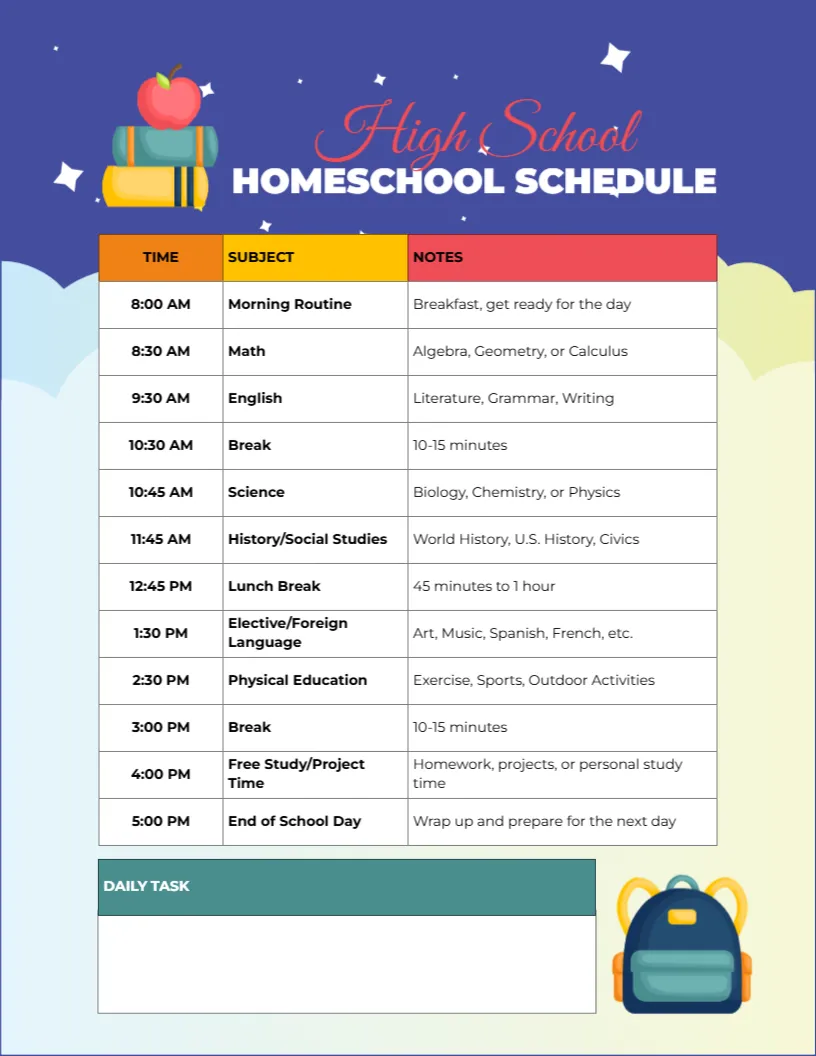
A deep indigo page with white stars fades into soft clouds at the foot. An apple sits on a stack of books at the top left beside High School in a red script and HOMESCHOOL SCHEDULE in bold white capitals. A table with orange, yellow and red headers lists the day from 8:00 AM Morning Routine through Math, English, a break, Science, History and Social Studies, lunch, an elective, Physical Education, another break and Free Study to End of School Day at 5:00 PM, with notes for each. A Daily Task box and a backpack sit at the foot.
Time, Subject and Notes
The page is 8.5 x 11 inches, portrait. The notes column gives examples, such as Algebra, Geometry or Calculus for maths, which helps older students see what each session covers.
A Ready Made High School Day
The sample day covers the core subjects with short breaks, a 45 minute to one hour lunch, an elective such as art or a language and physical education. Change the notes to your student’s actual courses, such as Algebra II or Chemistry, and adjust times for their pace.
Setting Up the High School Day
- Type actual course names in the notes.
- Adjust times.
- Choose an elective.
- Fill in the Daily Task box.
- Review weekly with your teen.
Letting Teens Own Their Schedule
Teenagers take more responsibility when they help plan their day. Sit down together, agree the core subjects and let them choose the order of some sessions. Ownership builds independence for college and work.
Credits and Record Keeping
High school homeschoolers often need records of hours and courses for transcripts. Keep completed schedules in a folder as part of your records, and check your local requirements for graduation.
Breaks Keep Focus Sharp
The two short breaks of ten to fifteen minutes help teens reset between long sessions. Encourage a quick walk or a snack rather than screens.
Electives and Languages
The elective slot can hold a foreign language, art, music, coding or a hobby. Online courses fit neatly into this hour.
Printing Indigo
The indigo background uses ink. Print one colour copy and keep black and white copies for daily use.
Assignments and Test Dates in the Task Box
Use the box for assignments due, test dates or reading pages. Teens can tick them off as they finish.
Using the High School Schedule
Review it together each Monday.
Step by Step Editing of the High School Indigo Apple Books Design
- On the high school indigo apple books design, click the main headline and type your own words, keeping a similar length.
- Retype every name, date and contact line on the high school indigo apple books design, checking each against a trusted source.
- Search the high school indigo apple books design for the words Lorem and Company so that no placeholder remains.
- Click any logo or photo on the high school indigo apple books design, choose Replace Image and resize the new picture to fit.
- Zoom the high school indigo apple books design to full size and read each line aloud before you save it.
- Keep a clean master of the high school indigo apple books design without private details, so later versions start tidy.
Next to try is the subject specific schedule. Have a look at the hour by hour schedule. Another option is the hybrid homeschool schedule. Every high school indigo apple books style alternative sits in homeschool planner templates.