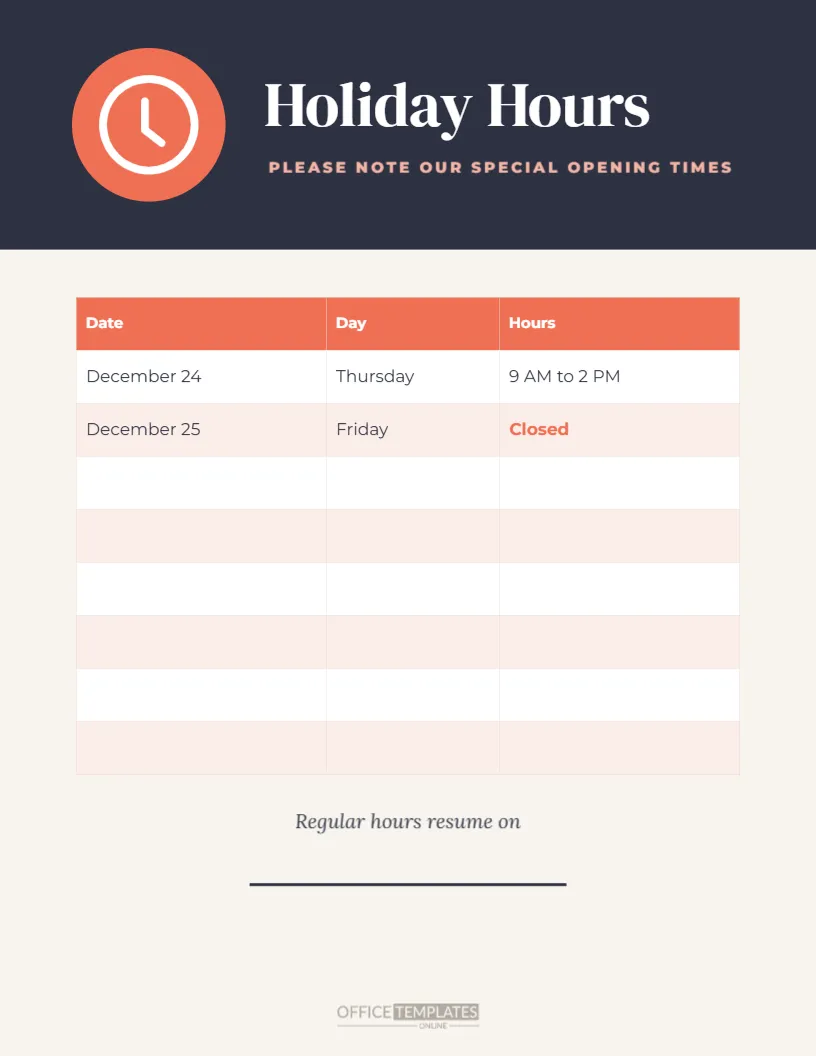
Not every holiday hours sign needs festive decorations. Many businesses want a clean, modern notice that works for any holiday and matches their brand. This US Letter template does exactly that. A charcoal header holds a coral circle with a white clock icon, a large Holiday Hours title in DM Serif Display, and a coral line: PLEASE NOTE OUR SPECIAL OPENING TIMES. Below, an editable table with Date, Day, and Hours columns shows two sample rows, including a closed day in coral, followed by six empty rows ready to fill in. A line for Regular hours resume on, a write-in rule, and a logo frame complete the page.
A Neutral Design for Any Holiday
Because the design has no holiday-specific artwork, you can use it for Christmas, Thanksgiving, Easter, national holidays, religious festivals, summer closures, or any other occasion. The clock icon signals opening hours at a glance, and the charcoal and coral palette feels modern and professional.
Filling In the Hours Table
The table has nine rows, including the header. The first two rows show sample entries for December 24 and 25. The remaining six rows are empty. Double-click the table to type your dates, days, and hours, or choose Edit Table Data to update everything at once. Use + Row if you need more rows.
Printing a Blank Table to Fill by Hand
If you prefer to write the hours by hand, delete the sample entries and print the sign with an empty table. The rows are tall enough for clear handwriting with a fine marker. This is useful when hours change at short notice.
Highlighting Closed Days
The sample shows Closed in bold coral. To highlight other closed days, select the cell text and change its colour and weight. Consistent highlighting helps customers spot closed days immediately.
The Regular Hours Line
Under the table, Regular hours resume on is followed by a write-in rule. Type the date in the editor or write it by hand. It answers the question every customer has: when will things be back to normal?
Branding the Holiday Hours Table Sign
Click the logo frame at the bottom and choose Replace Image to upload your logo. Branded signs look professional and reassure customers that the notice is official.
Changing the Header Colours
Charcoal and coral can be changed to your brand colours. Click the header to change its fill, select the coral circle to recolour it, and update the table header colour to match.
Changing the Clock Icon
The clock icon can be replaced with another symbol from the Elements panel, such as a calendar, a snowflake, or a sun, to suggest a particular season while keeping the clean layout.
Where to Use the Holiday Hours Table Sign
The sign suits offices, clinics, salons, gyms, libraries, retail stores, and any business that wants a tidy, readable notice. Place it on the door, at reception, and near the till.
Printing the Table Sign
Download a PDF and print on US Letter paper. The light page background prints economically, while the charcoal header adds impact. For a sturdier sign, print on card stock.
Sharing the Table Sign Online
Export a PNG and share it on social media, your website, and email newsletter. The clear table remains readable on phones, especially if you keep the number of rows modest.
Using the Sign for Seasonal Hours
Beyond holidays, the template works for summer hours, winter hours, school term changes, or temporary hours during renovations. Change the title to Summer Hours or Temporary Hours and fill in the table.
Keeping Multiple Locations Consistent
Businesses with several locations can duplicate the page for each branch and change the hours and address. Using the same design across all locations keeps your brand consistent.
Holiday Hours Table for Staff Rotas
The same table works internally as a holiday staff rota. Rename the Hours column to Staff on duty and post it in the break room, then use a second copy with customer hours on the door. Both sheets share one look, which keeps planning simple.
Accessible Table Design
Large text, generous row height and clear column headings make the table easy to read for older customers and people with low vision. Avoid squeezing too many rows into the table, and keep closed days in a strong contrasting colour.
Holiday Table Sign Questions
Can I add more rows?
Yes. Double-click the table and use + Row.
Can I print it with an empty table?
Yes. Delete the sample entries before printing.
Can I change the title?
Yes. Click Holiday Hours and type a new title.
Holiday Hours Tables for Libraries
Libraries often have different hours for each branch and service, such as the main desk, the children’s room, and the computer lab. Add columns to the table for each service, or duplicate the sign for each branch. Patrons appreciate a clear, consistent layout that shows exactly when they can borrow books or use computers over the holidays.
Holiday Hours Tables for Customer Service Lines
Call centres and support teams can use the table to show phone, chat, and email support hours over a holiday period. Rename the columns to Date, Phone and Live chat, and post the image on your help page and in your email signature, so customers know when to expect a reply.
Reviewing the Table Before Printing
Before you print, read each row aloud and check it against a calendar. Mismatched days and dates are the most common mistake on holiday notices, and a quick check by a colleague catches errors before customers do.
Holiday Hours Tables for Property Management Offices
Property offices can list leasing office hours, maintenance desk hours, and package room access in separate columns. Residents see at a glance when each service is available during the holidays, and the emergency maintenance number can go on the regular hours line at the bottom.
A Clean Notice for Every Season
Fill in the table, add your logo, and print the sign. A clean, modern holiday hours notice keeps customers informed, whatever the occasion.