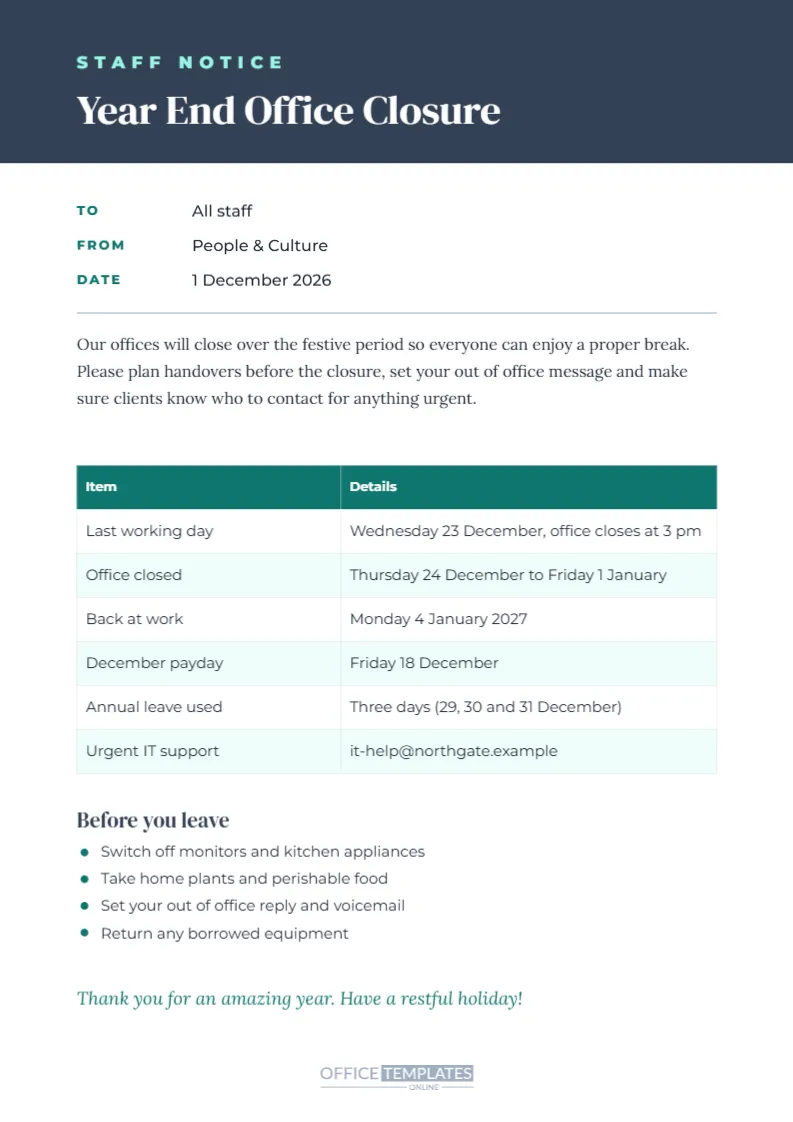
Before the office closes for the holidays, employees need practical information: the last working day, when to return, when they will be paid, whether they need to use annual leave, and what to do before they leave. This A4 template presents it as a clear staff memo. A slate blue header holds STAFF NOTICE in mint capitals, the title Year End Office Closure in DM Serif Display, and a logo frame. Below, memo lines show who the notice is to, who it is from, and the date. A short paragraph explains the closure, a teal table lists key dates and details, a Before you leave checklist with teal bullets covers practical tasks, and a warm thank you closes the memo.
What Staff Need to Know About the Year-End Closure
A good closure memo answers the questions employees always ask: when do we finish, when do we come back, when is payday, do I need to book leave, and who do I contact if something breaks? Putting all of this in one memo reduces repetitive questions to HR and managers.
The Staff Closure Dates Table
The table lists six items: last working day, office closed, back at work, December payday, annual leave used, and urgent IT support. The sample shows Wednesday 23 December as the last day, the office closed from Thursday 24 December to Friday 1 January, a return on Monday 4 January 2027, payday on Friday 18 December, three days of annual leave and an IT support email. Double-click any cell in the memo table to change it.
Explaining Annual Leave Over the Closure
Many companies require staff to use a few days of annual leave for the days between Christmas and New Year that are not public holidays. The sample row explains that three days are used. Make sure your policy is clear and consistent with employment contracts and local law.
December Payday
Payroll often runs early in December, so staff are paid before the holidays. Mention the payday in the table so employees can plan their spending. If January payday also moves, add a row.
The Before You Leave Checklist
The checklist covers four practical tasks: switch off monitors and kitchen appliances, take home plants and perishable food, set your out-of-office reply and voicemail, and return borrowed equipment. Edit the list to suit your office, such as locking filing cabinets or backing up files.
Editing the Memo Lines
The memo lines show To: All staff, From: People & Culture, and Date: 1 December 2026. Click each value to change it. If the memo comes from the managing director, change the From line accordingly.
Adding a Logo to the Staff Memo
Click the logo frame in the header and choose Replace Image. A branded memo looks official and matches your other internal communications.
Sharing the Memo With Staff
Send the memo as a PDF by email in early December, post it on the intranet, and print copies for notice boards and the kitchen. Add the closure dates to shared calendars so meetings are not booked during the break.
Printing the Staff Memo on A4
The template is set to A4, 210 x 297 mm. Print the memo PDF at full scale; the white background suits any office printer.
Adapting the Memo for US Offices
US offices can change the date format to Month Day, print on US Letter with fit to page, and adjust the table rows for holiday pay and PTO policies.
Urgent Support During the Closure
List who to contact for urgent issues: IT, facilities, security, and senior managers on call. Make sure the contacts know they are on call and have the information they need.
Remote Workers and the Closure
Remote employees need the same information. Send the memo by email, and remind them to set out-of-office messages and shut down equipment. If some teams continue working, explain who and when.
Thanking Staff at Year End
The memo ends with Thank you for an amazing year. Have a restful holiday! A short, sincere thank you matters. Some companies add a note about a team celebration or a holiday gift.
Slate and Teal Colour Options
The slate and teal palette feels modern and calm. You can change the header and table colours to your brand colours, keeping the text dark on light backgrounds.
Year End Memos for Schools and Charities
Schools, charities and public bodies also close over the holidays. Adapt the memo with term dates, volunteer arrangements or safeguarding contacts, and share it with staff and volunteers.
Preparing the Office Before the Break
Facilities teams should plan heating settings, alarm codes, cleaning schedules and mail redirection before the closure. Add any building-specific instructions to the checklist, such as keep windows locked or switch off printers at the wall, so the office is safe and secure while empty.
Year End Closure Memo Questions
Can I add more rows to the table?
Yes. Use + Row in the table.
Can I change the checklist?
Yes. Edit the list text and move the bullets if needed.
Can I print it on US Letter?
Yes, with fit to page selected.
Staff Memos for Retail and Hospitality Teams
Shops and restaurants rarely close for the whole holiday period, but they still need a staff memo about rotas, holiday pay, and the days the business is closed. Adapt the table to list closed days, the rota release date and the staff party, and post it in the staff room where everyone will see it.
Translating the Staff Memo
Workplaces with employees who speak different languages can duplicate the memo and translate it, so every team member understands the closure dates and payday clearly.
Year-End Memos and Client Deadlines
Remind staff which client deliverables are due before the break, so nothing urgent is left unfinished when the office closes.
Close the Year Smoothly
Update the dates and details, add your logo, and send the memo to your team. A clear year-end closure notice helps everyone finish well and enjoy the break.