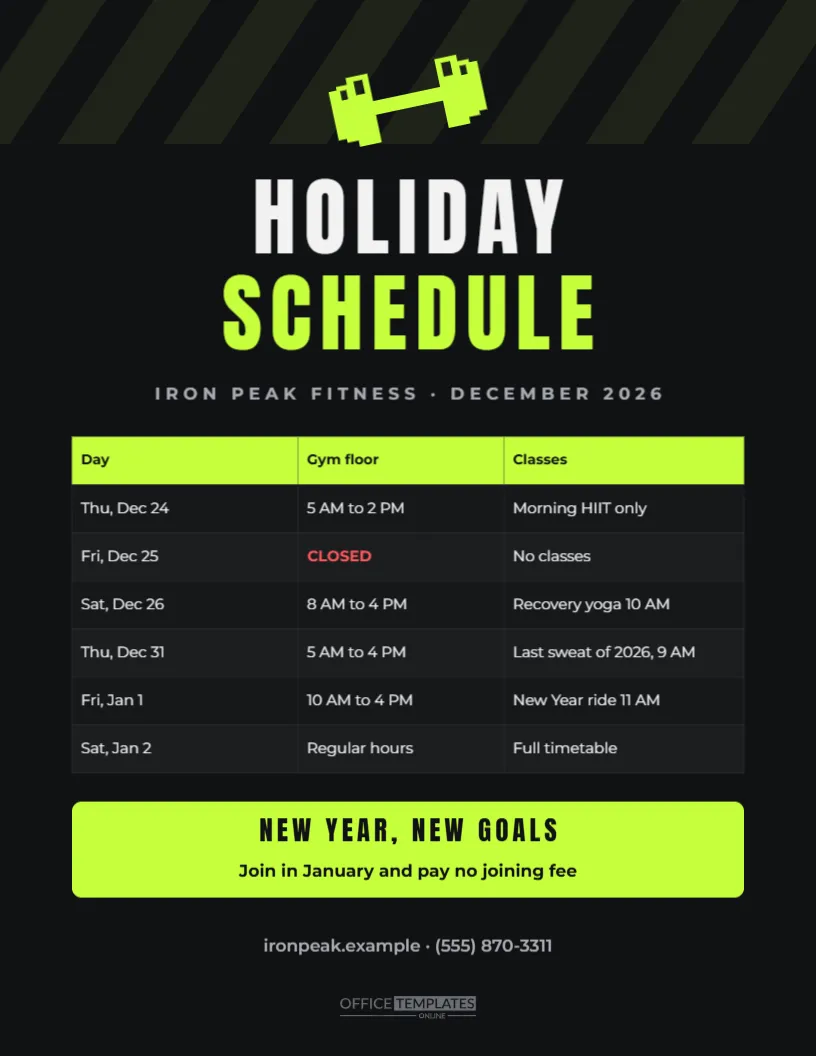
Gyms, fitness studios, and sports clubs change their schedules over the holidays, and members want to know when they can train and which classes are running. This US Letter template brings the energy of a modern gym to a holiday schedule. On a black background with subtle diagonal lime stripes, a neon lime dumbbell sits above HOLIDAY in tall white Anton capitals and SCHEDULE in neon lime. A grey line gives the gym name and month. A dark table lists each day with gym floor hours and class notes, with closed days in bright red. A lime strip at the bottom shouts NEW YEAR, NEW GOALS with a January joining offer, followed by the website and phone number.
Why Gyms Need a Holiday Schedule
Many members train more over the holidays, not less, because they have time off work and want to balance festive meals. Others take a break and plan to return in January. A clear schedule keeps regulars training, prevents complaints about unexpected closures, and sets up the January rush, when new members join with fresh resolutions.
The Black and Neon Gym Style
Black, neon lime, and white feel energetic and modern, matching the look of many gyms and fitness brands. The tall condensed Anton headline grabs attention from across the gym floor, while the dark table keeps the schedule readable under bright lights. The diagonal stripes at the top add movement without distracting from the information.
Gym Floor Hours and Classes
The table has three columns: Day, Gym Floor, and Classes. The sample shows shorter hours on Christmas Eve with a morning HIIT class, a closure on Christmas Day, recovery yoga on December 26, a last sweat of the year class on New Year’s Eve, and a New Year ride on January 1. Double-click the table to edit any cell or add rows.
Editing Class Names and Times
Replace the sample classes with your own timetable highlights. Keep entries short, such as Spin 9 AM or Boxing 6 PM, so they fit the column. If you run many classes, list only the changes and refer members to your app for the full timetable.
The New Year Offer Strip
January is the busiest month for gym sign-ups. The lime strip promotes a simple offer: join in January and pay no joining fee. Change the offer to suit your business, such as a free personal training session, a discounted first month, or a bring-a-friend week. Keep the headline short and bold.
Choosing a Gym Brand Colour
Neon lime can be swapped for your brand colour, such as electric blue, hot pink or orange. Change the dumbbell, the SCHEDULE text, the table header and the offer strip together to keep the design consistent. The black background suits almost any bright accent.
Where to Display the Gym Schedule
Place copies at reception, in the changing rooms, beside the class studio doors, and on the main gym floor. Members often read notices while resting between sets or waiting for a class, so eye-level placement near equipment works well.
Printing a Black Background Sign
Download a PDF and print on US Letter paper with a laser printer for deep blacks and bright lime. For a large poster in the studio, print at 18 x 24 inches at a print shop. Dark designs show fingerprints less when laminated.
Sharing the Schedule in Your App
Most gyms communicate through an app or members’ email. Upload the schedule image to your app’s news feed, send it in a December newsletter, and post it on Instagram. Many members follow their gym on social media for class updates.
Holiday Fitness Challenges
Holiday challenges keep members motivated, such as twelve workouts of Christmas or a step count challenge between Christmas and New Year. Mention the challenge on a second sign or in the classes column, and reward participants with small prizes in January.
Holiday Schedules for Yoga and Pilates Studios
Smaller studios can use the same layout with a calmer palette, such as charcoal and soft sage. Replace the dumbbell with a lotus or a yoga mat icon, rename the columns to Studio and Classes, and list special sessions such as a New Year’s Day intention-setting class.
Staffing Instructors Over the Holidays
Instructors and trainers need time off too. Plan cover early, cancel classes with low attendance, and communicate changes clearly. A schedule that members trust is more valuable than a long list of classes that may be cancelled at short notice.
Membership Freezes and Holiday Travel
Some members travel over the holidays and ask to freeze their memberships. Mention your freeze policy in the newsletter that accompanies the schedule, or add a small line at the bottom of the sign. Clear policies reduce awkward conversations at the front desk.
Holiday Schedules for Swimming Pools
Leisure centres with pools often close the pool for maintenance during quiet holiday days. Add a column for the pool or a note under the table, so swimmers do not arrive with their kit only to find the pool closed.
Gym Holiday Schedule Questions
Can I change the black background?
Yes. Click the background and choose any colour.
Can I add more columns?
Yes. Edit the table to add a column for the pool or the kids club.
Can I remove the offer strip?
Yes. Delete the strip and its text, and move the contact line up.
Personal Training Over the Holidays
Personal trainers often have fewer clients in the last week of December and a waiting list in January. Use the quiet days for fitness assessments, nutrition consultations, or short trial sessions for members who want to start the new year strongly. Mention these sessions in the classes column or on a second sign by the front desk, and invite members to book before the January rush fills every slot.
Keep Members Moving This Season
Update the schedule, set your January offer, and post the sign. A bold, energetic holiday schedule keeps members training through the festive season and ready for a strong start to the new year.