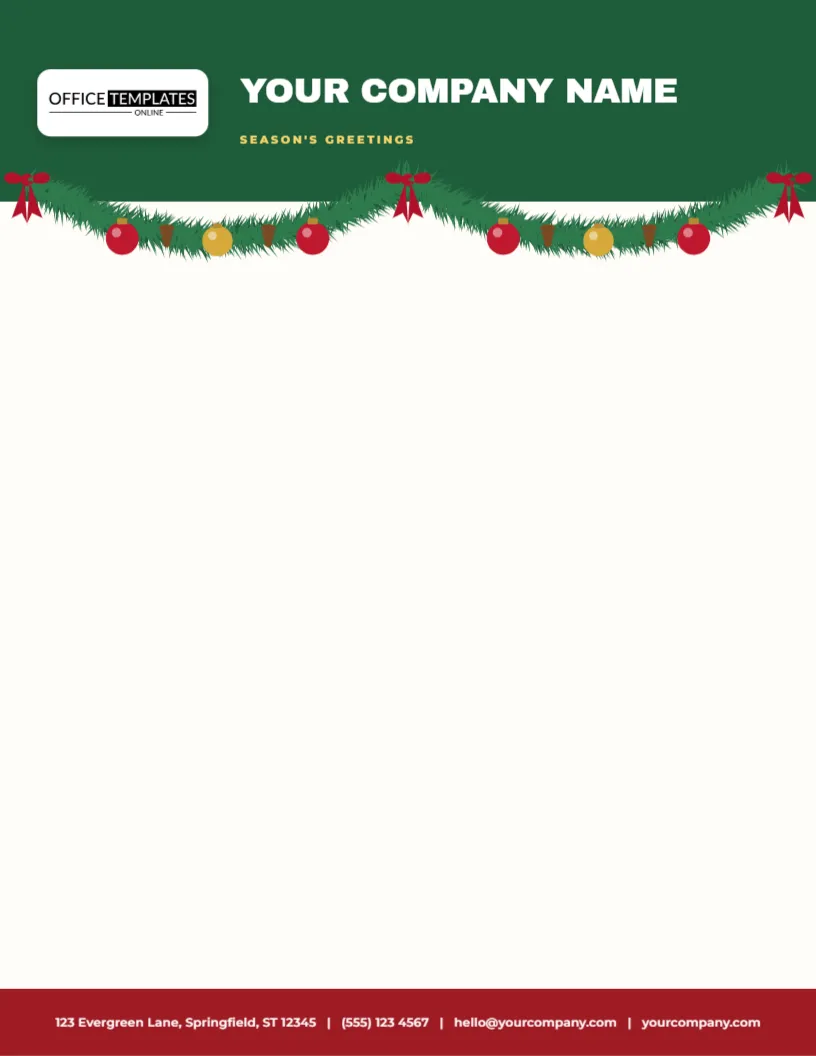
A letter sent in December is read differently from one sent in June, and a letterhead that looks like the season supports that mood before a single word is read. This one starts with a deep green block across the top of the sheet, two inches tall, with a white logo tile on the left and YOUR COMPANY NAME in bold white capitals beside it, with SEASON’S GREETINGS in small gold capitals beneath. A fir garland strung with red and gold baubles and red bows swags across the lower edge of the block. A red band at the foot carries the contact line in white.
What Sits Where on the Page
The page is a standard letter sheet, eight and a half by eleven inches. The green header block takes the top two inches, and the garland hangs over its lower edge. The logo tile sits to the left of the block, with the company name and the greeting beside it. That leaves around eight inches of clear space for a date, an address block, a salutation, and several paragraphs. At the bottom, a red band, one line of contact details, and the small OTO mark finish the page.
The Garland Artwork
The swag is a vector illustration made of overlapping needles in dark and mid green, with round baubles in red and gold, a few brown pine cones, and bows at the ends and the middle. Because it is vector art, you can recolour it from the colour swatches, ungroup it to remove a bauble, or stretch it to a different width. If you want a calmer look, delete the bows and keep the greenery. If you want a richer one, add a second garland at the foot.
| Element | Colour | Where to edit |
|---|---|---|
| Garland | Fir greens with red and gold baubles | Select the group and use its colour swatches |
| Company name | Cranberry red script | Click the text and type your name |
| Greeting line | Forest green capitals | Click the text and replace the words |
| Footer rule and contact line | Red and brown | Click the line and retype your details |
Adding Your Own Name and Details
Click the company name and type yours. A name of up to about twenty-five characters fits on one line at the current size. If your name is longer, reduce the font size by a few points or split it over two lines and nudge the greeting down. The contact line has four parts: address, telephone, email, and website, separated by vertical bars. Retype each part, or delete any you do not need, and the line will recentre.
Typing the Letter Itself
- Print the letterhead on plain paper and test the margins.
- Write your letter in a word processor with a top margin of two inches.
- Set the left and right margins to one inch and the bottom margin to one inch.
- Print the letter on the pre-printed sheet, or use the letterhead as a background in your design software.
- Save a PDF copy for emailing.
Printing the Letterhead in Bulk
If you send many letters, print the letterhead in batches on a good quality white or cream paper of twenty-four to thirty-two pound weight, then feed the sheets back through the printer for the text. A garland printed in full colour uses a modest amount of ink, since most of the sheet is plain. A print shop can run a few hundred copies cheaply. Ask for a matte stock, which accepts toner and ink well and avoids glare when the letter is photographed or scanned.
Who Uses a Garland Letterhead
- Small businesses writing to customers about holiday hours and offers.
- Schools and clubs sending end-of-year letters to families.
- Charities thanking donors and asking for a final gift of the year.
- Churches and community groups circulating event details.
- Families who like to send a formal letter with their Christmas cards.
Keeping the Tone Right
The garland says warmth, so write in a warm voice. Begin with a word of thanks, keep paragraphs short, and close with a clear sentence about what you would like the reader to do next. A holiday letterhead is not an invitation to bury the main message under decorations. Place any dates and times in a short list or a table near the top, so they are easy to find.
Questions About the Garland Letterhead
Can I remove the bows?
Yes. Ungroup the garland, select each bow, and press Delete.
Which fonts does the template use?
On the Christmas garland header letterhead sheet, Archivo Black sets the company name, and Montserrat sets the tagline and the contact line.
Is there a place for my logo?
The name line is the identity block. If you prefer a logo, delete the name and add an image or a logo placeholder from the editor.
Will it work for email?
Yes. Export it as an image or PDF and attach it, or use it as a header for a PDF newsletter.
Matching Stationery for the Season
Pair the letterhead with the Christmas return address labels and the round envelope seals in this collection, and every item you send shares one look. Add a garland-style gift tag on any parcel that goes with the letter. A matched set makes a small organisation look polished, and it takes only a few minutes to arrange.
Reusing the Template After Christmas
Remove the greeting line and the red bows, recolour the garland to white and silver, and the letterhead becomes a winter stationery sheet for January. Keep a copy of the original so you can return to it next December.
Writing Holiday Letters That Get Read
A decorative header earns attention for a few seconds, so use that time well. Put the most important sentence in the first paragraph, state any dates plainly, and keep the whole letter to one page where you can. Read it aloud before printing, and remove any sentence that does not help the reader. A short letter on a handsome sheet is far more likely to be kept than a long one.
Using the Garland for Digital Letters
Export the template as a PDF or an image and use it as the top of an emailed letter or a digital newsletter. The garland scales cleanly and looks sharp on screens. Place your text in a text editor, paste it into the layout, and send. Remember to attach a plain-text version for readers whose email apps do not display images.