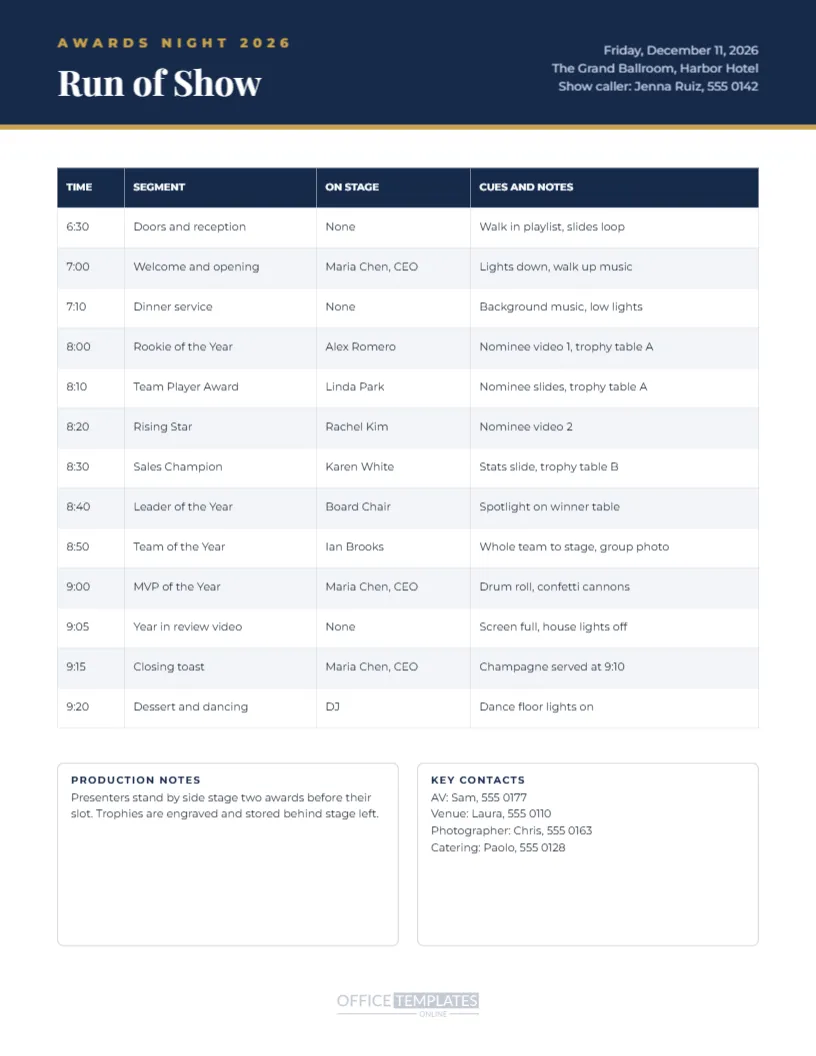
A smooth awards night depends on everyone knowing exactly what happens next. This run of show template gives your team a clear, printable cue sheet. The portrait US Letter page has a navy header with a gold stripe, showing Awards Night 2026, the title Run of Show, and the event date, venue, and show caller’s contact on the right. A four-column table lists times, segments, who is on stage, and cues and notes for thirteen moments of the evening, from doors opening to dessert and dancing. Two boxes at the bottom hold production notes and key contacts for AV, the venue, the photographer, and catering.
What Is a Run of Show
A run of show is a detailed timeline used by event teams to coordinate every part of an event. It tells presenters when to be ready, tells the AV team when to play videos or change lights, and keeps the evening on schedule. Professional events always use one, and even small awards nights run more smoothly with a simple version.
The Timed Cue Table
The table has four columns: Time, Segment, On Stage, and Cues and Notes. Each row describes one moment, such as Rookie of the Year with Alex Romero presenting and Nominee video 1, trophy table A as the cue. Edit every cell to match your event, and add or remove rows as needed.
Planning Award Segments
Allow about eight to ten minutes per award, including the introduction, nominee announcement, winner’s walk to the stage, presentation, and a short speech or photo. Leave buffer time between blocks so the evening does not run late.
Presenters and On Stage Column
The On Stage column tells everyone who should be on stage for each segment. Share the run of show with presenters in advance so they know when to be ready and where to stand.
Cues for AV and Lighting
The cues column is where you note music, videos, slides, lighting changes, and special effects such as confetti cannons. Clear cues help the AV team prepare and avoid awkward pauses.
Production Notes Box
The production notes box covers important reminders, such as presenters standing by side stage two awards before their slot and where trophies are stored. Add details about microphones, stage access, or accessibility arrangements.
Key Contacts Box
The key contacts box lists phone numbers for AV, the venue manager, the photographer, and catering. Having contacts on the same page as the timeline saves time when something needs quick attention.
Header Details and Show Caller
The header includes the event date, venue, and show caller’s contact. The show caller is the person who keeps the event running on time and gives cues. Update these details for your event.
Printing the Run of Show
Print copies for the host, presenters, AV team, venue manager and photographer. Print in colour or black and white, as the table remains clear either way. Keep spare copies at the stage and AV desk.
Sharing the Run of Show Digitally
Download a PDF to email to your event team before the night. Team members can view it on their phones during the event, and you can send updated versions quickly if the schedule changes.
Rehearsing With the Run of Show
Hold a short rehearsal before guests arrive, walking through the key segments with presenters and the AV team. Rehearsals catch problems early, such as missing videos or unclear stage entrances.
Run of Show for Virtual Awards
For virtual ceremonies, use the cues column for screen sharing, breakout rooms, and spotlighting speakers. A clear plan keeps online events engaging and prevents technical delays.
Run of Show for School and Sports Events
Schools can adapt the template for prize-giving evenings and sports clubs for banquets. Replace segments with student performances, speeches, and award presentations.
Run of Show and the Matching Program
Pair the run of show with the ceremony program, which gives guests a simplified version of the same schedule, and the certificates and table cards in this collection.
Saving the Run of Show
Save the template in your account and update it each year. Over time, it becomes a proven plan that makes organising your awards night easier.
Run of Show File Formats
Download a PDF for printing or a PNG for quick viewing on screens. The table stays aligned and readable in every format.
Briefing Presenters With the Run of Show
Send each presenter the run of show a week before the event with their segments highlighted. Include the award name, the nominees, the winner’s name in a sealed envelope plan, and how long they should speak. A short briefing call or email answering questions about stage entrances and microphones helps presenters feel confident and keeps the evening flowing smoothly from one award to the next.
Managing Winner Envelopes and Trophies
Use the cues column to note where each trophy and envelope is stored, such as trophy table A or B. Assign a stage helper to hand the right trophy and certificate to each presenter. Labelling trophies with the award name on the base avoids mix-ups in the excitement of the moment.
Planning for Changes on the Night
Things change: a presenter is delayed, a video will not play, or dinner service runs long. Mark optional segments in the run of show and agree a backup plan with the show caller. Updating everyone quickly through a group chat keeps the team coordinated.
Reviewing the Run of Show After the Event
After the awards night, note what ran late, what worked well, and what to change next year directly on a copy of the run of show. These notes make next year’s planning much faster and help the event improve every year.
Run of Show Version Control
Add a version number and date to the header each time you update the run of show, so everyone knows they are working from the latest copy.
Keeping the Awards Night on Time
Give the show caller a watch or timer and ask presenters to keep speeches short. If the evening runs late, decide in advance which segments can be shortened, such as dinner service or the year in review video.