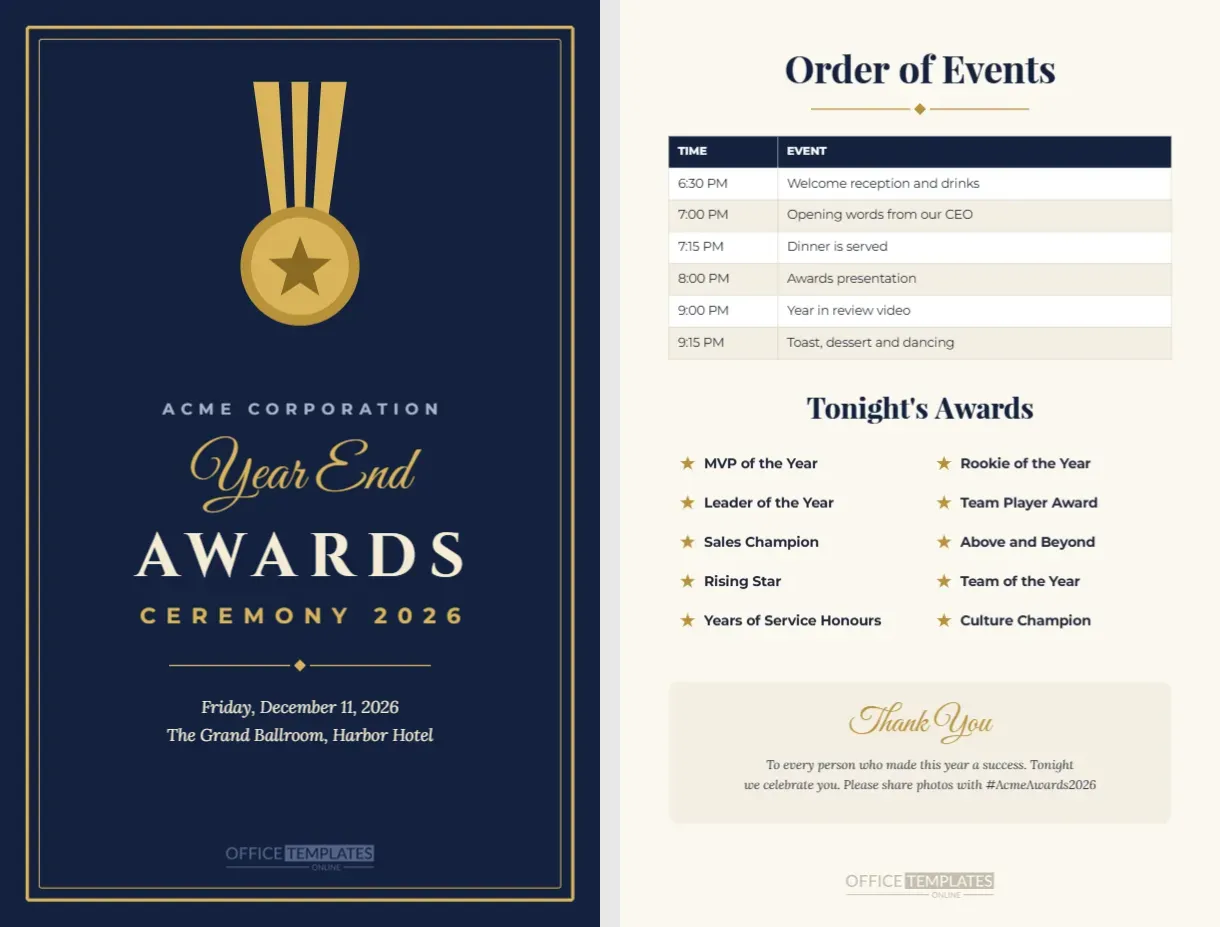
A printed program helps guests follow the evening and becomes a keepsake of the night. This awards ceremony program has two pages measuring 5.5 x 8.5 inches, half of a Letter sheet. The cover has a deep navy background with a double gold frame, a large gold medal hanging from a striped ribbon, the company name in spaced capitals, Year End in gold script, AWARDS in large cream Cinzel letters, and Ceremony 2026 in gold, followed by the date and venue. The inside page, on warm ivory, includes an Order of Events table with times, a two-column list of tonight’s awards marked with gold stars, and a thank-you box with an event hashtag.
Why Print an Awards Ceremony Program
A program tells guests what is happening and when, so they know when to take their seats, when dinner is served, and when the awards begin. It also lists every award category, building anticipation as the evening unfolds. Many guests keep their programs as souvenirs, especially winners, which makes the program part of the memory of the night.
The Navy and Gold Cover
The cover matches the formal mood of most awards ceremonies. The gold medal is drawn from editable shapes, and the double frame is grouped for easy recolouring. Change the navy to your brand colour, or replace the medal with your company logo for a branded program.
Editing the Company Name and Event Details
Replace Acme Corporation with your organisation’s name, and update the date and venue under the title. If your event has a theme or name, such as Night of Stars, add it in the script line in place of Year End.
The Order of Events Table
The inside page includes a two-column table listing times and events, from the welcome reception to dessert and dancing. The table is fully editable: change the times, rename events, and add or remove rows to match your schedule. Alternating row colours make the timeline easy to scan.
Listing Tonight’s Awards
Ten award categories are listed in two columns with gold stars, including MVP of the Year, Rookie of the Year, Leader of the Year, and Team Player Award. Edit the list to match your categories. If you have more awards, reduce the spacing or font size slightly to fit them in.
Thank You Message and Hashtag
A soft ivory box at the bottom of the inside page holds a script Thank You and a short message thanking everyone for a successful year, along with a hashtag for sharing photos. Change the message and hashtag to suit your event, or replace the box with sponsor logos.
Printing a Folded Program
Print both pages back to back on a sheet of Letter paper cut in half, or ask a print shop to print them as a single 5.5 x 8.5 card. For a folded booklet with more pages, duplicate the inside page and add speaker biographies, nominee lists, or a menu.
Adding Nominee Names to the Program
Some events list the nominees under each award. Add a short line under each category with the nominee names, or create an extra page listing them. Guests enjoy following along and cheering for colleagues they know.
Including a Dinner Menu
If your ceremony includes a meal, duplicate the inside page and replace the awards list with the menu. Listing courses and dietary options helps guests and catering staff during service.
Programs for School Award Ceremonies
Schools can use the program for prize-giving evenings, graduations and end-of-year assemblies. Change the cover to the school name and list awards by grade or subject. The navy and gold design suits many school colours.
Programs for Sports Banquets
Sports clubs can adapt the program for season banquets. List the order of events, the awards by team, and a thank you to sponsors and volunteers. Change the cover title to Season Awards Banquet.
Digital Programs for Virtual Ceremonies
For virtual or hybrid events, download the program as a PDF or images and share it in the meeting chat or by email. Guests can follow the schedule on their screens.
Order of Events Wording Ideas
Common segments include Welcome and Drinks, Opening Remarks, Dinner Service, Awards Presentation, Keynote Speaker, Year in Review Video, Closing Toast and Dancing. Use clear, short labels so guests can understand the schedule at a glance.
Matching Awards Ceremony Templates
Pair the program with the awards night invitation, run of show, nominee table cards and certificates from this collection. A consistent design across every item gives your ceremony a professional, well-planned feel.
Saving the Program Template
Save your program in your account. Next year, update the date, venue, schedule, and award list, and your program is ready in minutes.
Program Printing Quantity Tips
Print one program per guest plus about ten percent extra for late additions and keepsakes. Place programs on each seat or at each table setting before guests arrive.
Adding Sponsors to the Awards Program
Many awards events are supported by sponsors, and the program is the ideal place to thank them. Replace the thank-you box with a sponsors panel showing logos, or add a third page listing sponsors by level. Sponsors appreciate the visibility, and guests see the support that made the evening possible.
Proofreading the Program Before Printing
Check every name, title, and time carefully before printing. Ask a colleague to proofread too, especially the spellings of nominees and presenters. Last-minute changes to the running order are common, so print the programs a day or two before the event rather than weeks in advance.
Program Holders and Table Placement
For a tidy look, stand programs in small acrylic holders at the centre of each table, or tuck one into each folded napkin. Guests will spot them immediately when they sit down, and the navy cover adds an elegant accent to the table setting.
Awards Program File Formats
Download a PDF with both pages for printing, or PNG images of each page for digital sharing. The layout, table, and colours remain consistent in every format.