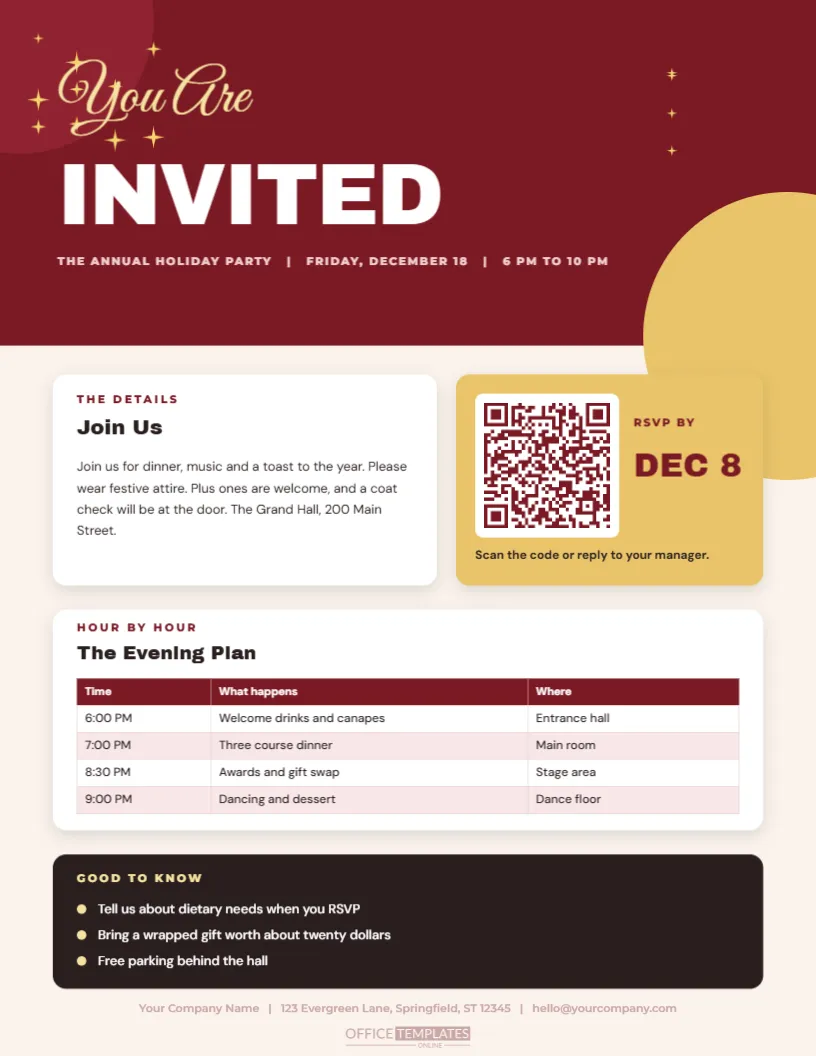
An office party needs organising, and guests need information. This one-page sheet gives a confident look. A burgundy block sprinkled with gold sparkles carries You Are in a large gold script, with INVITED beneath it in giant white capitals and the date and time on a line below. Under it, an event details card sits beside a gold card with a working QR code and the words RSVP BY DEC 8. A real table sets out the evening plan, hour by hour, and a dark Good to Know panel covers dietary needs, gifts and parking.
One Sheet for All the Details
Party details are often scattered across emails, chats and posters. This sheet gathers them in one place, with the invitation, the venue, the schedule and the practical notes. Print it for the notice board and send it as a PDF, and everyone has the same information. It also acts as a checklist for the organiser, who can see at a glance whether anything has been forgotten.
The Sparkle Header
The header is a deep burgundy panel with about twenty small gold sparkles scattered around its edges, kept clear of the central text so that the words stay easy to read. The script title is large and elegant, and the line of white capitals gives it a formal anchor. All elements are editable. Change the title to Season’s Greetings or Join Us, recolour the panel to your brand, and move or delete sparkles.
| Part | Where | Editing tip |
|---|---|---|
| Header and sparkles | Top | Retype the party name and date |
| Event details | Left | Add venue and dress code |
| RSVP QR code | Right | Replace with your form link |
| Evening plan table | Middle | Table options |
Making the RSVP Code Work
The template code points to a sample link. Create your own by building a simple response form, such as a shared spreadsheet or an online form, and generate a QR code for its address. Save the code as an image, place it over the sample, and size it to the white square. Test it with a phone before you print. Add a line for people who prefer to reply by email or to their manager.
The Evening Plan Table
The table lists five times with what happens and where: welcome drinks, dinner, awards and gift swap, dancing and taxis. Edit it to suit your event. Add a row for a speech or a raffle, or delete the dancing if there is none. A clear schedule helps the venue and the guests. Use the table options to colour the header in your company colour.
What to Tell Guests
- The date, time, and full address, with the nearest station or car park.
- The dress code, even if it is simply festive attire.
- Whether partners are invited.
- How to share dietary requirements.
- What to bring, such as a gift for the swap.
Handling Special Requirements
Ask guests to mention allergies and dietary needs when they reply, and pass them to the caterer in good time. Check access for anyone with limited mobility, and offer a quiet space if the party is loud. Mention any transport arrangements, such as a shuttle or a taxi voucher. Thoughtful planning makes the event enjoyable for everyone, and it avoids last-minute problems.
Questions About the Party Sheet
Can I remove the QR code?
Yes. Delete the box and replace it with a line of text.
Which fonts are used?
On the office holiday party info newsletter page, Archivo Black sets the titles and card headings, DM Sans sets the body text and tables, and Montserrat sets the small labels.
Can I use it for a family party?
Yes. Edit the wording and the details.
Can I change the burgundy?
Yes. Select the header and the table and choose new colours.
Sending and Following Up
Send the sheet by email a month before, post a copy on the notice board, and remind people a week before the RSVP date. Keep a list of replies, and chase the missing ones personally. Send a final note the day before with any changes. Good communication keeps numbers accurate, and it keeps the budget on track.
After the Party
Thank guests in a short message, and share a few photographs with permission. Ask for feedback to improve next year. Save the sheet as a template, so that next year’s organiser can reuse it. A tradition of tidy, friendly information makes the party something staff look forward to each December.
Budgeting and Planning Ahead
Decide the budget before you choose the venue, and list the main costs: food, drink, room hire, music and any gifts. Ask for quotes early, because December dates fill quickly. Use the evening plan table as a base for a run sheet, and add the name of the person responsible for each item. A tidy plan prevents last-minute scrambles on the day of the party.
Making the Party Welcoming for Everyone
Choose a venue with step-free access, offer non alcoholic drinks, and mention the start and end times clearly, so that staff with caring duties can plan. Avoid themes that might exclude anyone. Add a line inviting people to tell the organiser if they need anything. A thoughtful invitation helps every member of the team feel included.
Using the Sheet for Remote Colleagues
If some of your team work from home, send them the sheet by email and mention a way to join, such as a video call for the awards. You might also post a small gift in advance. A short message from the organiser, telling them they are part of the celebration, makes a big difference, and the sheet gives them the same information as everyone else.
Collecting Replies Without Chasing
Set the RSVP date a week before the venue needs final numbers, and send one reminder three days before it. The QR code makes replying quick, so most people answer in a few seconds. Keep the reply form short: a name, a yes or no, a plus one, and any dietary needs. Export the replies into a spreadsheet and share it with the caterer on the same day. Fewer questions mean fewer last-minute changes.