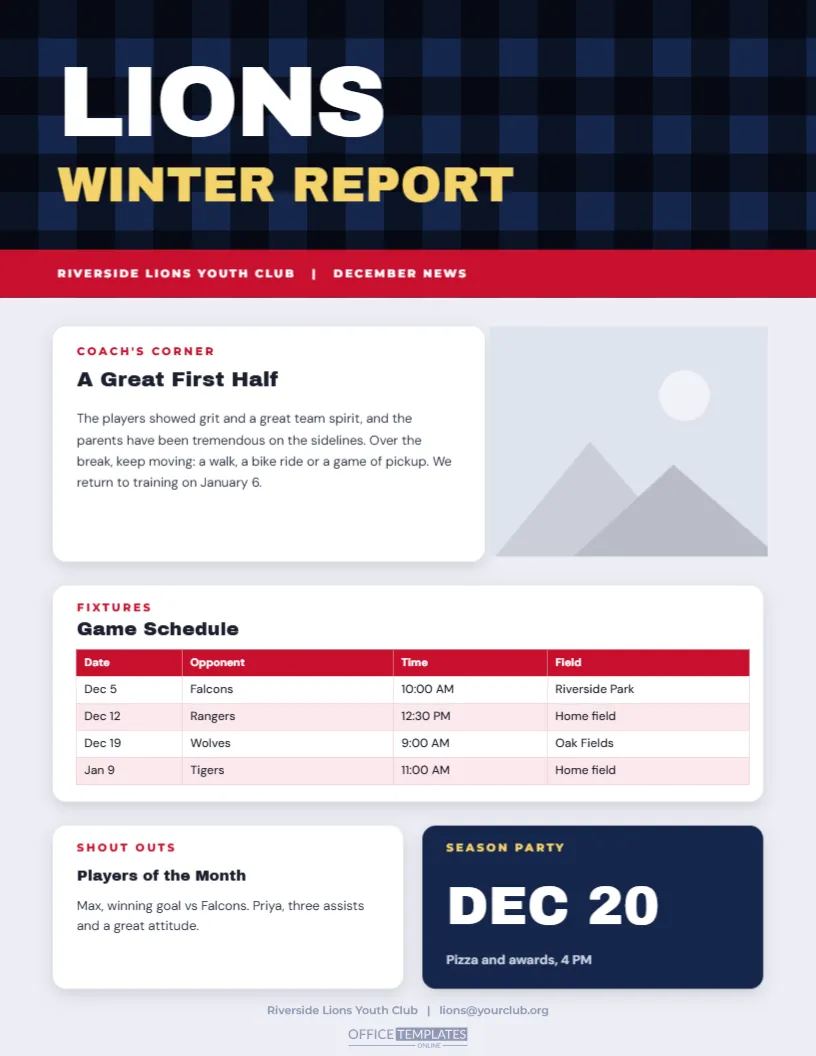
Parents, players and coaches all want the same thing from a club newsletter: dates, results and a little recognition. This template provides them on one page. A dark navy plaid block carries LIONS in enormous white capitals and WINTER REPORT in gold, with a red strip beneath. A Coach’s Corner card sits beside a team photo, a real game schedule table lists opponents, times and fields, a Players of the Month card gives shout-outs, and a navy panel shows the season party date in giant type.
What a Club Newsletter Should Do
A good club newsletter keeps families informed and builds team spirit. It says when and where the games are, celebrates achievements, and reminds everyone of deadlines. It also gives volunteers a way to be thanked. Because the template puts the schedule and the recognition on the same page, readers pick it up for the dates and stay for the news.
The Plaid Masthead
The header uses a dark navy plaid, made from translucent black stripes over a navy base, with the club name in a bold display font. The plaid gives it a lively, teamwear look, like a flannel jersey. Recolour the base to your club colours, and change the title to your own. A single colour band would also work, if you prefer a flatter style.
| Part | Where | Editing tip |
|---|---|---|
| Plaid masthead | Top | Recolour to club colours |
| Coach’s Corner | Left column | Write a short message |
| Team photo | Right column | Replace Image |
| Game schedule | Middle | Table options |
The Game Schedule Table
The schedule has four columns: date, opponent, time, and field. Edit each cell, add a row for each match, and delete the ones that have passed. Use the table options to change the header colour to red or to your club colour. Keep field names short and add a note about any changes. Parents rely on this table, so double-check dates and times before printing.
Writing the Coach’s Corner
The coach’s note should be positive and brief. Praise the effort, mention one skill the team is working on, and remind players of any off-season training. Keep it under seventy words. A message that sounds like the coach speaking, plain and encouraging, is more effective than a formal letter. End with a clear date for the next practice.
Recognising Players and Volunteers
- Name a player for a specific achievement, such as a goal or an assist.
- Thank a parent who drove, washed jerseys, or brought snacks.
- Mention the referee or the field manager, if they helped.
- Celebrate improvement as well as winning.
- Rotate the names so that every family is mentioned over the season.
The Season Party Box
The navy box at the lower right announces the season party with the date in large letters, so no one can miss it. Replace the sample date and the details with your own. Add the venue, the time, and what to bring. A clear announcement at the end of the newsletter gets more responses than a note buried in the text.
Questions About the Club Newsletter
Can I add a results table?
Yes. Add a second table below the schedule, with columns for date, opponent, and score.
Which fonts are used?
On the sports club season newsletter page, Archivo Black sets the titles and card headings, DM Sans sets the body text and tables, and Montserrat sets the small labels.
Can I use it for a school team?
Yes. Replace the club name with the school and the team.
Can I print it in black and white?
Yes. The design reads well in greyscale.
Sharing the Newsletter With Families
Hand out printed copies after training, post one at the clubhouse, and email a PDF. A message on the club’s group chat with the link keeps everyone up to date. Use the same template each month, with only the content changing, so parents always know where to look.
Raising Funds With the Newsletter
Local businesses may sponsor a newsletter in return for a small advertisement. Add a thin band at the foot with sponsors’ names, and thank them in each issue. The sponsors gain visibility, and the club gains funds for equipment. Keep the placement tasteful, and make sure the newsletter remains useful.
Looking Ahead to the Next Season
Use the final issue of the year to announce registration dates and fees for the spring season. A clear date and a link make signing up easy. A well-timed reminder in the newsletter can fill the teams before the new year begins.
Keeping Results and Standings Fair
Youth sports should celebrate effort, so choose how to present results with care. Some clubs print only the schedule and highlights; others show scores in a separate table. Agree on the policy with coaches and parents, and keep the tone positive. A newsletter that supports every child’s enjoyment of the game helps retain players and keeps the families happy.
Adding Training Times and Locations
Many families struggle to remember where practice is each week. Add a small table of training times for each age group, with the field and the coach’s name. Keep it beside the schedule so all the logistics are in one place. A reliable page reduces the number of messages that coaches receive, and parents appreciate the clarity.
Printing and Posting at the Clubhouse
Print a few large copies for the clubhouse board and a stack for the entrance, and post a PDF on the club website and group chat. Pin the schedule table at the field gate as well, so that families can check it on the day. Use bright coloured paper for the posted copy, which stands out against other notices, and plain white for the copies that go home.
Keeping the Tone Welcoming for New Families
A new family often feels lost in the first weeks. Add a short welcome paragraph with names of the club contacts and a line about buying uniforms and finding the field. A friendly note in the newsletter makes newcomers feel at home, and it saves volunteers many questions. Include a phone number and a smiling photograph of the welcome team.