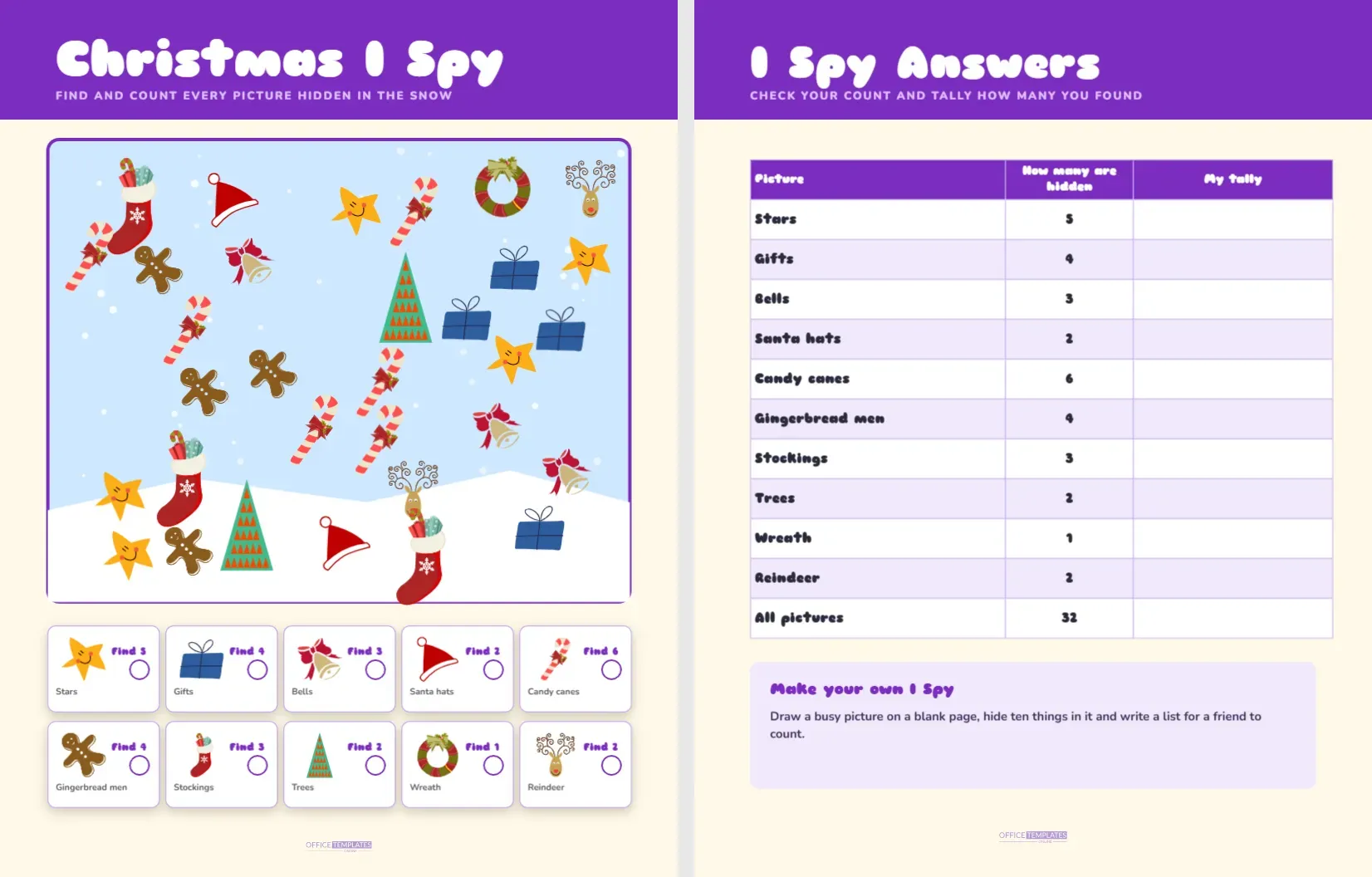
I Spy is the oldest game in the car, and this page puts it on paper. A busy winter scene is scattered with stars, gifts, bells, hats and gingerbread men, and under the scene a row of small cards says how many of each to find. Children search, count and circle, and a parent can check the totals on the second page.
What Is Hiding in the Snow
| Picture | How many | Where it tends to hide |
|---|---|---|
| Stars | 5 | Spread across the sky area |
| Gifts | 4 | Blue boxes with dark bows |
| Bells | 3 | Gold bells wrapped in red ribbon |
| Santa hats | 2 | Red hats with white edges |
| Candy canes | 6 | Striped hooks at different angles |
| Gingerbread men | 4 | Brown figures with icing dots |
| Stockings | 3 | Red stockings with a snowflake |
| Trees | 2 | Small green trees with orange triangles |
| Wreath | 1 | A green ring with a bow |
| Reindeer | 2 | Brown faces with curly antlers |
That adds up to thirty two pictures in the scene. The answer table on page two shows the same list with a column for the child’s own tally.
Looking Around the Snowy Scene
A bright purple band sits at the top with the title Christmas I Spy in a chunky rounded face and a line of capitals that says find and count every picture hidden in the snow. The scene is a pale sky blue rounded frame with a purple outline, white snowfall dots and a rolling white hill along the bottom. Underneath, ten small white cards with purple outlines each show a picture, the words Find and a number, the name of the thing and a small circle for ticking.
How the Scene Was Built
The pictures are library artwork placed one at a time so that none overlap. A seeded scatter routine picks a random position for each picture and rejects any spot that comes too close to another, which keeps the scene busy without hiding anything entirely. Each picture is an editable vector. You can recolour it, move it, delete it or ungroup it into its parts. If you move a picture so that it overlaps another, you can still count it, but the game becomes harder, so decide whether you want that.
Ways to Search
- Choose one picture at a time and sweep the whole scene looking only for that.
- Count out loud as you point, and circle each find with a pencil.
- Tick the small circle on the card when you reach the right number.
- Move to the next picture and repeat until all ten cards are ticked.
- Check your counts against the answer table.
Counting Skills Hidden in the Game
I Spy builds counting, sorting and visual scanning. A child who finds five stars has practised matching one number to one object, which is the foundation of arithmetic. Children also learn to ignore distractions, since the scene is full of pictures that are not the one they are searching for. Teachers can ask questions after the game: which picture was easiest to find, which had the most copies and how many pictures there were in all. The total of thirty two gives older children a small addition challenge.
The Answer Page
Page two repeats the purple band with the title I Spy Answers. A table lists the ten pictures with the number hidden, a column called My tally for the child to fill in and a final row that gives the total of thirty two. A lilac note at the bottom suggests a follow up game: draw a busy picture on a blank page, hide ten things in it and write a list for a friend to count.
Changing the Scene
Select any picture and drag it to a new place. To remove one, press delete, and then change the number on its card and in the answer table. To add one, insert a sticker from the library, drop it into the scene and add one to the count. If you want a different scene entirely, change the sky colour to a deep blue for a night version, and recolour the hill. Keep the card titles and numbers in step with the scene, or the game stops being fair.
Printing for Cars and Waiting Rooms
The page prints well on ordinary paper. Slip it into a clear sleeve and give a child a dry erase marker, and the page can be used many times. For long trips, print several copies with different scatter patterns by moving a few pictures around in the editor. The purple band uses a fair amount of ink, so print in draft mode if you need many copies.
Ways to Play I Spy
- Timed round: give each child a minute to find as many pictures as they can.
- Describe it: one child describes a picture without naming it and the other finds it.
- Colour clue: ask for the red things first, then the blue things.
- Team search: two children share the page and tick different cards.
Choosing the Right Pictures for a Child’s Age
A three year old can enjoy the page simply by pointing to every Santa hat they see, without counting. A four or five year old can count to three or four with a finger on each picture. A six or seven year old can manage the higher counts of five and six and keep a tally on the second page. For children older than eight, turn the page into a race: who can complete all ten cards in the shortest time? By changing how you play, a single printout fits a family of several ages.
Turning the Page Into a Story
After the search, ask the child to make up a short story that features at least three of the pictures. A gingerbread man who loses his hat in a snowy forest, a bell that rings by itself or a reindeer who collects stars all make good beginnings. Children often retell the story to the family at dinner, and the page becomes a creative writing prompt as well as a counting game. A quick sketch of the story on the back of the page makes a good keepsake.
Parent and Teacher Questions
Is every picture really counted correctly?
Yes. The counts are generated from the same list that places the pictures, so the table always matches the scene as delivered.
What if a picture is partly hidden?
The scatter keeps a small gap between pictures, so each one is fully visible unless you move it yourself.
Can I make a harder version?
Yes. Shrink the pictures, add extra copies and raise the counts on the cards and the table.