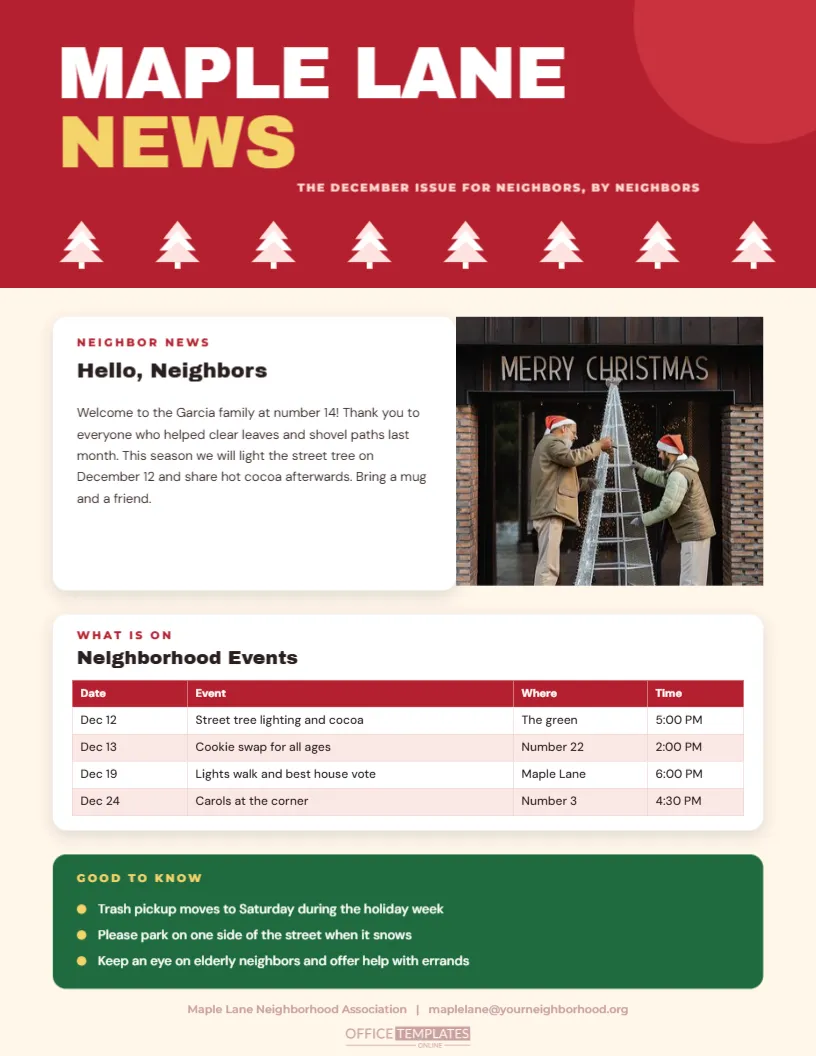
A street, a block, or an apartment complex is a small community, and a one-page newsletter keeps it connected. This template opens with a bright red block where MAPLE LANE sits in huge white capitals above NEWS in gold, with a row of little white trees along its lower edge. A neighbor news card sits beside a large photo slot, a real events table follows in a white card, and a green Good to Know panel holds three practical reminders.
What a Neighbourhood Newsletter Does
It tells people what is happening, who has joined the street, and where to find help. It builds trust, because neighbours who know each other are more likely to look out for each other. It also gives volunteers a place to announce plans for parties, cleanups, and safety tips. A single page every month is enough, and it only takes an hour to produce.
The Masthead and the Tree Border
The red header is a plain rectangle with a title in a brush script, a subtitle in small capitals, and nine tiny white trees along its lower edge. Each tree is made of three triangles and a trunk, and the row gives the masthead a festive finish. All parts are editable. Change the name to your own street, recolour the band to your association’s colour, or delete the trees for a plainer look.
| Part | Where | Editing tip |
|---|---|---|
| Masthead | Top of the page | Change the street name |
| Neighbor news | Left column | Welcome new residents here |
| Photo slot | Right of the news | Replace Image |
| Events table | Middle of the page | Table options |
The Neighborhood Events Table
The events are listed in a real table with four columns: date, event, place, and time. Add a row for each plan, remove the ones that have passed, and change the colours in the table options. Keep the descriptions short so that each row fits on one line. A tidy table makes the page look organised, and neighbours can find the dates quickly.
What to Put in Neighbor News
- A welcome for new residents, with their house number.
- A thank you to a volunteer or a helpful neighbour.
- News of a birth, a graduation or a milestone, with permission.
- Local safety tips and seasonal advice.
- A photograph from a recent event.
The Reminders List
At the foot of the page, a short bulleted list handles practical matters: trash collection changes, parking rules in snow, and a call to look in on older neighbours. Keep each reminder to one line, and use plain words. These small notices are often the most useful part of a newsletter. Change the bullet colour or add a line for a lost cat or a found glove.
Delivering the Newsletter
Print copies and deliver them by hand, or post them on a community board and email a PDF to those who prefer it. A volunteer on each block can take care of delivery in a few minutes. Include a name and a contact for anyone who wants to contribute. A small team keeps the newsletter alive, and the effort pays off in goodwill.
Questions About the Neighborhood Newsletter
Can I print it in black and white?
Yes. The design works in greyscale, though the red header will print as a dark grey.
Which fonts are used?
On the neighborhood community newsletter page, Archivo Black sets the titles and card headings, DM Sans sets the body text and tables, and Montserrat sets the small labels.
Can I add a second photo?
Yes. Duplicate the photo slot and place it in a free area.
Can I use it for an apartment building?
Yes. Replace the street name with the building name and edit the events.
Starting a Street Tradition
A lights tour, a cookie swap or a carol evening is easy to organise and gives the newsletter a regular headline. Invite neighbours to help with each event, and thank them in the next issue. Over several years, the street develops a calendar of traditions, and the newsletter is the place where they are recorded.
Keeping Privacy in Mind
Share personal news and photographs only with permission, and avoid printing addresses or phone numbers beyond what neighbours need. A newsletter delivered to every door is public, so keep sensitive matters out of it. A respectful tone and careful choice of content keep the community comfortable.
Recruiting Volunteers to Share the Work
A newsletter survives when several people share it. Ask one neighbour to collect news, another to take photographs, and a third to deliver copies. Rotate the roles each year. A small team keeps the quality high and prevents burnout. Thank each volunteer by name in the next issue, because recognition is the best reward for unpaid work.
Keeping the Page Readable in a Small Community
Use clear headings, short paragraphs, and a type size of at least nine and a half points so that older neighbours can read it. Avoid abbreviations, and spell out dates and times. If you print in black and white, check that the table still reads clearly. A newsletter that every neighbour can read builds a stronger community than one that only a few can follow.
Printing and Posting on a Budget
Most neighbourhood newsletters are produced with a home printer or a local library copier. Print a master copy in colour and photocopy the rest in black and white. A few dozen copies cost very little, and a PDF costs nothing at all. Ask a local business to sponsor the printing in return for a small thank you at the foot, and the whole project can pay for itself.
Using the Photo to Build Community
A picture of neighbours at a past event shows what the community is like and invites others to join. Choose a cheerful, clear photograph, ask permission from anyone prominent, and add a caption with the date. Over a few years, the photos in the newsletter become a visual history of the street. Keep a stack at the community noticeboard, where the red header is easy to spot from across the room.