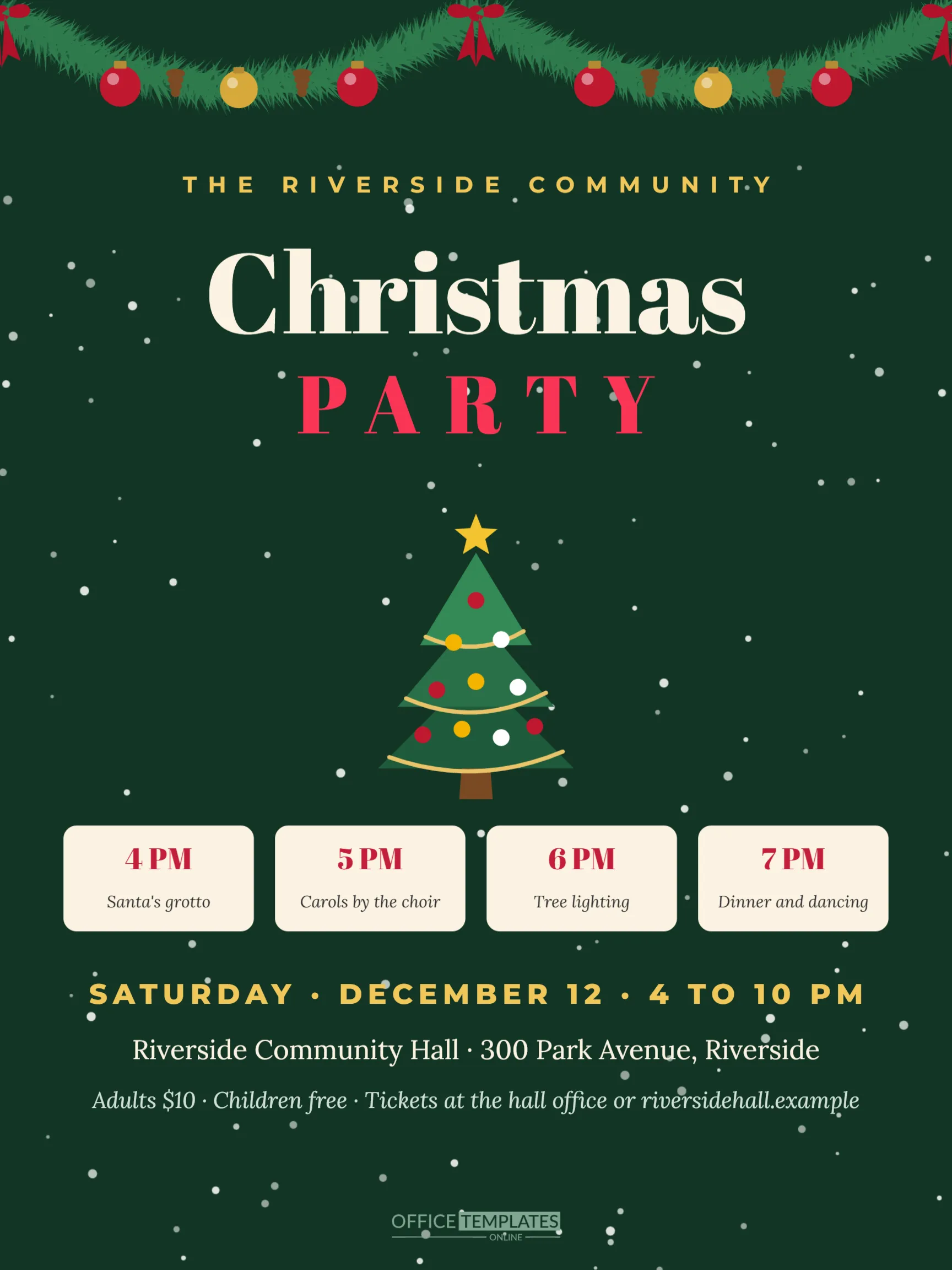
A community Christmas party brings a whole town, parish, school or association together: Santa’s grotto for the children, carols by the choir, the lighting of a big tree, and dinner and dancing to finish. To fill the hall, the event needs a poster that can be seen from across a street or a car park. This 18 x 24 inch poster is designed for exactly that: a deep green background with falling snow, a full fir garland across the top, a large decorated tree, four programme tiles showing the schedule, and bold ticket information at the bottom.
Designed to Be Read From a Distance
A poster has to work at two distances. From far away, people should recognise it as a Christmas party: the big cream Christmas title in Abril Fatface, PARTY in red with wide spacing, and the tree in the middle do that job. Up close, people need the details: the programme tiles, the date, the venue and the ticket prices. The layout stacks these in a clear order from top to bottom, so readers find what they need in seconds. THE RIVERSIDE COMMUNITY at the top names the organiser in gold capitals.
The Programme Tiles
Four cream tiles in a row show the schedule: Santa’s grotto at 4 PM, carols by the choir at 5 PM, the tree lighting at 6 PM, and dinner and dancing at 7 PM. Each tile has the time in large red Abril Fatface and the activity in italic below. Tiles are a clear way to show a schedule on a poster, because each time stands on its own and the eye moves along them like a timeline. Click each time and activity to change them. If you have more activities, shorten the text or add a second row by copying the tiles.
Date, Venue and Tickets
Below the tiles, SATURDAY, DECEMBER 12, 4 TO 10 PM appears in large gold capitals, the venue and address in cream Lora, and the ticket line in pale italic: Adults $10, Children free, Tickets at the hall office or the website. A poster should always answer three questions: when, where, and how much. If the event is free, say so clearly, for example, Free entry, all welcome.
Where to Put Up Posters
Posters work best in busy places where your audience passes every day. Good spots include the community hall itself, library and post office notice boards, supermarket community boards, school entrances, church porches, cafés and shop windows that welcome local events, sports clubs and doctors’ surgeries. Ask permission before putting up posters, put them up about four weeks before the event, and replace damaged ones. Smaller versions, printed at letter size from the same file, work for notice boards with limited space.
Printing an 18 x 24 Poster
Download the poster as a PDF. The text and illustrations are vectors, so the file prints sharply at full poster size. Order prints from a print shop or online poster printer on satin or matte poster paper. For outdoor use, ask for weatherproof paper or lamination, or place posters in plastic sleeves. The same PDF scales down to 11 x 17 inches or letter size for smaller notice boards, keeping the same proportions.
Editing the Community Party Poster
Change THE RIVERSIDE COMMUNITY to your organisation. Update the programme tiles, the date line, the venue line and the ticket line. The tree, garland and snow are editable vectors and groups; recolour them to match your organisation’s colours, or replace the tree with a photo of your town’s tree by adding a rectangle from the Elements panel and using Replace Image.
Planning a Community Christmas Party
A successful community party needs a team. Recruit volunteers for setup, ticketing, the grotto, catering, music, and clean-up. Book entertainment early: choirs, bands and Santa performers are in high demand in December. Check the hall’s capacity and safety rules, arrange first aid, and make sure the venue is accessible. If you serve food and drink, check local licensing and food safety requirements. A raffle or tombola can help cover costs or raise funds for a local cause.
Promoting Beyond the Poster
Use the same design online. Download a JPG to share on community Facebook groups, neighbourhood apps, the school newsletter and local radio or newspaper event listings. Consistent visuals help people recognise the event wherever they see it. The Facebook event cover in this collection uses the same colours and can be adapted.
Accessibility on Posters
Good contrast and large type make posters readable for everyone. The poster uses cream and gold on dark green for strong contrast. Keep the minimum text size large; on an 18 x 24 inch poster, the smallest lines are still easily readable at a short distance. Mention step-free access and any quiet area for people who find crowds overwhelming, if you have them.
After the Event
Take down posters promptly after the party, especially from shop windows and public boards. Share a thank you post with photos online, using the same design colours, to thank volunteers and attendees and build excitement for next year.
Community Poster Questions
Can I add sponsor logos?
Add a row of small shapes above the brand mark and use Replace Image for each logo.
Can I add a QR code for tickets?
Use the editor’s QR tool to create a code linking to your ticket page and place it near the ticket line.
What size is the poster?
18 x 24 inches, portrait. It scales down to 11 x 17 and letter size.
Volunteer Recruitment From the Same Design
Community parties depend on volunteers. Make a second version of the poster by changing the programme tiles to volunteer roles, such as Setup at 2 PM, Grotto helpers, Kitchen team, and Clean up crew, and the ticket line to a contact for volunteers. Post it a few weeks before the main poster to build your team early.
Bring Your Community Together
Fill in the programme, print the posters, and put them up around town. A bright, clear poster is the first step to a packed hall and a festive night for everyone.