The best Diwali photo card starts long before you open an editor. It starts with the photo. So this page begins there, with a short step-by-step guide to taking and choosing a family picture that suits the design, and then explains how the card itself works.
Step One: Take a Photo That Suits the Arch Window
The photo on this card sits inside a tall, round-topped arch window, a little under three inches wide and about three and a half inches tall. That shape changes what makes a good picture.
- Shoot in portrait orientation: The arch is taller than it is wide, so a vertical photo fills it without losing heads or feet.
- Keep faces in the upper middle: The rounded top of the arch trims the corners, so leave a little space above the heads.
- Use the festival light: Photos taken at dusk with diyas or fairy lights behind the family look magical inside the dark maroon frame. Turn off the flash and ask everyone to hold still for a moment.
- Wear colour: Festive clothes in saffron, pink, green, or gold glow against the maroon card.
- Include the rangoli or the doorway: A photo taken at the decorated entrance ties the picture to the toran printed above it.
Step Two: Place the Photo in the Card
Click inside the arch, where the placeholder shows soft mountains and a sun, and choose Replace Image. Upload your photo, and it fills the arch automatically while the frame keeps its shape. The picture is centred and scaled to cover the window, so if faces land too low or too high, crop the photo on your phone or computer first (leaving a little extra room above the heads) and replace it again. The gold frame and dark inner border sit beneath the photo, so the arch always looks finished.
Step Three: Write the Greeting
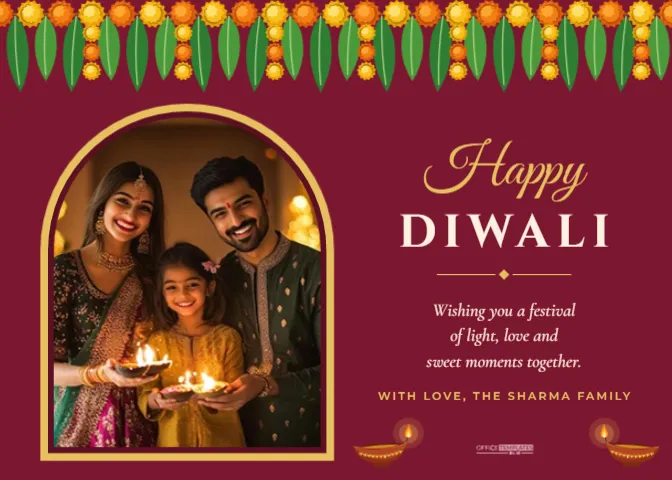
The right side of the card holds the words: Happy in Great Vibes script in gold, DIWALI in spaced Cinzel capitals in ivory, a small gold divider, a three-line wish in Cormorant Garamond italic, and WITH LOVE, THE SHARMA FAMILY in gold capitals. Click any line to rewrite it. Keep the wish to three lines so the text column stays balanced next to the arch.
The Design Around Your Photo
This is a 7 x 5 inch landscape card with a rich maroon background. A full-width toran runs across the top edge: a cord of alternating orange and yellow marigold pompoms with mango leaves hanging between them and short marigold strands at intervals, just like the toran tied over a front door for Diwali. Below it, on the left, the arch window holds your photo inside a gold outer frame and a deep wine inner border. On the right, the greeting is centred in its own column. Two terracotta diyas sit at the bottom corners of the text area, and the Office Templates Online mark sits between them in a soft rose tint.
Everything decorative is editable vector art: the toran, the diyas and the gold frame can be recoloured from their colour swatches, resized or moved.
Photo Checklist Before You Download
| Check | Why it matters | Quick fix |
|---|---|---|
| Faces are not cut by the curved top | The arch trims the top corners | Crop the photo with more space above the heads |
| Photo is sharp at 100 percent zoom | Blurry pictures look worse in print | Use the original file from the phone, not a chat download |
| Skin tones look natural | Warm indoor light can turn faces orange | Correct white balance in your phone’s editor first |
| Nobody is hidden behind someone else | Small window, many faces | Arrange people in two rows |
| Text column still reads clearly | A busy photo can distract | Keep the right column free of extra decoration |
Wording Ideas for a Family Diwali Photo Card
- Wishing you a festival of light, love, and sweet moments together.
- From our home to yours, may this Diwali sparkle with joy.
- Lots of laddoos, lots of light, and lots of love from all of us.
- Our first Diwali as a family of four. Wishing you every happiness.
- May the lamps we light tonight guide you to a bright new year.
For the signature line, family name cards look smart in capitals: WITH LOVE, THE PATEL FAMILY, or FROM RIYA, DEV AND BABY ANAYA.
Printing a Photo Card
Photo cards print best as photos. Download the design as a high-quality JPG or PDF and order it as a 7 x 5 inch print from a photo lab, pharmacy kiosk, or online print service; many offer card stock or lustre photo paper at that size. At home, use a photo printer and matte photo card. Choose full bleed, because the maroon background and the toran both touch the edges. If you print a big batch, order a single proof first to check that the maroon is not too dark and that faces are bright enough.
Sharing the Card on Phones and Social Media
A landscape card fits nicely in WhatsApp chats and Facebook posts. Download as JPG for messaging. If you want an Instagram post, the square greeting post in this collection is a better shape, but this card still works as a feed image because Instagram allows landscape posts. Write a short caption with the card, such as Happy Diwali from all of us, so the message reaches people who view images without opening them.
Variations on the Arch Window Card
- A couple’s first Diwali: change the greeting to Our First Diwali and add the year in gold capitals.
- A baby’s first Diwali: soften the maroon to a dusty rose and replace the photo with a newborn picture.
- Grandparents’ card: use an old family photo in the arch and the line Sixty Diwalis and counting.
- A shop or small business: use a photo of your team in front of the store and sign with the business name.
Questions About the Diwali Photo Card
Can I add a second photo?
The layout is built around one photo, but you can add a small second shape from the Elements panel in the text column, use Replace Image on it, and shrink the greeting slightly to make room.
Can I change the arch to a rectangle?
The arch is the heart of the design, but you can delete it and the frame and add a rectangle from the Elements panel, then use Replace Image on the new shape.
What if my photo is landscape?
It will still fill the arch, but the sides will be cropped. Crop it to a portrait shape first, with the important people in the middle.
Does the card include an inside page?
No, it is a single flat card. Use Add Page if you want to print a message on the back.
Frame Your Diwali Memories
Pick your favourite festival photo, drop it into the arch, sign the card with your family name, and send it to the people who make your Diwali bright. It takes a few minutes and becomes the card people put on the fridge.