A bad rota costs a small business more than it seems. Staff turn up for the wrong shift, two people book the same weekend off, and someone works six nights in a row by accident. Most of these problems come from a handful of avoidable rota mistakes. This page starts with those mistakes, then shows how this template helps you avoid them.
Six Rota Mistakes Managers Make
- Publishing the rota too late: Staff need time to plan childcare, transport, and second jobs. Aim for at least two weeks’ notice.
- No clear shift codes:Morning means different times to different people. Codes with exact times remove confusion.
- Uneven distribution: The same people always get the nights or weekends, which causes resentment and turnover.
- Too little rest between shifts: A late shift followed by an early start leaves people exhausted and is limited by law in many places.
- Undocumented swaps: Staff swap shifts verbally and nobody knows who is actually coming in.
- Ignoring holidays and leave: Approved leave gets forgotten when the rota is drawn up.
How the Template Prevents Them
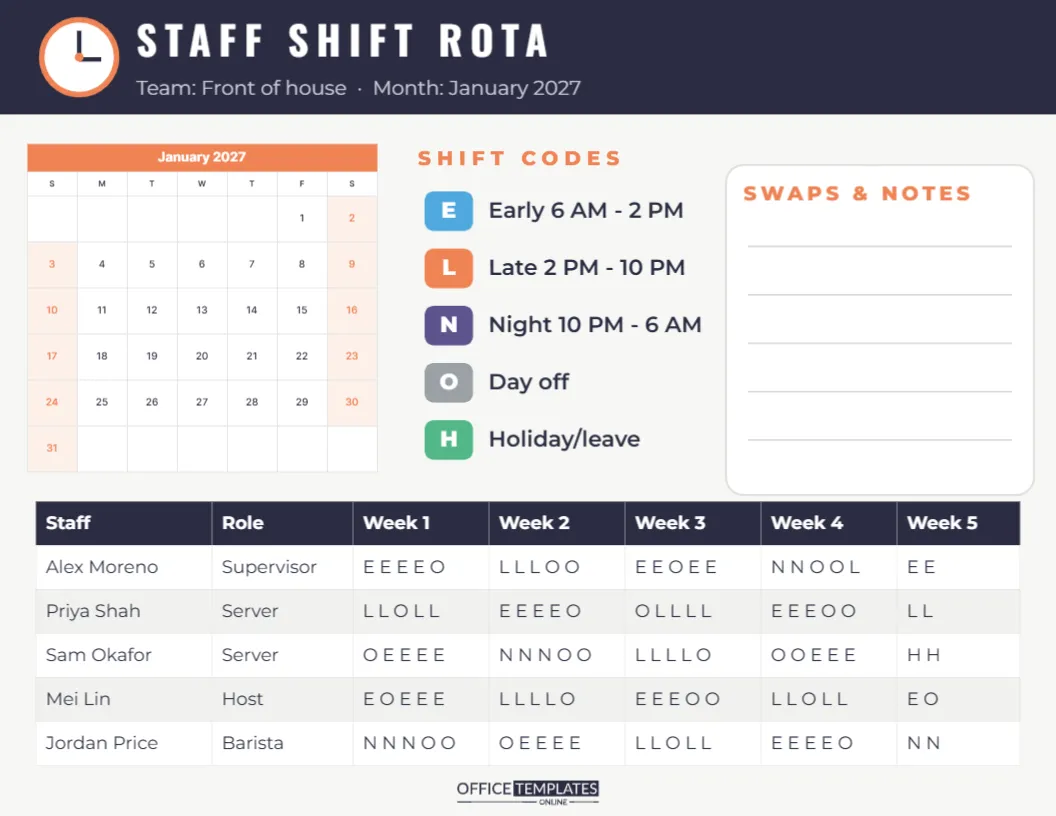
The rota is US Letter landscape, 11 x 8.5 inches. A charcoal header with a small clock face reads STAFF SHIFT ROTA in white Oswald, with Team: Front of house · Month: January 2027 underneath. On the left, a compact month calendar with an orange title row shows the dates, so everyone can see which days each week covers.
In the middle, a SHIFT CODES key lists five colour-coded chips with exact times: E for Early (6 AM to 2 PM) in blue, L for Late (2 PM to 10 PM) in orange, N for Night (10 PM to 6 AM) in violet, O for Day off in grey, and H for Holiday or leave in green. On the right, a SWAPS & NOTES box gives five lines for recording approved swaps. The bottom of the page is a table with columns for Staff, Role, and Week 1 to Week 5, with sample staff and their shifts written in codes, such as E E E E O for five days in a row.
Reading the Shift Codes
| Code | Shift | Hours |
|---|---|---|
| E | Early | 6 AM – 2 PM |
| L | Late | 2 PM – 10 PM |
| N | Night | 10 PM – 6 AM |
| O | Day off | Not working |
| H | Holiday or leave | Approved time off |
Each letter in a week cell represents one working day in order, so L L O L L means late, late, day off, late, late. Edit the codes and times in the key to match your business, for example, a 7 AM start or a split shift code S.
Filling In the Staff Table
The table is the editor’s Table object. Click any cell to type, and use the Table options to add a row for each staff member or a column for a sixth week. The sample team includes a supervisor, two servers, a host and a barista, which suits restaurants and cafés, but the same layout works for shops, care homes, warehouses, gyms and call centres. Add a column for contracted hours if you need to check totals.
Fair Rotas, Happier Teams
Use the table to check fairness before publishing. Count nights and weekends per person across the month and balance them. Rotate unpopular shifts so nobody gets stuck with them. Mark approved holidays first, using the H code, then fill the remaining shifts. Check that nobody goes from a late or night shift straight into an early. Small checks like these are the difference between a rota people accept and one they complain about.
Handling Swaps Properly
Swaps are inevitable. The SWAPS & NOTES box gives you a simple record: write the date, who swapped with whom, and the manager’s initials. Ask staff to request swaps in writing and to find their own cover from people with the same skills. Update the table if you republish the rota, so the printed version always matches reality.
Switching the Rota Month and Brand Colours
The small calendar is the editor’s Calendar object: open Calendar Options to change the month and year, and start the week on Monday if your rota weeks run Monday to Sunday. Recolour the header, chips and table to match your brand. Fonts are Oswald for the header and Inter for the rest, both Google Fonts.
Sharing the Rota with Staff
Download the rota as a PDF to print for the staff room noticeboard, or as a PNG to share in the team’s group chat. Post it at the same time every month so staff know when to expect it. Keep previous months in a folder, which helps with payroll queries and holiday disputes.
A Rota-Building Routine That Works
Experienced managers build the rota in the same order every month. First, look at the calendar for the coming month and note public holidays, events, and expected busy days, such as paydays or local festivals. Second, mark all approved leave with the H code. Third, place your most experienced staff on the busiest shifts, then fill the gaps with the rest of the team. Fourth, check each person’s total hours against their contract. Finally, review the whole table for fairness and rest breaks before publishing.
This routine takes about an hour for a team of ten, and it gets faster each month because last month’s table becomes the starting point. Duplicate the template, change the month in Calendar Options, and edit only the cells that change.
Rota Mistake Number Seven: Not Asking the Team
The best rotas include staff preferences. Ask the team to note availability and preferred shifts by a set date each month, perhaps on a sheet next to the printed rota. You will not be able to give everyone what they want, but asking makes people feel heard and reduces last-minute swaps.
A simple rule, such as requests by the 15th for next month’s rota, sets expectations clearly. Staff who miss the deadline can still swap later through the SWAPS & NOTES box, but the rota itself goes out on time, every time, and the team learns to plan around it.
Set the month, assign the codes, and publish early. A clear rota keeps the whole team on the same page.