Give Every Day of the School Week Its Own Clear Plan
From Monday morning to Friday afternoon, a classroom can move through dozens of lessons, activities, breaks, and special events. This Weekly Classroom Schedule template gives teachers a simple visual space to organize those plans without making the schedule feel crowded or complicated.
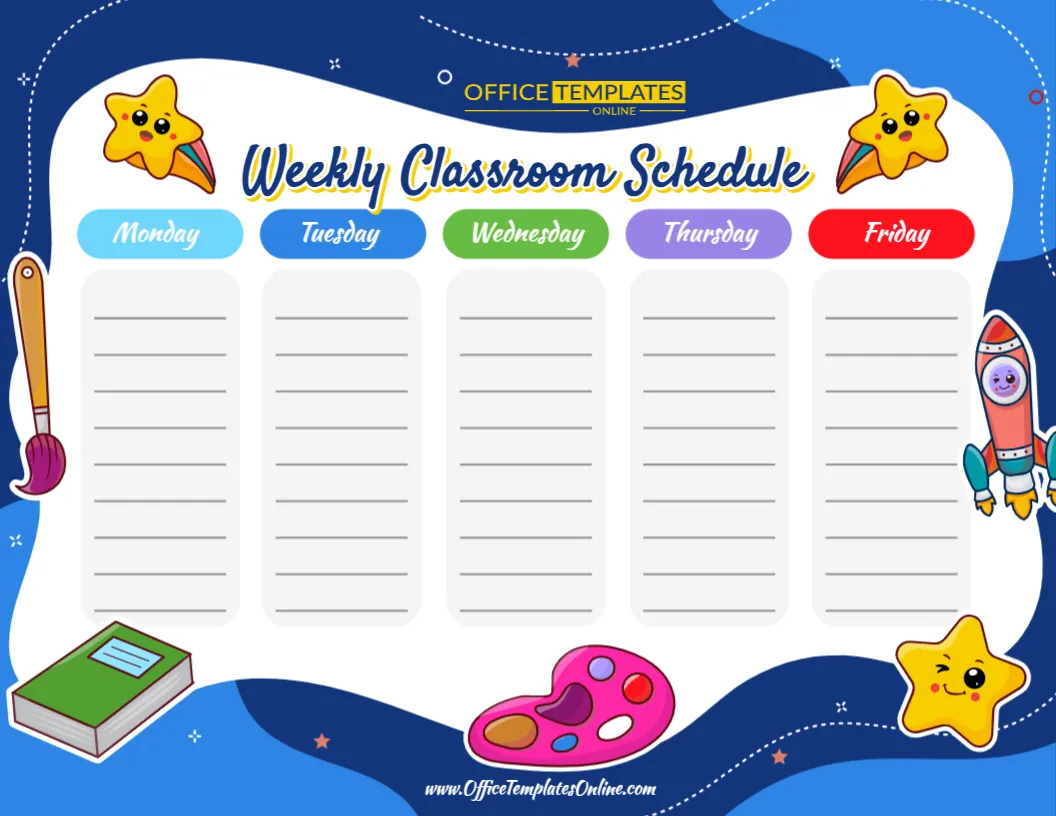
The design separates the school week into five individual columns for Monday, Tuesday, Wednesday, Thursday, and Friday. Each column provides multiple blank writing lines, giving you the freedom to enter the lessons, activities, reminders, or routines that belong to that day.
Unlike a detailed timetable with fixed time slots, this design is intentionally open-ended. You decide what information belongs on each line and how detailed your weekly plan should be.
The template is customizable through the online browser-based editor, with no login required to begin. After adding your own schedule, you can download the completed design as a PDF, PNG, or JPG.
Five Days, Five Easy-to-Follow Sections
The main schedule is divided evenly across the school week.
Each day has its own colored heading, making the columns easy to distinguish:
Monday appears in light blue, Tuesday in blue, Wednesday in green, Thursday in purple, and Friday in bright red.
Below every weekday heading is a clean writing area with several horizontal lines.
This simple structure gives you flexibility. Instead of forcing every classroom into predetermined times or subjects, you can decide what each line represents.
One line could represent a lesson, another could be a break, and another could be an activity or reminder.
Start with a Blank Schedule and Make It Your Own
This template does not come filled with sample Mathematics, English, or Science lessons. Instead, the main planning area is left blank.
That can be especially useful if you already know exactly what needs to go into your weekly routine.
You might fill the schedule with:
- Morning Meeting
- Mathematics
- Reading
- Writing
- Science
- Social Studies
- Recess
- Lunch
- Art
- Music
- Physical Education
- Library
- Computer Class
- Independent Work
- Group Activities
- Project Time
- Review
- Dismissal
Or you can use completely different entries based on your class, grade, curriculum, or teaching style.
More Flexible Than a Fixed Timetable
Some classroom schedules need exact start and finish times. Others simply need to show what is happening each day and in what order.
This template is designed especially well for the second approach.
There is no dedicated time column in the visible design. Instead, each weekday provides a list-style planning area. This gives teachers the freedom to create a straightforward sequence of activities without attaching a specific time to every entry.
For example, Monday could show:
Morning Meeting ? Mathematics ? Reading ? Recess ? Science ? Lunch ? Art
Tuesday could contain a completely different sequence.
If your school routine changes slightly from day to day, this format can be easier to maintain than a tightly structured hourly timetable.
A Cheerful Design for Elementary Classrooms
The visual style is playful, bright, and strongly connected to school life.
The schedule itself sits inside a large white area, helping the information remain clear against the dark and light blue background.
Around the edges, colorful illustrations add personality to the design. These include a paintbrush, book, artist’s palette, rocket, and smiling star characters.
The combination of school, art, and playful space-themed graphics makes the schedule particularly appealing for younger learners.
At the same time, the decorative elements remain around the outside of the planning area, leaving the five weekday columns clean and easy to use.
Make Monday Through Friday Easy to Tell Apart
Color is used carefully throughout the design.
Instead of giving every weekday the same heading, each day receives a different color. This creates a simple visual distinction between the five sections.
Students can quickly learn that their Monday activities are in the first light-blue section, Wednesday is under the green heading, and Friday appears beneath the red heading.
The large “Weekly Classroom Schedule” title at the top also makes the purpose of the page immediately clear.
The result is a classroom schedule that feels friendly and colorful without sacrificing organization.
What Can You Put on the Schedule?
Although subjects are an obvious choice, the blank layout gives you many possibilities.
You can mix regular lessons with important parts of the school day. A typical column might contain core subjects alongside recess, lunch, special classes, independent reading, or creative activities.
You could also use the lines for broader learning blocks rather than individual subjects.
For example, instead of listing every small activity separately, you might use entries such as Morning Learning, Literacy Block, Lunch & Recess, Afternoon Activities, and End-of-Day Review.
The right approach depends on who will use the schedule and how much information they need.
Edit the Weekly Schedule Directly in Your Browser
There is no need to recreate this design in a word processor, spreadsheet, or graphics program.
Open the template in the online editor and personalize the available content directly through your browser.
Best of all, you do not need to log in to start customizing the template.
Add the lessons and activities you want students to see, review the information for each weekday, and prepare the schedule for download.
The layout is already designed for you, so your attention can stay on planning the school week rather than building five matching columns from scratch.
Create a Schedule Students Can Check Independently
A weekly classroom schedule is not only useful for teachers.
Once displayed, it can give students a quick way to check the plan for the week. Weekly schedule formats are commonly used to keep classes and activities visible together in one place.
Students can look at the appropriate weekday column when they want to know what activities are planned.
For younger learners, teachers can also review the relevant column at the beginning of each morning. This can turn the schedule into part of the daily classroom routine.
Use It for More Than Academic Subjects
A useful weekly schedule can include much more than Mathematics, English, and Science.
Consider adding recurring events such as library visits, assemblies, physical education, music lessons, computer time, clubs, group projects, or classroom celebrations.
You could also include routine items such as:
Morning arrival to show how the school day begins.
Recess and lunch to make breaks visible alongside lessons.
Independent reading for scheduled quiet learning time.
Creative activity for art, crafts, or project work.
Pack-up time to remind students when to organize their materials.
Weekly review for a Friday reflection or recap session.
Because the layout does not dictate what each line must contain, it can adapt to many different classroom routines.
Suitable for Homeschool Weekly Planning
The design can also work outside a traditional classroom.
Homeschool families can use each weekday column to plan subjects, learning activities, reading, projects, physical activity, and educational outings.
A parent might keep Monday focused on core subjects, schedule an art activity on Tuesday, include a science project on Wednesday, and reserve part of Friday for review or enrichment.
Weekly homeschool schedules commonly use Monday-to-Friday layouts because they allow subjects and activities to be balanced across the school week.
The blank format means a homeschool family can create a routine that fits its own learning style instead of following a fixed school timetable.
Helpful for Special Weekly Activities
Another useful feature of this layout is that it can accommodate activities that happen only once per week.
Perhaps students have:
Art on Monday
Library on Tuesday
Computer class on Wednesday
Music on Thursday
Physical Education on Friday
These special activities can be added to the correct weekday without changing the overall structure of the schedule.
The same idea works for assemblies, clubs, tutoring sessions, enrichment programs, classroom jobs, or other recurring events.
Display the Finished Schedule in the Classroom
After customization, the schedule can become part of your classroom organization area.
It can work well:
Near the whiteboard, where students can check it during lessons.
On a bulletin board, together with classroom rules, calendars, and announcements.
Near the classroom entrance, giving students a quick look at the day when they arrive.
In a learning area, where students can refer to it independently.
Near the teacher’s workstation, providing an easy overview of the week.
Weekly classroom schedules are also commonly prepared for wall or board display so the week’s routine stays visible.
Use It as a Fresh Schedule for Each Week
The template can also be treated as a reusable weekly planning format.
If your classroom routine stays almost identical each week, you can create one main version and update it whenever necessary.
If activities change regularly, customize a fresh schedule for each week.
For example, one week might include a science project, while the following week has an assembly or special art activity. Updating the relevant weekday column lets you reflect those changes without redesigning the entire schedule.
This can be particularly convenient for classrooms where special events and learning activities vary from week to week.
How to Customize Your Weekly Classroom Schedule
Creating a personalized schedule is straightforward:
- Open the Weekly Classroom Schedule template in the online editor.
- Start with Monday and enter the lessons or activities in the order you want them displayed.
- Continue through Tuesday to Friday, adding the correct information to each column.
- Include breaks, special subjects, or recurring events where needed.
- Keep entries short and clear so students can read the schedule quickly.
- Review all five days for missing or incorrect information.
- Finalize the available design elements according to your needs.
- Download your completed schedule as PDF, PNG, or JPG.
The blank lined format gives you plenty of freedom while keeping the overall structure consistent.
Create Different Versions for Different Classes
Teachers who work with more than one class can prepare separate versions of the schedule.
For example, you might create one weekly schedule for a morning group and another for an afternoon group.
Specialist teachers could create schedules for different grades.
Tutors might prepare one version for each learning group.
A learning center could customize separate schedules for different classrooms or programs.
Because the same visual design can be reused with different content, it can help maintain a consistent look across several schedules.
Keep the Wording Short and Student-Friendly
Since this template is designed for quick reference, short activity names will usually work best.
Instead of entering a long sentence such as “Students will participate in an independent reading and comprehension activity,” simply writing “Independent Reading” keeps the schedule cleaner.
Likewise, “Science Project”, “Math Review”, “Art Class”, or “Library” can often communicate everything students need to know.
Short entries also leave more visual space between activities, helping the schedule remain readable when viewed from a distance.
Download as PDF, PNG, or JPG
Once the schedule looks the way you want, you can download your completed design in three convenient formats.
Choose PDF when you want a practical document format for printing or sharing.
Choose PNG when you want a high-quality image version for digital use.
Choose JPG when you need a widely compatible image file that is easy to save and use on many devices.
This gives you the flexibility to prepare the schedule for a classroom display, digital reference, or other educational use.
Turn a Blank Week into an Organized Learning Plan
The strength of this Weekly Classroom Schedule template is its simplicity. Instead of deciding in advance how many Mathematics lessons, breaks, or activity periods your class should have, the template gives you five clean weekday sections and lets you build the week your way.
Fill Monday through Friday with subjects, lessons, breaks, projects, special classes, or daily routines. The colorful headings make each day easy to recognize, while the lined planning areas keep the information organized and readable.
Whether you are preparing a regular elementary classroom routine, planning a changing school week, organizing homeschool lessons, or creating a schedule for an educational program, this editable template gives you a colorful starting point without locking you into fixed times.
Customize the Weekly Classroom Schedule online with no login required, add your own Monday-to-Friday activities, and download the finished design as a PDF, PNG, or JPG.