Turn Key Contract Details into a Clear, Professional Record
Commercial agreements often pass through several important stages before they are put into effect. The parties need to agree on the terms, appropriate representatives may need to review and approve them, and authorized individuals ultimately sign the contract. When you want a concise document that summarizes those details, this Commercial Contract Signing Certificate Template provides a practical starting point.
The template is designed to record information about a commercial contract, the organizations involved, its signing or approval, the relevant dates, and the authorized representatives. Its certificate-style presentation makes these details easier to review than information scattered across emails, notes, or other informal records.
You can customize the template online directly in your browser without logging in. Replace the example information with your own contract details, personalize the available elements, and download the completed certificate in PDF, PNG, or JPG format.
What Is a Commercial Contract Signing Certificate?
A Commercial Contract Signing Certificate is a document that can be used to summarize information concerning the approval and signing of a business agreement.
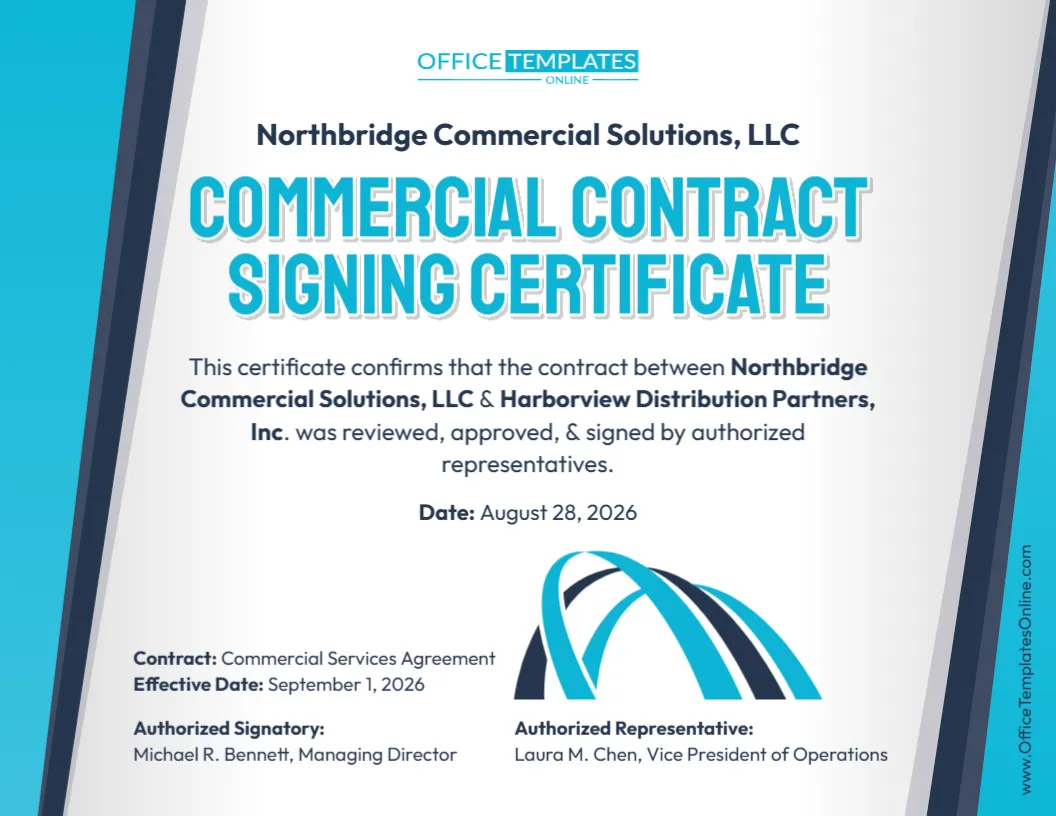
For example, it may identify the contracting parties, type of agreement, signing or certificate date, effective date, authorized signatory, and another authorized representative. It can also include a statement indicating that the relevant agreement was reviewed, approved, and signed by authorized representatives, when that statement is accurate.
The certificate is best understood as a supporting business record or summary. It does not replace the underlying commercial contract, its signature pages, or other documentation required to establish that an agreement is valid and enforceable.
A Quick Look at the Information This Design Can Hold
Unlike a generic certificate with only a person’s name and title, this template provides room for several contract-specific details.
The design can be customized to show:
- Company or organization name at the top of the certificate.
- Names of the contracting parties involved in the commercial agreement.
- Confirmation statement describing the review, approval, or signing of the contract.
- Certificate date showing when the confirmation was prepared.
- Contract name or type, such as a Commercial Services Agreement.
- Effective date of the agreement.
- Authorized signatory’s name and position.
- Authorized representative’s name and position.
- Available branding and design elements for a more personalized presentation.
This combination makes the template useful when you want more context than a simple statement that a document has been signed.
Keep the Contract and Certificate Details Consistent
When customizing this template, consistency is especially important.
The names of the businesses on the certificate should match the names used in the underlying agreement. If the contract uses complete legal entity names, those same names should generally be reflected in the certificate where appropriate.
The contract title should also correspond with the actual agreement. For example, if the document is formally titled “Commercial Services Agreement,” avoid replacing it with a different description that could create uncertainty about which agreement the certificate refers to.
Dates deserve the same attention. A certificate or signing date and an effective date are not necessarily the same thing. If the agreement becomes effective on a different date from the date it was signed or the certificate was prepared, enter each date in the appropriate place.
Identify the People Connected with the Agreement
The lower portion of this template provides dedicated areas for an Authorized Signatory and an Authorized Representative.
These roles may or may not be different in your situation.
An authorized signatory is generally someone who has appropriate authority to sign an agreement for an organization. Another authorized representative might be identified for operational, administrative, implementation, or other business purposes.
You should customize these labels and details according to the actual arrangement. Do not identify someone as an authorized signatory merely because they participated in negotiating, preparing, or reviewing the contract.
The certificate should reflect authority that already exists, rather than being used to create authority simply by adding someone’s name to the design.
When Could You Use This Template?
This template can be useful when a company wants a professionally formatted summary relating to the signing of a commercial agreement.
Depending on the circumstances, it may be suitable for commercial service agreements, supplier arrangements, distribution agreements, business-to-business contracts, partnership arrangements, consulting agreements, operational agreements, or other commercial transactions.
It can also be useful for internal business documentation where teams want a convenient reference showing the agreement involved, its effective date, and the people identified as authorized representatives.
The specific documentation needed for any transaction will depend on the contract, the organizations involved, and applicable requirements. Some situations may not require a separate signing certificate at all, while others may require additional documentation.
Designed for Fast Reading, Not Just Good Looks
The template uses a clean blue, white, and dark-accented business design that gives the page a formal appearance without making it difficult to read.
The Commercial Contract Signing Certificate title is prominently displayed near the top. The main confirmation statement occupies the center of the design, followed by a clearly separated date.
Contract-specific information is placed toward the bottom, where the contract name and effective date can be quickly located. The signatory and representative details also have their own areas, helping prevent important information from becoming mixed together.
This visual hierarchy can be particularly helpful when the certificate is reviewed later and someone needs to identify the relevant agreement and representatives quickly.
Edit Everything You Need Right in Your Browser
You do not need to recreate this certificate in another program or spend time trying to reproduce its layout.
Open the template using the online editor and customize the editable content directly from your browser. No login is required, making it easy to begin personalizing the design immediately.
Replace the sample business names with your contracting parties. Update the contract title, dates, signatory information, representative information, and confirmation wording. You can also personalize applicable visual elements available through the editor.
Because the layout has already been prepared, even users without professional design experience can create a polished-looking certificate while concentrating on the information that matters.
An Easy Editing Order to Help Avoid Mistakes
For this particular template, it can help to customize the information in the same order as the underlying contract.
Start with the official name of the company displayed at the top. Next, enter the complete names of both parties involved in the agreement.
Then edit the central statement. Make sure any claim that the contract was reviewed, approved, and signed is factually correct. If only some of those actions apply, change the wording accordingly.
After that, enter the certificate date, contract title, and effective date.
Finally, update the authorized signatory and authorized representative information, including their names and professional titles.
Before downloading the finished certificate, compare these details with the underlying agreement. This extra check can help catch mismatched dates, misspelled names, incorrect titles, or leftover sample information.
Download a Finished Copy in Three Convenient Formats
Once the certificate is complete, choose the download format that best matches your intended use.
PDF is a convenient option for printing, electronic sharing, or storing the certificate alongside other contract records.
PNG provides a high-quality image version and can be useful when you need the certificate as an image rather than a traditional document.
JPG offers another widely supported image format that can be convenient for digital use and sharing.
With PDF, PNG, and JPG available, you can select the format that works best for your particular workflow.
What This Certificate Does Not Replace
A professional-looking certificate should not be confused with the commercial agreement itself.
This template does not replace the underlying contract, its signature pages, required approvals, amendments, resolutions, powers of attorney, or other supporting documentation that may be necessary in a particular transaction.
Likewise, writing that a contract has been “approved” or “signed by authorized representatives” does not establish those facts if they have not actually occurred.
The certificate should therefore be completed using information that can be verified from the agreement and relevant company records.
Pay Special Attention to Signing Authority
Who can legally bind a company to a commercial contract can depend on the organization’s structure, governing documents, internal delegations, resolutions, applicable law, and the nature of the transaction.
A person’s job title alone may not always answer that question.
Before identifying someone as an authorized signatory, make sure the information is accurate for the particular organization and agreement. If the transaction involves significant obligations or there is uncertainty about signing authority, appropriate legal or professional guidance may be necessary.
The template itself is a document-design resource and does not provide legal advice or establish contractual authority.
Create a Useful Companion Record for Your Commercial Agreement
A signed commercial agreement can contain many pages of terms, conditions, schedules, and supporting information. This editable Commercial Contract Signing Certificate Template gives you a more concise way to present selected information about the agreement and the representatives connected with its signing.
Customize the contracting parties, confirmation statement, dates, contract name, authorized signatory, and representative details using the browser-based editor. Make sure every entry matches the actual agreement and your organization’s records.
There is no login required to edit the template, and you can prepare it without starting the design from scratch. When your certificate has been reviewed and is ready for use, download the completed version as a PDF, PNG, or JPG.