Door hangers are a backbone of local political campaigns. Canvassers knock on doors, and when nobody answers, they leave a hanger with the candidate’s face, name, and message. For city council, school board, county, and state races, where many voters do not know the candidates, that face-to-face recognition can decide an election. This template is designed for exactly that: a large candidate photo, classic red, white, and blue stripes, a bold name, and a clear election date on the front, with four priorities and voting information on the back.
Candidate Front Layout
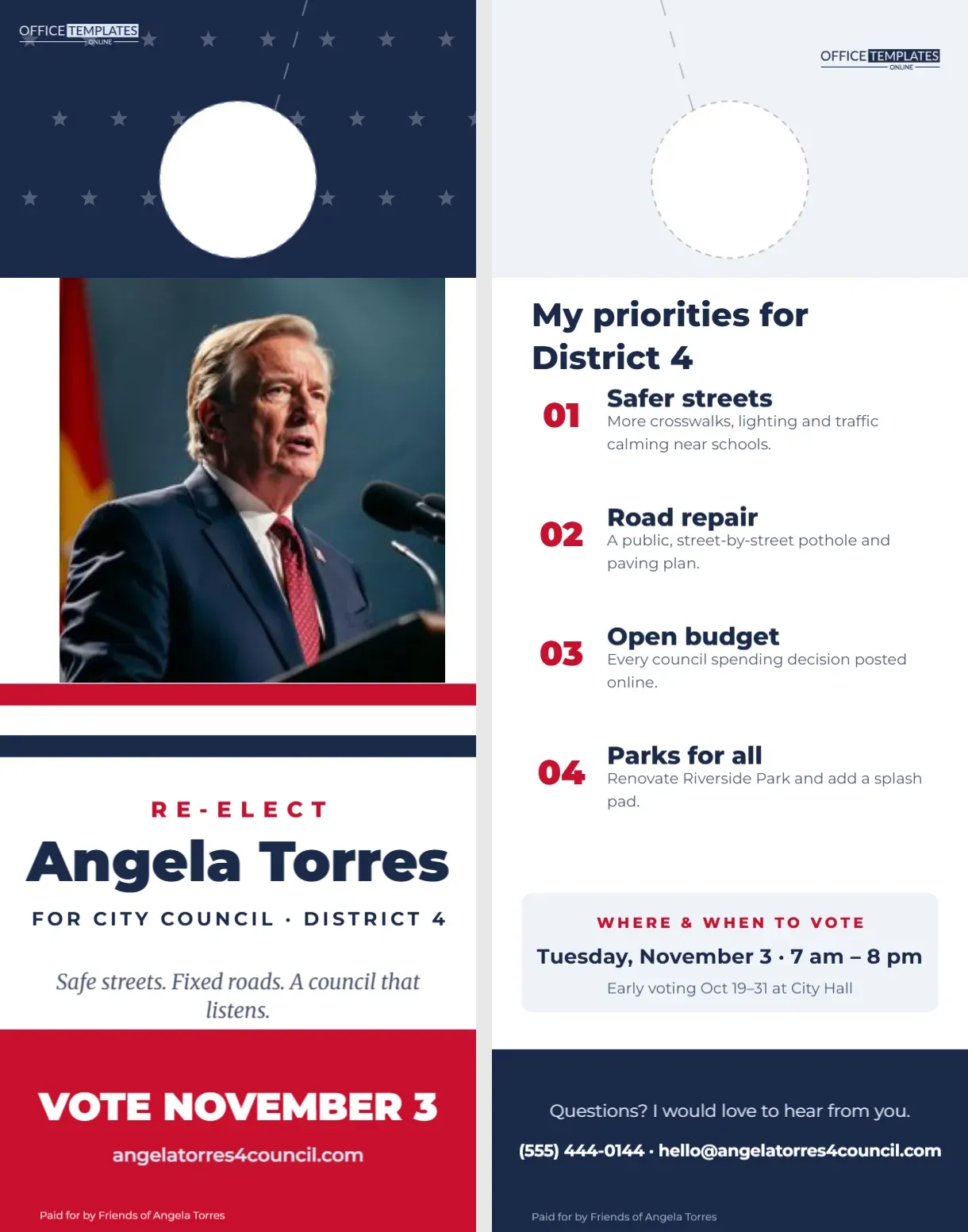
The hanger is 4.25 x 11 inches and printed on both sides. The top of the front is navy with faint white stars around the door hole. A large photo of the candidate fills the next section. Below it, three horizontal stripes, red, white, and navy, run across the card like a flag band. Re-elect is set in red spaced capitals, the candidate’s name Angela Torres in heavy navy Montserrat, and the office For City Council · District 4 underneath. An italic slogan follows: Safe streets. Fixed roads. A council that listens. A red footer carries Vote November 3 in large white type, the campaign website, and a small Paid for by disclaimer.
Choosing the Candidate Photo
The photo slot is the most important part of the front. Click it and choose Replace Image to upload a professional portrait: chest-up, smiling, natural light, with a simple or local background like a park or main street. Avoid busy backgrounds. A warm, approachable portrait helps voters recognise the candidate at events and on the ballot.
The Back: Four Priorities and How to Vote
The back’s headline, My priorities for District 4, introduces four numbered points in red with a bold title and one line each: safer streets, road repair, open budget, and parks for all. A light box below explains where and when to vote: the date and poll hours, and early voting dates at City Hall. A navy footer invites questions, gives a phone number and email, and repeats the disclaimer.
Writing Clear Priorities
Voters skim. Each priority should have a short, concrete title and one sentence that explains what you will actually do. Safer streets: more crosswalks, lighting, and traffic calming near schools is specific and memorable; Making our community better is not. Four priorities is a good number: enough to show range, few enough to remember.
Paid-For-By Disclaimers
Most jurisdictions require campaign materials to include a disclaimer stating who paid for them, such as Paid for by Friends of Angela Torres. The exact wording, size, and placement rules vary by country, state, and race. Check your election authority’s rules and update the disclaimer lines on both sides before printing. Getting this wrong can lead to fines or complaints.
Campaign Message Checklist
| Element | Where on the hanger | Tip |
|---|---|---|
| Candidate name | Front, largest text | Use the name as it appears on the ballot |
| Office and district | Under the name | Be precise: District 4, Seat 2 |
| Election date | Front footer | Include the day of the week |
| Priorities | Back | Three to five, concrete and local |
| How to vote | Back | Polling hours and early voting |
| Disclaimer | Both sides as required | Follow local election law |
“Re-elect” or “Elect”
The sample says Re-elect for an incumbent. For a first-time candidate, change it to Elect or Vote for. The line is a separate text box, so it is a one-word change. Incumbents can mention achievements on the back, such as Fixed 12 miles of roads since 2023.
Recolouring the Campaign Palette
Red, white and navy are traditional for American campaigns, but local races often use distinctive colours to stand out. Change the top band, stripes, name and footer to your campaign colours. Make sure colours match your yard signs and website so voters recognise your brand everywhere.
The Door Hole Guide
A dashed white circle at the top marks the hole and a dashed slit marks the cut, so canvassers can slip the hanger onto doorknobs. Printers that produce campaign materials can die-cut thousands quickly. Never place campaign materials in mailboxes; in the US, that is illegal.
Printing in Volume
Campaign hangers are usually printed in large runs. Download as a PDF with bleed and crop marks and ask for 14 pt coated card. Many campaigns use union printers and include the union label (bug); ask your printer if that matters in your community. Order a proof and check names, dates, and the disclaimer carefully.
Canvassing With Hangers
Give canvassers walk lists of target voters and a stack of hangers. When someone answers, the canvasser hands over the hanger after the conversation; when nobody answers, they leave it on the knob. Track which doors received hangers so your data stays accurate for follow-up.
A Second Hanger Before Election Day
Many campaigns drop a second, simpler hanger in the final weekend: just the photo, name, date, and polling place. Duplicate this template and reduce it to those essentials for a Get Out the Vote version.
Volunteer Notes on the Hanger
Canvassers can make a hanger personal by writing a quick note in the white space on the back: Sorry we missed you!– Sam, your neighbour on Oak St. Voters respond far better to a neighbour’s handwriting than to printed slogans. Leave a little room on the back for these notes, and give volunteers pens that write well on your chosen cardstock.
Matching Your Yard Signs and Mailers
Consistent design helps voters remember a name. Use the same photo, colours, and slogan on the door hanger, yard signs, mailers, and social media. When a voter sees the hanger and then a yard sign on the way to the polls, the repetition does its work.
Campaign Hanger FAQ
Can I use this for a school board race?
Yes. Change the office line and priorities to education topics.
Can I remove the photo?
Yes, but a photo usually helps name recognition. If you remove it, enlarge the name.
What size is the hanger?
4.25 x 11 inches, front and back.