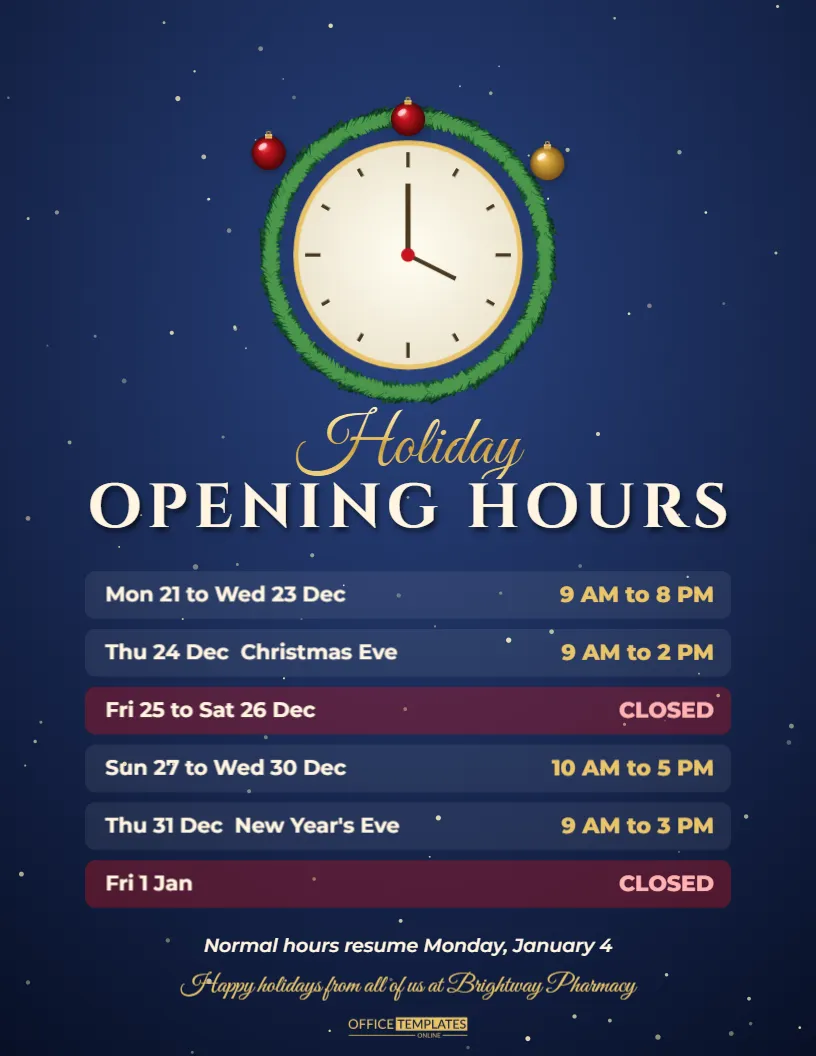
Every shop gets the same question in December: are you open on Christmas Eve? This flyer answers it for you. A midnight blue glow carries a glowing clock face wrapped in a pine garland with baubles, a gold title announces the schedule, and a neat list shows each day with the hours, closed days highlighted so nobody turns up to a locked door. A warm seasonal greeting closes the page. It suits shops, restaurants, clinics, salons, libraries, offices, and any business with changed hours over the holidays.
Why a Holiday Hours Poster Saves Time and Frustration
Customers plan errands around holidays, and staff dislike answering the same question. A clear poster in the window and on your website gets rid of confusion, shows you care about their time, and lowers the number of calls in the busiest week of the year.
The Glowing Clock Face as a Visual Hook
The clock has a gold rim, simple hands, and a soft glow. The garland wraps around it with baubles hanging at the edge. A clock is a clear symbol of opening times, so visitors understand the purpose of the page before they read it.
Editing the Gold Title
The title can read Holiday Opening Hours, Our Christmas Schedule, or Season Hours. Replace it with your own wording and keep it to a single line if possible. Gold on midnight blue has a strong contrast, which makes it easy to read in a window.
Filling In the Hours List
| Date | Example hours | Status |
|---|---|---|
| Wednesday, December 23 | 9 AM to 7 PM | Open late |
| Thursday, December 24 | 9 AM to 2 PM | Early close |
| Friday, December 25 | Closed | Merry Christmas |
| Thursday, December 31 | 9 AM to 3 PM | Early close |
List each date with a weekday, and use consistent time formats. Closed days are highlighted so they stand out.
Highlighting Closed Days Clearly
Use a bold colour or a pill label for closed dates. Customers scan the list for the days they plan to visit, and a glance should tell them whether to come or not. If you reopen on a particular morning, make that line stand out too.
Emergency Contacts and Out of Hours Support
For clinics, repair services, and utilities, add an emergency number below the list. Tell customers what to do when you are closed, for example, call the on-duty line or visit the urgent care site. This detail can matter far more than the hours themselves.
Online Orders, Pickups and Deliveries
If your online shop stays open while the storefront is closed, mention it. State the last dispatch date and the date that deliveries resume. Add a link or QR code that leads to the shop for customers who prefer to order from home.
Different Hours for Different Departments
Some businesses have a restaurant and a shop, or a clinic and a pharmacy with different hours. Add a small second column or a second flyer for each department. Keep each one simple so that nobody misreads the times.
Posting the Hours on Doors, Windows and Counters
Place one copy at eye level on the front door, one at the till, and one inside any lift or lobby. Post it two weeks before the first change, so that regular visitors see it on several visits. Replace it with a normal hours sign on January 2.
Updating Google Business Profile and Website Hours
Customers search online before they visit. Update your holiday hours on Google, social profiles, and your website, using the same dates as the poster. A consistent message across channels avoids wasted trips and negative reviews.
Colour and Contrast for Window Displays
The deep blue background and gold lettering work well in daylight and under shop lights. If sunlight reflects on glass, choose a matte print or place the poster on the inside of the window. Check readability from the pavement.
Adding a Personal Message to Customers
The greeting at the bottom is a place to thank customers. Write a sentence that sounds like your business, for example: Thank you for a wonderful year; we wish you a peaceful holiday. A personal note leaves a lasting impression.
Staff Holiday Rotas and Planning
Create the opening schedule before staff book holidays. Share it with the team early so that rotas are fair. Sharing the flyer with your staff also helps them answer questions consistently when customers ask.
Final Check of Dates and Times
Compare every line with your calendar. Confirm that weekdays match dates in the current year. Ask someone else to read the list aloud to catch errors, and print one copy before running the full set.
Pre-Christmas Late Night Shopping and Extended Hours
Many shops extend their hours in the week before Christmas. Highlight late nights in a bold colour so shoppers can plan visits after work. A line such as Open until 9 PM on December 22 and 23 turns the flyer into a sales tool as well as a notice.
Different Needs for Clinics, Pharmacies and Services
Medical services need to state when prescriptions can be collected and where urgent care is available. Add the contact details of the nearest out-of-hours service. A clear list of alternatives is a kind and responsible way to support patients and customers who need help on a closed day.
Updating the Poster for New Year and Bank Holidays
Hours often change again around New Year and public holidays. Produce a second version of the flyer with a different title and dates, or add a second block below the first. Keeping the same look gives customers a consistent reference for the entire season.
Translating the Poster for Multilingual Communities
If your area has many languages, add a second line under the title or create a second flyer. Keep the dates in numerals and the days in both languages. Inclusive notices help everyone in the community and show that your business values every customer.
Social Media Versions of the Hours Notice
Post the flyer on your profiles with a pinned message and a story highlight. Update it if hours change at short notice. A single image that people can screenshot is often more helpful than a long caption, and it keeps your answers consistent everywhere.