Haunted attractions are built to startle, and startled people sometimes trip, run, or bump into things. That is why most haunted houses, haunted trails, and scream parks ask guests to read and sign a waiver before they enter. This template gives you a clear, professional form that explains the risks in plain language, collects the information you need, and leaves space for a parent or guardian to sign for minors.
An Important Note Before You Use It
This form provides sample wording only. Waiver rules differ between countries, states, and venues, and some places limit what a waiver can cover. Before using the form for a real event, have it reviewed by a qualified professional, such as a lawyer or your insurance provider, and check what your venue or local authority requires. The footer of the template carries a short reminder of this, which you can keep or remove once your wording has been approved.
What the Form Includes
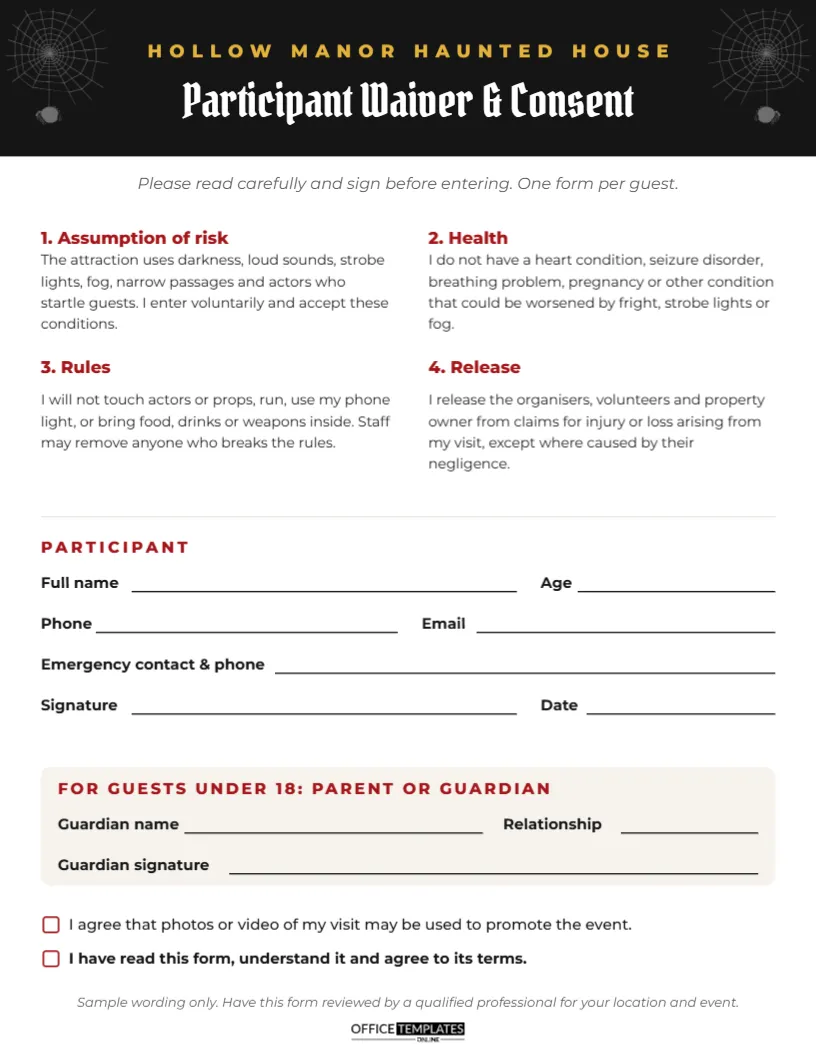
The form is US Letter size, 8.5 x 11 inches. A black header carries the attraction name, Hollow Manor Haunted House, in gold capitals and the title Participant Waiver & Consent in Pirata One, a gothic Google font. Grey spider webs fill the top corners. Under the header, an italic line asks guests to read carefully and sign before entering, one form per guest.
Four numbered sections sit in two columns, each with a red heading:
- 1. Assumption of risk: describes darkness, loud sounds, strobe lights, fog, narrow passages, and actors who startle guests.
- 2. Health: asks guests to confirm they do not have a condition that could be made worse by fright, strobes, or fog.
- 3. Rules: no touching actors or props, no running, no phone lights, and no food, drinks, or weapons inside.
- 4. Release: a sample release of the organisers, volunteers, and property owner.
Below a thin divider, the PARTICIPANT section collects full name, age, phone, email, an emergency contact and phone, signature, and date. A shaded box for guests under 18 collects the guardian’s name, relationship, and signature. Two checkboxes at the bottom cover photo and video consent and confirmation that the form has been read.
Adapting the Terms to Your Attraction
Every paragraph is editable. Tailor the wording to what guests will actually experience. If your haunt includes any of the following, mention it clearly in section 1 or 2:
| Feature | Why to mention it |
|---|---|
| Strobe or flashing lights | Can affect guests with photosensitive epilepsy |
| Fog or haze machines | Can affect guests with asthma or breathing problems |
| Uneven floors, stairs or ramps | Trip and fall risk in the dark |
| Tight spaces or crawl tunnels | Not suitable for claustrophobic guests |
| Actors who follow or chase guests | Startle risk and a reason guests may run |
| Outdoor trail sections | Weather, mud, and tree roots |
Collecting Forms Without Long Queues
Paper waivers can slow a busy entrance. A few practical habits help:
- Let guests download and sign the form in advance, and bring it with their ticket.
- Set up a waiver table before the ticket desk with clipboards and pens.
- Have a volunteer check that every guest under 18 has a guardian signature.
- Store signed forms in a box or folder for each night and keep them for the period your adviser recommends.
Rules That Keep Guests and Actors Safe
The rules section protects actors as much as guests. Actors should never touch guests, and guests should never touch actors. Make sure the rules on the form match the rules you announce at the door and post on signs inside. Common additions include no alcohol, no smoking, keeping hands at your sides, staying with your group, and using a safe word or raising a hand to be escorted out. A chicken exit with a staff member is a thoughtful option for guests who change their minds partway through.
Photo and Video Consent
Many haunts photograph guests’ reactions at the scariest moment, then share the photos on social media or sell them as souvenirs. The first checkbox on the form asks for permission. Keep this as a separate, optional choice rather than a condition of entry, and respect guests who leave it unticked. For school and church events, photos of children usually need specific parental consent, which the guardian block covers.
Header, Webs and Readable Type
The black header, red section headings and grey webs give the form an official look with a Halloween edge. Change the attraction name in the header, or recolour the header to match your event branding. The spider webs are editable vector graphics you can recolour or remove for a plainer form. Fonts are Pirata One for the title and Montserrat for the body text, both Google Fonts. Keep body text at a readable size; legal terms that are too small to read do nobody any favours.
Storing Completed Forms
Signed waivers contain personal information, so store them securely and only for as long as needed. A locked box during the event and a locked cabinet afterwards is usually enough for a small haunt. If you scan forms into a computer, keep the files in a password-protected folder. Ask your adviser how long to keep them.
Printing the Waiver
Download the PDF and print on plain white letter paper. Black-and-white printing works perfectly and keeps costs low for large numbers. Print plenty of spares, as guests often spoil a form or arrive with extra friends. For pre-event sharing, send the PDF by email with the booking confirmation.
Waiver Form Questions
Is this form legally binding?
It is sample wording only. Whether a waiver is enforceable depends on local law, so have it reviewed before use.
Do children need their own form?
Yes. Each guest under 18 needs a form signed by a parent or legal guardian.
Can I add a medical question section?
Yes, but collect only what you need, and keep that information private and secure.
Can I use the form for other events?
The layout suits escape rooms, corn mazes, and hayrides with updated risks and rules.
Update the attraction name and terms, have your wording checked, and print a stack for the waiver table. Then the only thing guests need to worry about is what is waiting in the dark.