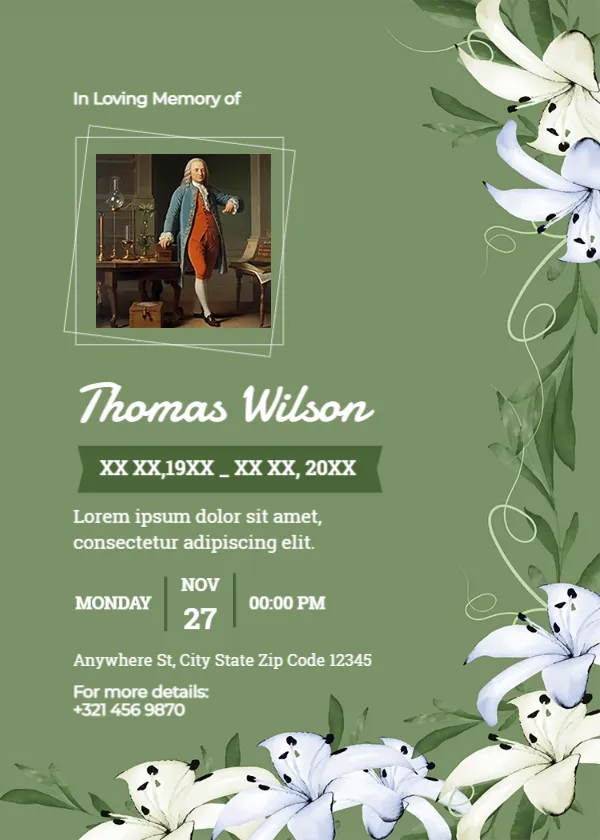
White Lilies and a Tilted Photo Frame on Sage Green
A sage green card carries white lilies with dark green leaves and curling vines along the right side and bottom. In Loving Memory of sits at the top left in small white type, above a photo in a double tilted frame of thin white lines. The name, Thomas Wilson in the sample, runs in a large white script, with the dates on a darker green banner, a placeholder line, a service row and an address and contact number.
Text on the Left, Flowers on the Right
The card is 5 x 7 inches. The text sits in a left column while the lilies fill the right edge, which gives the card a calm, balanced look.
A Space for a Personal Story
The page name mentions a personalized story, and the line under the dates is a placeholder for one. Replace the Lorem ipsum with two short lines about the person, such as A devoted teacher who loved his garden. Set the service row, which shows Monday, Nov 27 at 00:00 PM, and the address and phone.
Preparing the Lily Funeral Card
- Add the photo.
- Type the name and dates.
- Write a two line story.
- Set service details.
- Add the contact number.
Writing a Two Line Life Story
Pick the one or two things people will remember most, such as a career, a passion or a role in the family. Short, warm sentences work better than long lists.
Lilies as a Funeral Flower
White lilies are a traditional funeral flower, often linked with peace and the restored innocence of the soul. They suit both religious and secular services.
Replacing the Painting With a Real Photo
The tilted frame suits a full body or seated photo. The sample uses an old painting, so replace it with a real photo of the person.
Printing the Sage Green Lily Card
Sage green prints softly on matte card. Check that the white text stays crisp against the green.
A Contact Number for Mourners
The For more details line lets guests call about directions or flowers. Use a family member’s or funeral director’s number.
Keepsake Value
A personal story turns the card into something mourners keep.
Using the Lily Funeral Card
Send it once the service is confirmed.
Step by Step Editing of the Personalized Story Green Lilies Design
- On the personalized story green lilies design, click the main headline and type your own words, keeping a similar length.
- Retype every name, date and contact line on the personalized story green lilies design, checking each against a trusted source.
- Search the personalized story green lilies design for the words Lorem and Company so that no placeholder remains.
- Click any logo or photo on the personalized story green lilies design, choose Replace Image and resize the new picture to fit.
- Zoom the personalized story green lilies design to full size and read each line aloud before you save it.
- Keep a clean master of the personalized story green lilies design without private details, so later versions start tidy.
Similar designs include the celebration of life card. Compare it with the simple funeral card. You may also like the teal service details funeral card. Every personalized story green lilies style alternative sits in condolence templates.