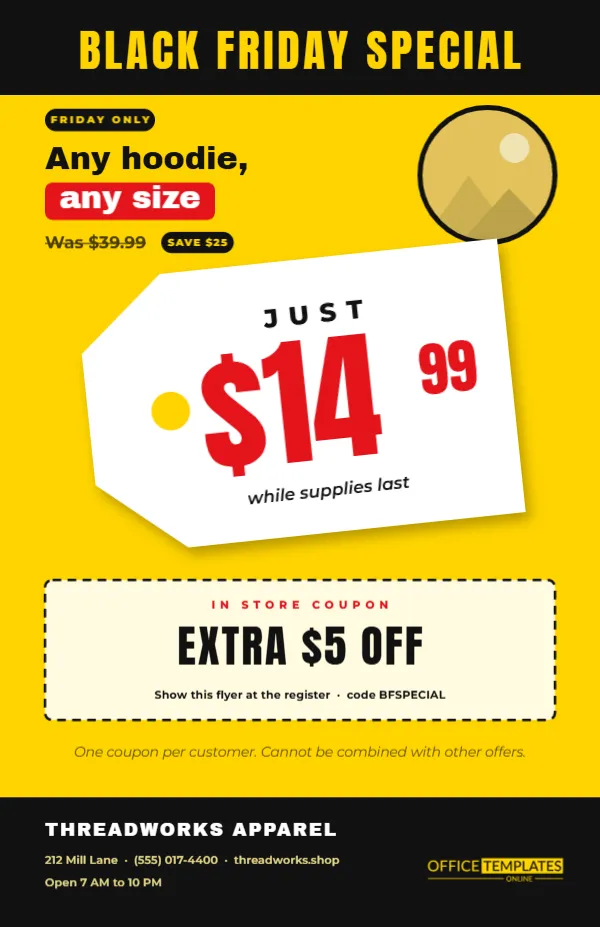
Sometimes one great price sells better than a list of twenty. A shop with a single standout deal, like hoodies for $14.99, can build a whole flyer around it. This half-letter design does exactly that. A big white swing tag, tilted as if it had just been clipped to a garment, carries the price in huge red numerals. The rest of the page supports it with a product photo, an in-store coupon, and the shop details.
One Hero Price on a Swing Tag
The swing tag is the design’s centre. It has a cut corner shape, a punched hole on the left, and a soft shadow that lifts it off the page. Inside, the word JUST sits above $14 in large Anton, with the 99 cents raised beside it, and a small italic note says while supplies last. Customers recognise the shape instantly, because they see price tags every day.
Sunshine Yellow for Instant Attention
Yellow and black are the most visible colour combination there is, which is why it is used for warning signs. Here it makes the flyer jump out of a bag stuffer or a counter display. The black header bar reads BLACK FRIDAY SPECIAL in yellow capitals, and the footer repeats the black so the page feels framed.
The Product Photo and Offer Line
Above the tag, a short block reads FRIDAY ONLY and then Any hoodie, any size in a heavy font, with the old price, $39.99, struck through. To the right, a circular photo slot with a thick black ring shows the product. Replace it with a photo of the item in your shop, ideally on a plain background.
The Dashed In-Store Coupon
| Part of the coupon | Sample text |
|---|---|
| Label | IN STORE COUPON |
| Offer | EXTRA $5 OFF |
| How to redeem | Show this flyer at the register |
| Code | BFSPECIAL |
| Terms | One coupon per customer; cannot be combined with other offers |
The coupon sits inside a dashed border, so it looks like something to cut out or show. Change the amount and code to match your till system.
Why Half Letter Works for This Flyer
At 5.5 by 8.5 inches, the flyer is exactly half a US Letter sheet. You can print two on one page and cut them, which halves your paper costs. The smaller size is also perfect for handing out at the door, slipping into shopping bags, or leaving in a stack by the till.
Choosing the Right Hero Product
Pick something with broad appeal and a price that sounds almost too good: hoodies, phone chargers, scarves, mugs, kids’ toys. It should be a product you can stock in quantity, because a hero price that sells out in an hour can disappoint. If stock is limited, say so on the tag.
Editing the Price Tag Flyer
- Change the product line and the old price.
- Retype the price on the tag, keeping the cents small.
- Replace the circular photo with your product.
- Edit the coupon amount, code, and terms.
- Update the shop name, address, and hours in the footer.
Keeping the Tag Text Inside the Shape
The text on the tag is grouped and rotated with it. If you enter a longer price, such as $149.99, reduce the font size a little so the cents stay inside the tag. Check the right edge after every change, because a price that runs off the tag looks careless.
Printing Two Flyers Per Sheet
Download the PDF, then use your printer settings to print two pages per sheet on US Letter, or place two copies side by side in a design program. Cut along the middle. Yellow backgrounds use a fair amount of ink, so a test print first is a good idea.
Using the Flyer as a Counter Sign
Slip a copy into an acrylic sign holder next to the till or the product display. The tag shape reads well from a few steps away and reminds people of the offer at the moment they are deciding. Pair it with a stack of loose copies people can take home.
Turning the Price Tag Into a Social Post
Export the flyer as an image and crop it around the tag for a bold social post. The tilted tag and yellow background look striking in a feed, and the coupon code gives followers a reason to visit in person.
Writing a Clear Product Line Above the Tag
The product line, Any hoodie, any size, is short and specific. Keep yours just as simple. Name the product and the condition that matters most, such as any colour or all styles. A long description crowds the space between the header and the tag, and it competes with the price for attention.
Matching the Flyer to Real Price Tags in the Store
Print a few copies of the swing tag on card, cut them out, and hang them on the actual products. When customers see the same tag they saw on the flyer, they find the deal faster and trust that the price is real. It is a small detail that makes a big difference on a busy day.
Planning Stock Around a Single Hero Price
A one-product flyer concentrates demand. Make sure you have enough stock, and decide in advance what happens if it runs out, such as a rain check or a substitute product. Write that rule on the flyer if you can, so staff and customers know what to expect.
Using the Price Tag Flyer for Several Weeks
Some shops run a weekly hero price through November. Keep the same yellow layout and change only the product, the price, and the photo each week. Customers start to recognise the tag and look for the next one, which turns a single flyer into a small series with very little extra work.
Hero Price Tag Flyer Questions
Can I show two prices on the tag?
It is designed for one. For several products, use the doorbuster or grocery flyers instead.
Can I remove the coupon?
Yes. Delete the dashed box and its text, then move the footer note up.
Will the price tag print on its own?
It prints as part of the flyer. You can also copy the tag into a new page to make standalone tags.