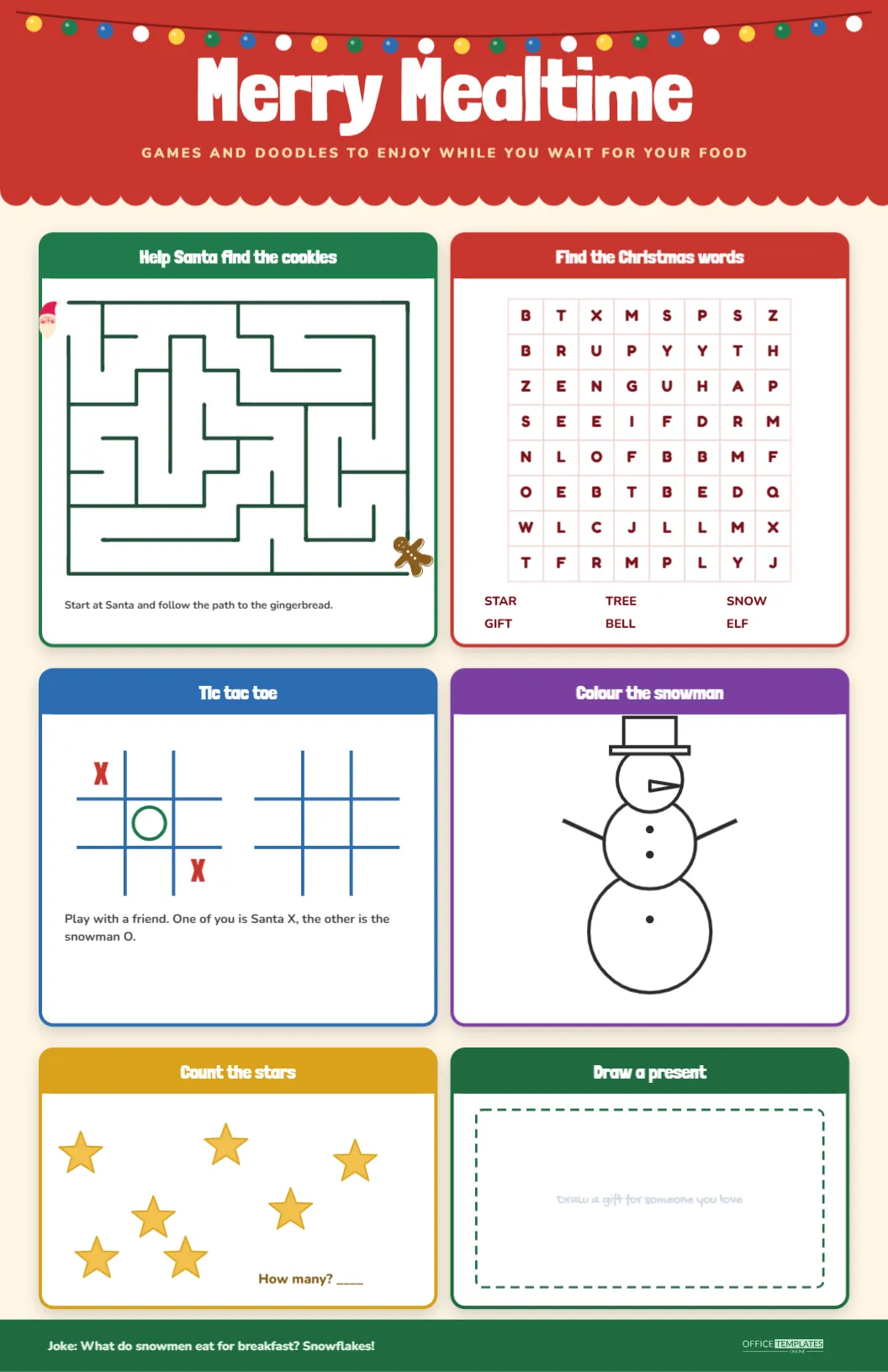
A restaurant, a church hall or a family kitchen on Christmas Eve has the same problem: children are hungry, the food is not ready and boredom is growing. This tabloid sized placemat gives them six small games to play while they wait, all on one sheet that fits neatly under a plate. A red scalloped banner at the top says Merry Mealtime, and a green footer carries a joke.
Six Activities, One Sheet
| Panel | Colour | Activity | Takes about |
|---|---|---|---|
| Help Santa find the cookies | Green | A ten by eight maze from Santa to a gingerbread man | 3 minutes |
| Find the Christmas words | Red | An eight by eight word search with six words | 5 minutes |
| Tic tac toe | Blue | Two boards, one with a game already started | 2 minutes a game |
| Colour the snowman | Purple | A large outline snowman with a top hat | 5 to 10 minutes |
| Count the stars | Gold | Seven stars scattered on a white card | 1 minute |
| Draw a present | Dark green | A dashed frame for a gift for someone you love | 5 minutes |
The Banner and the Layout
The sheet is eleven inches wide and seventeen tall, often called tabloid or ledger size. A tomato red banner runs across the top with a scalloped lower edge, a string of coloured bulbs in gold, green, blue and white and the words Merry Mealtime in giant white letters. A line of gold capitals beneath says games and doodles to enjoy while you wait for your food. Below it, six cards in two columns and three rows hold the games. Each card has a white face, a bold coloured outline and a coloured title bar.
Walking Through the Six Cards
The maze has ten columns and eight rows with rounded dark green walls. A tiny Santa face stands at the entrance on the left and a gingerbread man waits at the exit on the right, with the instruction to start at Santa and follow the path to the gingerbread. Because it is generated, the maze always has exactly one route.
The word search is a real Table with eight columns and eight rows of dark red letters on pale pink lines. Six words, STAR, TREE, SNOW, GIFT, BELL and ELF, are listed under the grid and read across or down.
The tic tac toe card shows two blue boards, one with an X, an O and another X already placed to show how the game works. The text invites a friend to play, with one player as Santa X and the other as the snowman O.
Where It Is Handy
- Family restaurants: print on 11 by 17 inch paper and slide under each child’s plate.
- Church halls and community suppers: fill a table with placemats before the meal.
- School Christmas lunches: use the games as a quiet activity between courses.
- Home dinners: set the placemats at the children’s table so that the kitchen stays calm.
- Waiting rooms and clinics: print on smaller paper for a handout.
The Joke at the Bottom
A dark green strip across the foot of the page carries a short joke: What do snowmen eat for breakfast? Snowflakes! The OTO logo sits on the right of the strip in a light green tint. For a restaurant, you may change the joke to a new one each week, or replace the text with your own greeting and opening hours. A line of text in the strip is all it takes to personalise the sheet.
Making the Sheet Your Own
Every card is editable. Double click the word search table to open Manage Data and type a new grid, or change the six words and the list beneath it. The maze is a group of walls, and you can replace it with a different maze from the same set. The star count uses seven star shapes, so add or delete some and change the answer you keep. The text in the card titles, the instructions and the joke can all be typed over. For an organisation, add a small logo above the footer, or change the banner colour to match.
Printing a Tabloid Placemat
- Choose tabloid, ledger or 11 by 17 inch paper in the print dialogue.
- Turn off scaling so that the sheet prints at its full size.
- Use a heavier paper, around 120 gsm, so that the mat survives a spilled drink.
- If your office printer cannot handle the large size, send the file to a copy shop.
- For repeated use, laminate the placemat, and let children draw with dry erase markers.
Keeping Children Busy Without Screens
Parents often reach for a phone at a restaurant table. A placemat of paper games offers a different kind of attention. Children colour, solve and play together, and parents can join in. The six activities cover different skills: the maze for planning, the word search for reading, tic tac toe for strategy, colouring for calm, counting for numbers and drawing for imagination. When the food arrives, the placemat becomes a table cover and the mess stays on the paper.
Writing Your Own Version for a Business or a Club
A placemat is a friendly bit of marketing. A restaurant might add a short note under the joke with opening hours for the holidays, or a thank you to families. A club or charity could use the banner for a message about an event. Because the sheet is editable, you can change the joke each week and keep children coming back to see what is new. For a community supper, change the title to match the event and add the date. Keep the extra text short, so the games remain the focus of the mat.
Choosing Paper for Spills
A placemat meets milk, juice and gravy. For one night, ordinary paper is fine, but for an event or a busy week choose a coated stock or laminate each sheet. A laminated mat can be wiped clean and reused, and children can draw on it with dry erase markers, which also removes the need for crayons on the table. If laminating is not possible, print on a heavier paper and expect to replace it after a meal. A sheet of paper is cheap, and the smile on a waiting child’s face is worth the cost.
Placemat Questions
Can the placemat be printed on A3?
Yes. A3 is a little wider and a little shorter than tabloid, so choose Fit to page and the layout will adjust slightly.
Where are the word search answers?
The words are placed across or down, and you can check them in the editor by selecting the table and reading the grid.
How many stars are in the counting card?
There are seven, drawn in gold with a darker outline.
Can I print a version with the games only?
Yes. Delete the banner in the editor and enlarge the cards to fill the page.