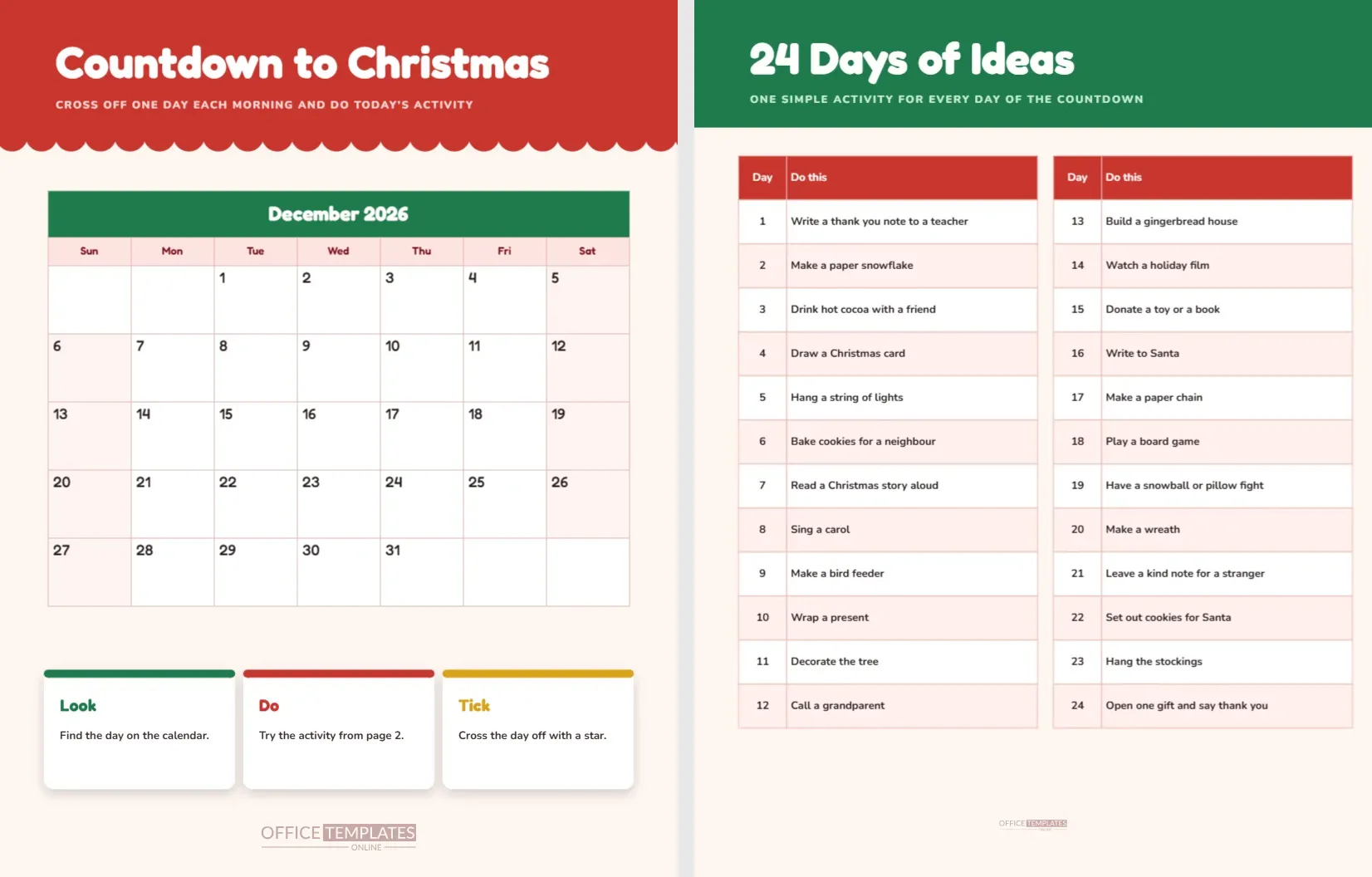
Every child knows the feeling of waiting for Christmas. A countdown calendar turns the waiting into something to do. This printable gives you a bright December 2026 month grid with big squares to cross off, three simple cards that explain the routine and a second page of twenty four small ideas, one for each day. It is built with the editor’s own Calendar object, so you can change the month or the year yourself.
A Real Calendar Object, Not a Drawing
The month grid on page one is not made of loose lines and text. It is the editor’s Calendar element, the same one used for planners and wall calendars. Click it and open Calendar Options to switch the month, the year, the first day of the week, the style, the font and the colours. The grid rebuilds itself from those settings. For this printable, the settings are December 2026 with Sunday as the first day, large cells and a green title bar.
December 2026 at a Glance
| Fact | Detail for 2026 |
|---|---|
| First of December | Falls on a Tuesday |
| Weeks shown | Five rows from the first Sunday column to the thirty first |
| Christmas Eve | Thursday the 24th |
| Christmas Day | Friday the 25th |
| Last day of the month | Thursday the 31st |
Red Scallops and a Green Calendar Bar
A tomato red band runs across the top with a scalloped lower edge, like the icing on a cake. The title Countdown to Christmas stands in white, with a short line telling the child to cross off one day each morning and do today’s activity. The calendar sits in the middle in a white and pink palette: a green month bar, a pale pink day name row and white day squares with the numbers in the top left corner. Weekend days have a very light pink tint. Beneath it, three white cards in green, red and gold show Look, Do and Tick.
The Look, Do, Tick Routine
- Look: find today’s date on the calendar and say it aloud.
- Do: choose the idea for the day from page two and try it.
- Tick: cross the date off with a star, a sticker or a coloured pen.
- Repeat every morning until Christmas Eve.
The routine takes a minute and gives each day a small celebration. Children who struggle to wait enjoy having a task to finish before the day starts.
Page Two, Twenty Four Days of Ideas
The second page has a green band with the title 24 Days of Ideas. Two tables list the days from one to twenty four, split into two columns of twelve rows. Each row has the day number and a simple activity. Ideas include writing a thank you note to a teacher on day one, making a paper snowflake on day two, drinking hot cocoa with a friend on day three and hanging the stockings on day twenty three. Day twenty four suggests opening one gift and saying thank you.
Why the Ideas Are Small
A countdown only works if every day is doable. A child will lose heart after a hard Tuesday if the day’s idea needs an hour of preparation. The ideas here take ten to thirty minutes and mostly use things already in the house: paper, pens, a kettle for cocoa and a little time. A few are acts of kindness, such as donating a toy or leaving a note for a stranger, which turn the countdown into a month of generosity as well as fun.
Customising the Calendar
To reuse the sheet next year, select the calendar, open Calendar Options and change the year to 2027. The grid will rebuild with the new weekdays, and the first of December will land on the correct day. You can also switch the week start to Monday, change the colours to a favourite palette or increase the font size for younger children. The three cards and the title text are normal text boxes, so you can edit them freely. In the ideas tables, double click and use Manage Data to change any day’s activity.
Putting It on the Wall
Pin the calendar low enough that a child can reach it and tick the day. A fridge door or a bedroom wall works well. Keep a pen on a string next to it, or use stickers, which are easier for small hands. For classroom use, print the calendar as a poster on large paper and let a different child cross off the day each morning. A class countdown builds anticipation and offers a quiet moment of routine in a busy December.
Other Ways to Run the Countdown
- Chore chart: add a small tick for a daily job and treat the countdown as a helper plan.
- Kindness calendar: write one act of kindness in each square instead of using the idea list.
- Gratitude calendar: write one thing you are thankful for each day.
- Sticker calendar: let each child choose a sticker for their favourite day.
Using the Calendar With Several Children
When two or more children share a calendar, the question of who crosses off the day can start an argument. Solve it with a rota: the youngest child crosses off the odd days and the eldest the even days, or the family can draw names from a hat each week. Another idea is to give each child a different coloured pen, so that every date shows who ticked it. Choosing the daily activity can also rotate, which gives each child a turn at being the planner for the day and teaches them to think about what the whole family might enjoy.
What to Do When a Day Gets Missed
Busy days happen, and no calendar survives a whole month without a gap. If a day is missed, do two activities the next morning, or choose the easiest idea and call it a catch up day. A missed square is not a failure, and the countdown remains useful even when it is a little messy. Many families find that the best days are the ones with the simplest ideas, such as drinking cocoa together or singing a carol in the car, so keep a few of those in reserve.
Countdown Calendar Questions
Does it work for other years?
Yes. Open Calendar Options and change the year, and the grid updates by itself.
Can I print it in black and white?
Yes. The green and pink areas become grey, and the numbers remain easy to read.
Can I write in the squares?
Yes, with a pen after printing. The squares are large enough for a short note or a sticker.
Why is the first of December a Tuesday?
That is simply how the 2026 calendar falls. For other years, use Calendar Options to update the grid.