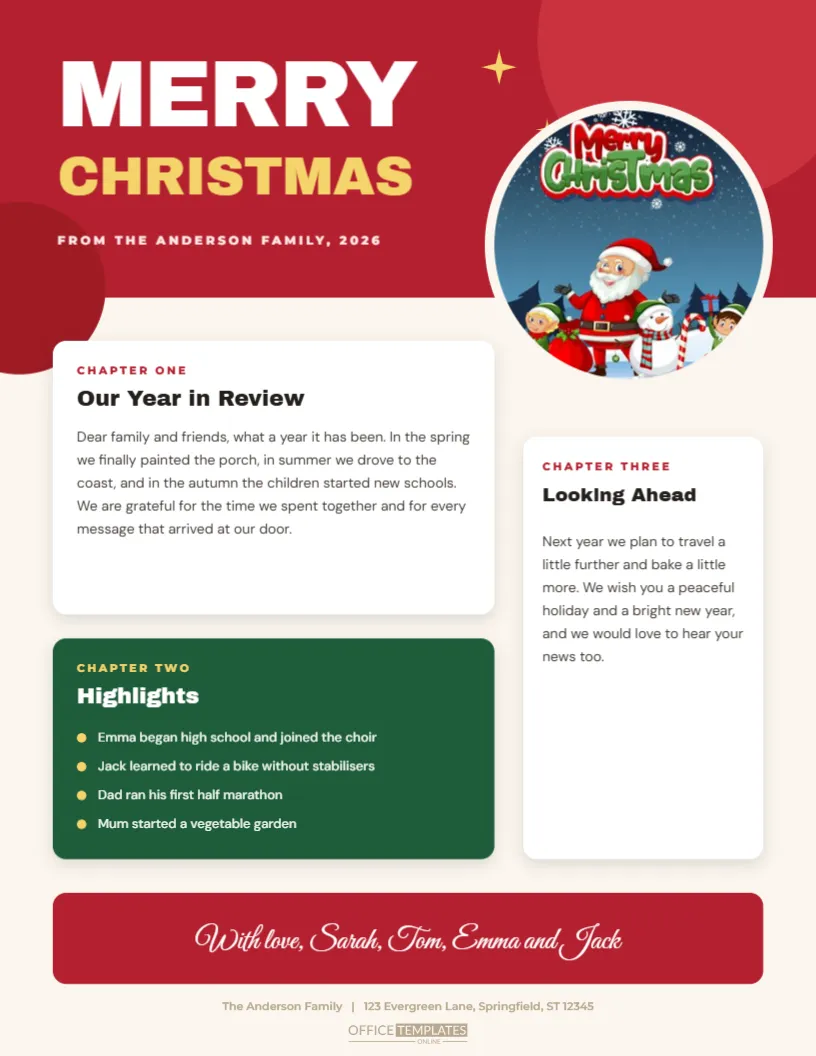
The annual family letter is an old tradition that email has not replaced, and this version gives it a bold, modern look. The top of the page is a full-width red block with MERRY in huge white capitals, CHRISTMAS in gold beneath it, and a small line: FROM THE ANDERSON FAMILY, 2026. A big round photo slot overlaps the edge of the block. Below, rounded cards carry the chapters, Our Year in Review, a green Highlights card and Looking Ahead, and a red ribbon at the foot holds a script signature.
How the Letter Is Organised Into Chapters
The layout is a single page in two columns. The left column holds the main story and a short list of highlights. The right column holds a large photograph, and under it the Looking Ahead note. The red block gives the page a bold start, and the signature in script closes it. The structure is designed so that about two hundred and fifty words of your own writing fit comfortably without crowding.
Swapping in the Family Photo
The photo area is a slot filled with a placeholder image. Click it and choose Replace Image, and the picture you choose will fill the frame without changing its size. Choose a portrait or square photograph with a clear subject, such as the whole family at the tree. The slot is about three inches wide and three inches tall, so crop the picture to a similar shape before uploading for the best result.
| Section | Purpose | Suggested length |
|---|---|---|
| Our Year in Review | The main story of the year | 60 to 90 words |
| Highlights | Four short bullet points | Under 10 words each |
| Looking Ahead | Plans and good wishes | 40 to 60 words |
| Signature | Names in script | One line |
Writing a Letter People Enjoy
- Open with a warm sentence, not an apology for being late.
- Mention each family member at least once.
- Choose two or three stories and tell them with a detail or a joke.
- Be modest about achievements and generous with thanks.
- End with a wish for the reader, and an invitation to get in touch.
The Highlights List
A short bullet list is the easiest part of a family letter to read. Choose four items that give a quick picture of the year: a birthday, a trip, a new school or a new pet. Keep each to a single line. If you have more news, add a line or two, but remember that the list is meant to be scanned. Replace the red bullets with another colour if you wish.
Looking Ahead
The last section is a place for wishes. Mention a hope for the new year, such as a holiday or a new project, and end with a kind line for the reader. Do not make the closing too long. A friendly final sentence and the family signature are all you need. The signature is a text box, so you can type any names.
Printing and Posting the Letter
Print on cream or white card stock of about twenty-eight-pound weight, which looks smart and slips easily into a card. If you are sending many copies, print them in a batch at a copy shop. Use a laser printer for sharp text. Fold the letter in three to fit a standard envelope, or send it flat in a larger one. A hand-signed note on the back adds a personal touch.
Questions About the Family Letter
Can I use two photos?
Yes. Duplicate the photo slot and move it to the empty area, then resize both.
Which fonts are used?
On the family Christmas letter newsletter page, Archivo Black sets the titles and card headings, DM Sans sets the body text and tables, and Montserrat sets the small labels.
Can I change the border colour?
Yes. Select the two blocks and choose new colours.
Can I email it?
Yes. Export it as a PDF or an image and send it as an attachment.
Making a Series for Different Branches of the Family
Many families write a slightly different letter for each side. Duplicate the page, edit the text, and change the photo for each version. Save them with clear names, and you can print the right one for each envelope. It takes a short while and makes each relative feel that the letter was written just for them.
Keeping the Letters as a Family Archive
Save a copy of every year’s letter in one folder. After a decade, you will have a record of the family’s life. Print the set and bind it as a small book for a milestone birthday. A collection of annual letters becomes a treasure, and the template makes each one match the last.
Pairing the Letter With Other Printables
The Christmas cards, the gift tags and the envelope seals in this collection share a warm style. A letter on this page, a card in a matching envelope and a tag on the parcel make a tidy Christmas package for a distant friend. Keep a small stack of spare letters in a drawer for any last-minute reply.
Choosing the Right Photograph
A family letter lives or dies by its picture. Choose a photograph in which everyone can be seen, and which shows personality, such as a family in matching jumpers or a dog in a Santa hat. Avoid cluttered backgrounds. Crop the image to a square or a slightly tall rectangle before you upload it, so that faces sit comfortably in the frame and no one is cut off at the edge.
Sending the Letter by Post or by Email
For mailing, print on cream card stock and fold in three. For email, export a PDF and name the file with the year and the family name, so recipients can find it later. Write a short personal line in the body of the message, because a letter attached to a blank email can look like spam. Offer to post a paper copy to anyone who prefers one. Print a spare copy for the family album, since the red block and the round portrait make it a keepsake.