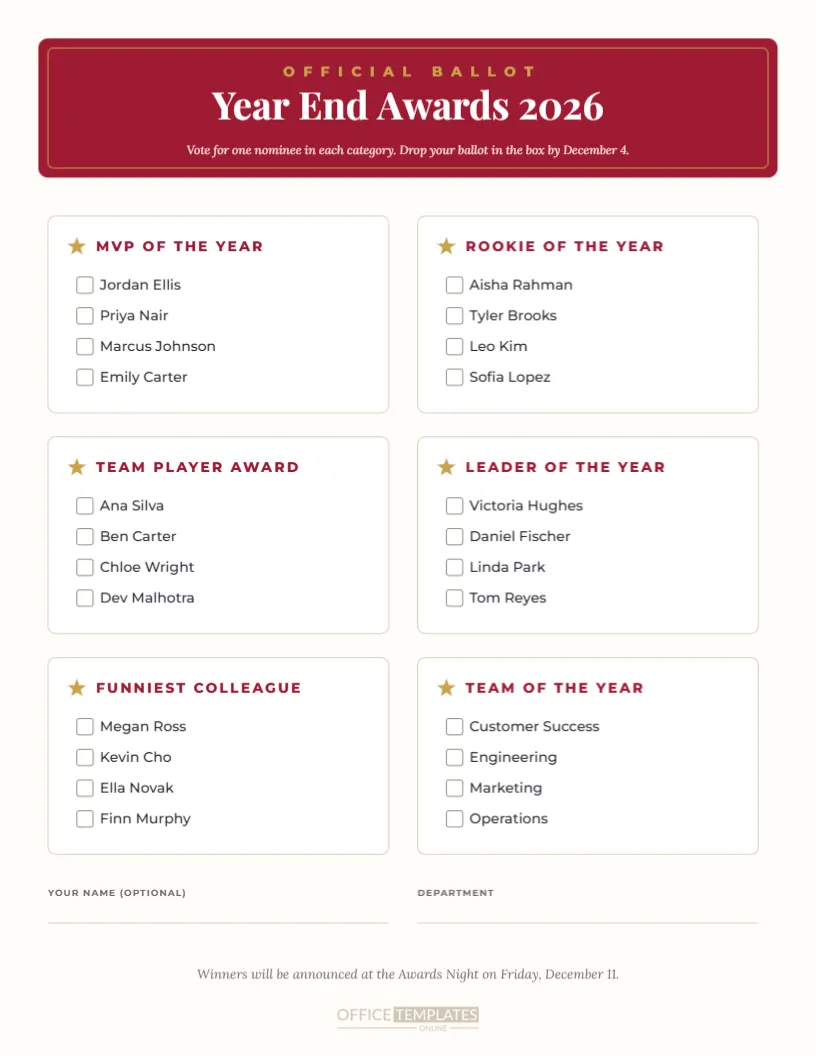
When staff choose the winners, awards feel more meaningful, and this year’s end-of-year awards voting ballot makes the process simple. The portrait US Letter ballot opens with a rich burgundy header panel with a gold inner frame, showing Official Ballot in spaced gold capitals, the title Year End Awards 2026 in white Playfair Display, and instructions to vote for one nominee per category. Below, six white category boxes are arranged in two columns, each with a gold star, the category name in burgundy capitals, and four nominees with checkboxes. Optional name and department fields and a note announcing when winners will be revealed complete the page.
Why Let Staff Vote for Awards
Voting involves everyone in the awards process and gives winners the knowledge that their peers chose them. It also generates excitement in the weeks before the ceremony as people discuss nominees. Combining a nomination stage with a final vote creates a fair, transparent process that people trust.
Six Award Categories
The ballot includes MVP of the Year, Rookie of the Year, Team Player Award, Leader of the Year, Funniest Colleague, and Team of the Year. Edit any category name to match your awards. The mix of serious and fun categories keeps voting engaging.
Editing Nominee Names
Each category lists four nominees. Replace the names with your shortlisted nominees. If a category has three or five nominees, delete a row or duplicate one, adjusting spacing so the box stays balanced.
Burgundy and Gold Ballot Design
The burgundy header with a gold frame gives the ballot an official, ceremonial feel, like a ballot for a prestigious awards show. The white category boxes keep voting clear. Change the header colour to match your brand or event theme.
Optional Voter Details
At the bottom, fields for the voter’s name and department are marked optional. Keep them if you want to prevent duplicate votes, or delete them for fully anonymous voting. Anonymous ballots often encourage more honest choices.
Running a Paper Ballot Vote
Print ballots and place them in a sealed ballot box at reception or in the break room. Set a clear deadline, shown in the header instructions. After voting closes, a small committee can count votes and keep results secret until the ceremony.
Using the Ballot for Online Voting
For remote teams, share the ballot as an image or PDF to show the categories and nominees, then collect votes using an online form with the same structure. The visual ballot helps people see all nominees at a glance before voting.
Ballots for School and Club Awards
Schools can use the ballot for student council elections, class superlatives, or prom court voting. Clubs can use it for member of the year or committee positions. Change the categories and nominees to suit your group.
Keeping Voting Fair
Ask voters to complete one ballot each and to vote for one nominee per category. If using paper ballots, number them or ask for names to prevent duplicates. Clear rules help everyone trust the results.
Announcing the Winners
The footer reminds voters that winners will be announced at the Awards Night. Update the date and event name. Keeping results secret until the ceremony adds excitement and gives every nominee a moment in the spotlight.
Printing the Voting Ballot
The ballot prints well on standard paper in colour or black and white. Print one per eligible voter plus extras. Using slightly heavier paper makes ballots easier to handle and fold.
Combining the Ballot With Nomination Forms
Use the nomination form in this collection to gather nominations first, then shortlist the top four in each category for the ballot. This two-step process balances open participation with a manageable final vote.
Funny Categories on the Ballot
Adding a light-hearted category like Funniest Colleague or Best Office Snack Sharer increases participation and keeps the mood fun. Use our funny office superlatives template for the winners’ awards.
Counting Votes Efficiently
Create a simple tally sheet with each category and nominee, and have two people count each ballot to avoid mistakes. Record the totals in a spreadsheet so you can double-check results before the ceremony.
Saving the Ballot Template
Save your ballot in your account and reuse it each year with new categories and nominees. A familiar ballot design helps staff recognise the awards process immediately.
Setting the Voting Timeline
A clear timeline keeps voting organised. Open nominations about six weeks before the ceremony, publish the shortlist and ballots three weeks before, close voting a week before, and use the final week to count votes, order trophies and prepare certificates. Share the timeline with staff at the start so everyone knows when to take part.
Ballot Boxes and Voting Stations
Decorate a simple box with the awards branding and place it somewhere visible, such as reception or the staff kitchen. A small table with printed ballots, pens, and a sign explaining the rules makes voting quick and encourages people to take part on their way past.
Sharing Shortlists Before Voting
Before ballots go out, share a short paragraph about each nominee so voters know why they were shortlisted. A shortlist poster or email with nominee highlights makes voting more informed and celebrates every nominee, not just the eventual winners.
Ballots for Customer Choice Awards
Businesses can also invite customers to vote for their favourite staff member or product. Change the header to Customer Choice Awards and place ballots at the counter, turning the awards into a fun customer engagement campaign.
Breaking Ties in the Vote
Decide in advance how to handle a tie. Options include a quick second round between the tied nominees, a deciding vote from the committee chair, or presenting a joint award. Agreeing the rule early prevents any awkward debate when the votes are counted.
Keeping Ballots After the Awards
Store counted ballots securely for a few weeks after the ceremony in case any questions arise, then shred them to protect voter privacy.
Ballot File Formats
Download a PDF for printing or an image for sharing on screens and in emails. The checkboxes and category boxes remain aligned in every format.