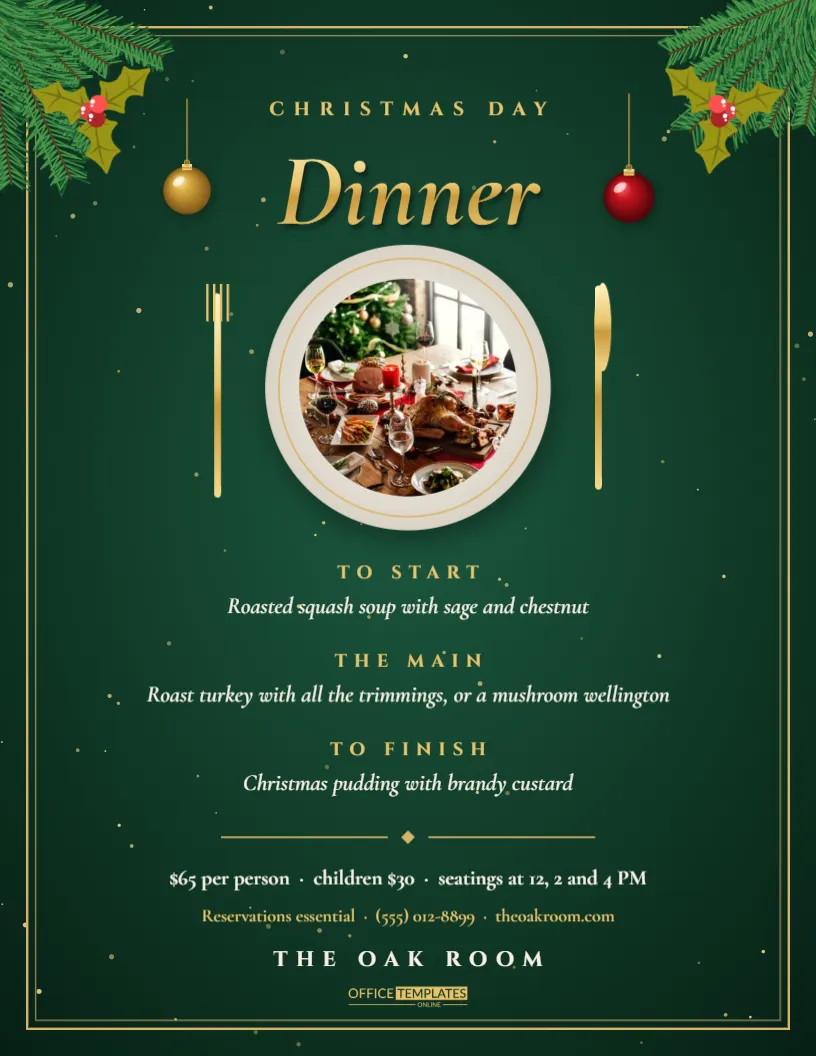
Restaurants, hotels and pubs that serve Christmas Day dinner need a flyer that feels special enough for a family tradition. This design uses a deep forest green glow inside a fine gold frame, with pine corners, gold baubles and holly. At the centre, a round photo slot sits on a plate with gold cutlery, so you can show your own roast. A gold title announces the day and a three-course menu with prices follows. It is ready to print for the window, the tables and the booking desk.
A Premium Look for a Christmas Day Dinner Menu
People pay more for Christmas Day, so the page must look worth it. The gold frame and dark green background feel like a printed menu in a good restaurant. The pine and holly corners add a seasonal note without making the page look childish.
Replacing the Round Food Photo on the Plate
The photo slot is a circle sitting inside a plate shape. Click it, choose Replace Image, and pick your own dish. A well-lit overhead shot of a roast turkey, a nut roast, or a dessert works best. If you do not have a photo yet, the placeholder holds the place without disturbing the layout.
Editing the Three Course Christmas Menu
| Course | Placeholder dish | Tip |
|---|---|---|
| Starter | Smoked salmon with horseradish cream | Offer a vegetarian option beside it |
| Main | Roast turkey with all the trimmings | Name the sides |
| Dessert | Christmas pudding with brandy sauce | Mention a lighter alternative |
Replace each line with your own dishes. Keep descriptions to a single short line so the menu stays elegant.
Setting the Price and Booking Details
State the price per adult, the price per child, and the booking deadline in one place. Add whether a deposit is required and how to pay it. People hate to hunt for these details, so make them easy to find under the menu.
Gold Frame and Pine Corner Details
The frame is a thin gold line that runs around the page edge. Pine branches reach into each corner with gold baubles and holly berries. Because they are separate objects, you can remove the corners if you add a long menu and need extra room.
Dietary and Allergy Information on a Dinner Flyer
A short note, such as Vegetarian, vegan and gluten-free dishes available on request, avoids awkward phone calls. If you can, label dishes with small letters, and ask guests to tell you about allergies when they book.
Times, Sittings and Table Sizes
Christmas Day often runs in two sittings. State the arrival times plainly, for example, 12 noon and 3 PM. If you also take large tables, say the maximum party size. A phone number and a website link give guests two ways to reserve.
Using the Flyer to Fill Last Minute Bookings
If tables remain in December, post the flyer in social channels with the words A few tables left. Update the date in the footer and add a promo line, such as a free glass of fizz for early bookers.
Take Away and Delivery Christmas Dinners
Many kitchens now offer Christmas dinner to go. Adapt the same layout by changing the title to Christmas Dinner Boxes, adding collection times and the order deadline. Keep the plate photo, since it communicates the meal even without a table.
Printing the Menu Flyer on Quality Paper
For a restaurant, choose a heavier stock. A matte finish keeps gold text from glaring. Ask your printer to trim the sheet cleanly so the gold frame looks even on all sides.
Matching Table Cards and Gift Vouchers to the Menu
Reuse the frame and title style on place cards and vouchers. The consistent look elevates the entire experience, from the first poster in the window to the table setting.
Photographing Your Christmas Dinner for the Photo Slot
Natural window light and a plain plate give the cleanest results. Shoot from directly above and wipe the rim of the plate. A bright, tidy photo helps the gold elements look luxurious instead of heavy.
Wording the Welcome Line Under the Title
A single warm sentence can set the mood: A feast to remember with the people you love. Keep it brief, and put the practical facts in the lines below.
Final Review Before Printing the Dinner Flyer
Check every price, the dates, the booking contact, and the dietary note. Read the menu aloud once to catch awkward wording. Print a test copy and hold it next to a real menu to see that the colours match your brand.
Choosing Menu Wording That Sounds Inviting
Descriptions sell dishes. Replace plain names with a few well-chosen words, such as slow-roasted, honey-glazed, honey glazed or buttery. Avoid long lists of ingredients, because the page works best when each dish gets one tidy line. Use the same tone for all three courses so the menu reads smoothly from start to finish.
Deposits, Cancellations and Policies Guests Should Know
Christmas Day tables are in high demand, so many venues take a deposit. State the amount, the date by which it is due, and the cancellation terms in a short footer line. Customers appreciate honesty and are more likely to book when the rules are visible.
Pairing Wines and Drinks With the Christmas Menu
A short drinks note adds value. Mention a welcome glass of fizz, a wine pairing, or a non alcoholic option for drivers. A single line under the dessert keeps the page tidy while giving guests a reason to choose your venue over another.
Adding a Kids Menu Without Crowding the Page
Families make up much of the Christmas Day crowd. Add a compact line below the main menu with a children’s price and two or three child-friendly choices, such as turkey slices, sausages, and ice cream. Keep the type smaller than the main menu so the layout stays balanced and the gold frame keeps breathing room.
Sample Timeline for a Christmas Day Service
Guests like to see how the meal unfolds. A simple order such as arrival drinks, starters, mains, dessert, and coffee reassures them that the kitchen is organised. You can add this as a single line under the menu without losing the elegant look of the frame.