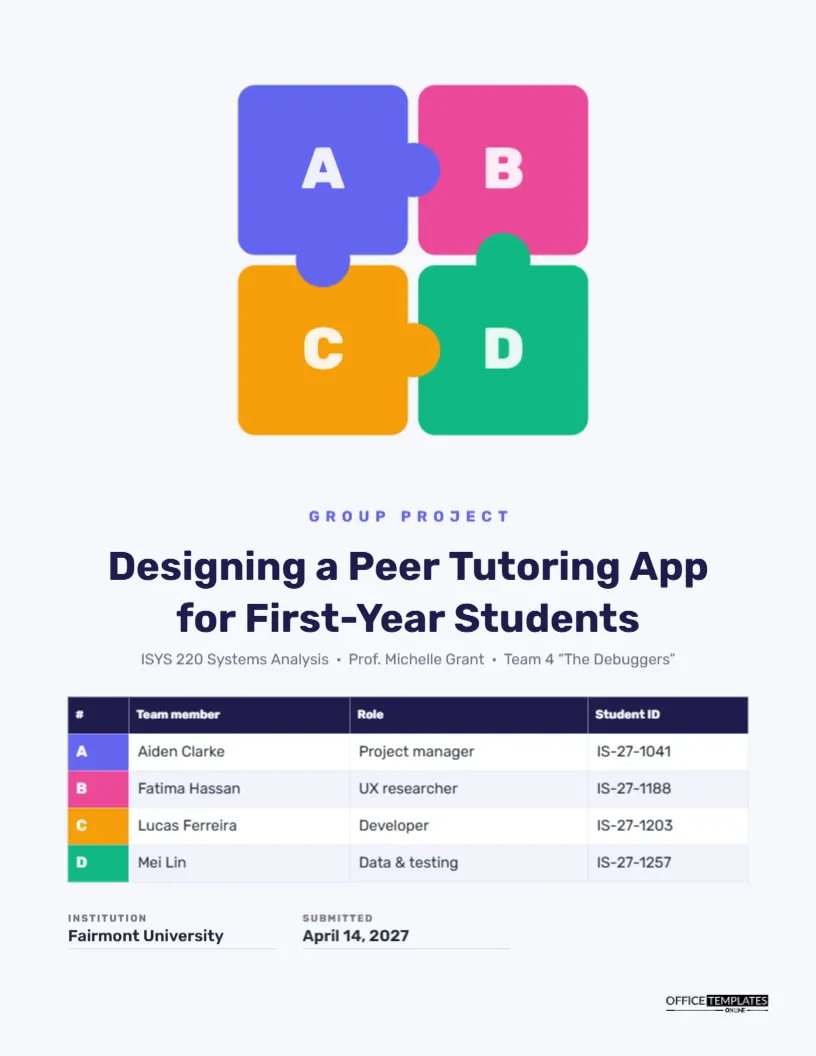
Group projects are a fact of student life, and they come with one recurring question: who did what? Instructors want to see every member’s name, and increasingly they want roles too, so they can grade fairly and spot teams where one person carried the load. This cover answers that question by design. Four interlocking puzzle pieces, each a different colour and letter, represent the team members, and a table underneath matches each letter to a name, a role, and a student ID. It makes teamwork visible from the very first page.
Four Pieces That Fit Together
The background is a soft, cool off-white. In the upper half, four rounded squares in indigo, pink, amber, and green sit in a two-by-two grid, with round knobs bridging the gaps between them like puzzle connectors. Each piece carries a large white letter: A, B, C, and D. Below the puzzle, an indigo label in spaced capitals reads Group Project; the title, Designing a Peer Tutoring App for First-Year Students, is centred in bold navy Rubik; and a grey line gives the course, professor, and team name: ISYS 220 Systems Analysis · Prof. Michelle Grant · Team 4 ‘The Debuggers’. The team table follows, then two small details and the logo.
The Team Table, Colour-Coded
The table has four columns: #, Team member, Role, and Student ID, and one row per member. The first cell of each row is filled with that member’s puzzle colour and letter, so the cover’s illustration and the table connect. The sample lists Aiden Clarke (Project manager), Fatima Hassan (UX researcher), Lucas Ferreira (Developer), and Mei Lin (Data & testing). Select the table and use Edit Table Data to type your team. For a five-person team, use Add Row and choose a fifth colour for the new letter cell.
Agreeing on Roles Early
Writing roles on the cover forces a useful conversation at the start of a project. Teams that assign clear roles tend to work better, and the cover then records the agreement. Typical roles include:
- Project manager or coordinator: schedules meetings, tracks deadlines, and submits the final work.
- Researcher: finds sources, runs interviews or surveys, and summarises findings.
- Writer or editor: drafts sections and keeps the voice consistent.
- Designer: creates visuals, slides, and diagrams.
- Analyst or developer: handles data, calculations, or code.
- Presenter: leads the final presentation, often shared.
Most people do more than one thing; list the main responsibility on the cover and describe contributions in more detail in a contribution statement if your instructor asks for one.
A Sample Contribution Statement
| Member | Main contribution | Share of work |
|---|---|---|
| A · Aiden Clarke | Project plan, meeting notes, final editing | 25% |
| B · Fatima Hassan | Student interviews, personas, usability tests | 25% |
| C · Lucas Ferreira | Prototype screens and clickable demo | 25% |
| D · Mei Lin | Survey analysis, requirements table, test plan | 25% |
Put a statement like this on the page after the cover. Instructors use it with peer evaluations to adjust individual marks. Be honest; uneven shares are fine if everyone agrees they reflect what happened. Draft it together in the last team meeting rather than having one person write it alone, and keep the wording factual: name tasks and deliverables, not effort or attitude.
Naming the Team
The course line includes a team name in quotes: Team 4 ‘The Debuggers’. Team names are optional, but they help instructors remember you, and they make the cover more personal. Keep them short and appropriate. If your course assigns team numbers only, write Team 4 and leave out the name.
Group Project Titles That Show the Outcome
Group projects often produce something: an app, a plan, a campaign, a policy proposal. Name it in the title. Designing a Peer Tutoring App for First-Year Students tells the reader what the team designed and for whom. Other examples: A Zero-Waste Plan for the Student Union Café, Rebranding the Campus Food Pantry for Greater Reach, A Feasibility Study for Bike-Share at Fairmont University.
Changing Colours and Letters
The puzzle is a group, so it stays aligned. Ungroup it to recolour pieces; you might use your team’s chosen colours or your school’s palette. The letters over the pieces are separate text boxes and can become initials, such as AC for Aiden Clarke, if you prefer. If you change a piece colour, change the matching letter cell in the table too, so the link between picture and table stays clear. For a three-person team, delete one piece and its letter, and reposition the rest.
Keeping a Group Project on Track
A cover cannot fix a team, but a few habits help. Set a shared document and a shared folder on day one. Agree on internal deadlines a few days before the real one. Hold short, regular check-ins rather than long, rare meetings. Keep a simple task list with names and dates. And finish the cover early: filling in the team table is a quick way to confirm everyone’s role and student ID before the deadline rush.
Courses Where This Cover Works
It suits business, information systems, engineering design, marketing, public health, education, and communication courses. For a lab group in a science course, change the roles to Data collection, Analysis, Write-up, and Figures. For a group presentation, use the cover as a title slide; the puzzle reads well on a screen.
Print and Submit Notes for Teamwork
The page is US Letter, 8.5 x 11 inches. The light background keeps ink use low, and the four colours print brightly on most printers. Download as a PDF for submission; usually one member submits on behalf of the team, so agree who will do it and that the file includes this cover with every name.
Group Cover FAQ
Should I put everyone’s email on the cover?
Not normally. Student IDs identify members; add emails to the contribution page if your instructor requests them.
What if a member leaves the course?
Remove them from the table and note the change in your contribution statement.
Can I use this for a two-person project?
Yes. Keep two pieces, delete two, and remove the extra table rows.