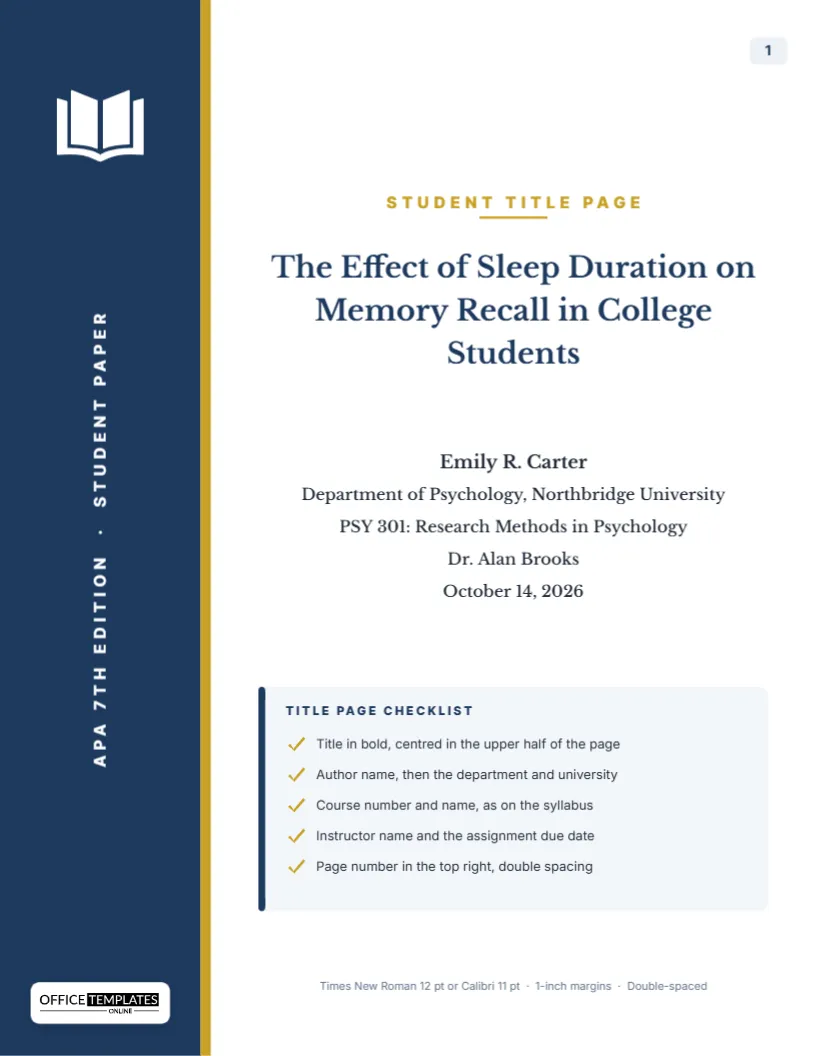
The APA 7th edition changed the student title page in ways that still trip people up. The running head is gone for student papers, the course number now has its own line, and the instructor’s name and due date are required. If your professor grades formatting, a wrong title page costs marks before anyone reads your introduction. This template puts every element in the order the Publication Manual asks for, centred in the upper half of the page, and adds a navy sidebar and a small checklist so the page looks finished, not bare.
The Seven Elements an APA Student Title Page Needs
APA 7 lists a fixed set of items for student papers. Each one sits on its own double-spaced line, and the order matters. The table below shows what goes where and what the template already contains as sample text.
| Element | Position on the page | Sample text in the template |
|---|---|---|
| Page number | Top right corner, starting with 1 | 1 |
| Paper title | Three or four lines down, bold, centred | The Effect of Sleep Duration on Memory Recall in College Students |
| Author name | One blank line below the title | Emily R. Carter |
| Affiliation | Department and university on one line | Department of Psychology, Northbridge University |
| Course | Course number and name from the syllabus | PSY 301: Research Methods in Psychology |
| Instructor | Name in the form the instructor prefers | Dr. Alan Brooks |
| Due date | Month, day, and year written out | October 14, 2026 |
How This Layout Keeps APA Rules and Still Looks Designed
APA does not forbid design, but it expects the text block to stay plain and readable. So the decoration lives outside the text. A deep navy sidebar runs down the left edge with an open-book icon at the top and the words APA 7th Edition · Student Paper set vertically. A thin gold stripe separates the sidebar from the white page. Everything your instructor actually checks sits in the white area, centred, in Libre Baskerville for the title and Inter for the smaller lines. If your instructor wants a strictly plain page, you can select the sidebar and delete it, and the remaining text block is still correctly placed.
Bold Title, Plain Everything Else
A common APA mistake is bolding or enlarging every line. Only the title is bold in APA 7. The author, affiliation, course, instructor, and date are regular weight, and none of them carry labels such as Name: or Course:. The template follows that rule. Keep the title in title case, capitalising major words, and avoid abbreviations in it. If your title runs past two lines, shorten it before you shrink the font; APA suggests a focused title of around 12 words or fewer.
Using the Built-In Checklist Card
Below the title block there is a light card headed Title Page Checklist with five gold-ticked lines: the title in bold and centred in the upper half, the author name followed by department and university, the course number and name as printed on the syllabus, the instructor and due date, and the page number at the top right with double spacing. A small note at the very bottom of the page repeats the basic settings: Times New Roman 12 pt or Calibri 11 pt, 1-inch margins, double-spaced. It is there for you, not for your reader. Use it as a last check before you submit, then delete the card if your professor prefers the page to contain only the required items. Select it, press Delete, and the rest of the page does not move.
Editing Your Details Online
Every line on the page is a separate text box, so you can click into any of them and type. Replace the sample title with yours, then work down the stack: your name, your department and university, the course, the instructor and the date. The font, size, and centring are already set, so the result stays consistent. The OTO logo sits at the bottom of the navy sidebar on a light plate; it identifies where the template came from and can be removed if your instructor asks for an unbranded cover.
Recolouring the Sidebar for Your University
Navy is a safe academic colour, but you may want your school colours. Click the sidebar rectangle and pick a new fill. The open-book icon is an editable vector, so its colour swatches appear when you select it, and you can match it to the new background. The gold stripe is a separate thin shape; change it to silver, maroon, or green to pair with the sidebar. Keep the contrast strong enough for the vertical text to stay readable.
Student Paper or Professional Paper?
This template is for student papers. A professional APA paper, the kind submitted to a journal, needs a running head, an author note, and sometimes several affiliations. If you are writing for publication, check the journal’s guidelines first. For coursework, graduate seminars and most undergraduate assignments, the student format here is what your instructor expects unless the syllabus says otherwise.
The Lines People Most Often Get Wrong
- Adding a running head. Student papers no longer need one in APA 7. Only the page number goes in the header.
- Using “Professor” when the instructor is “Dr.” Write the name the way your instructor signs emails or the syllabus.
- Numeric dates. Write October 14, 2026, not 10/14/26.
- Missing course number.Research Methods alone is not enough; include the code, such as PSY 301.
- Placing the block in the middle of the page. APA wants it in the upper half, which this layout already does.
Paper Size, Margins and Printing
The page is US Letter, 8.5 x 11 inches, the size APA assumes for papers in the United States. The text block keeps clear of a one-inch margin on all sides. Use Download As PDF for a clean file you can upload to Canvas, Blackboard, or Moodle, or print it straight from the PDF. On a home printer, choose Actual size rather than Fit to page so the margins stay accurate. The navy sidebar prints best on a laser printer; inkjets may band slightly on large dark areas, which does not affect the text.
Combining the Title Page with Your Paper
Most instructors want a single document. Download the title page as a PDF, then merge it in front of your paper, or insert it as the first page of your word processor file. Make sure your paper’s page numbering continues from 2 on the next page, since the title page already carries page 1.
Questions About APA Title Pages
Do I need an abstract after this page?
Student papers usually do not need an abstract unless the instructor requests one. If they do, it starts on page 2.
Can I use a different font?
APA 7 accepts several fonts, including Times New Roman 12, Calibri 11, Arial 11, Georgia 11, and Lucida Sans Unicode 10. Libre Baskerville is close in feel to Times; if your instructor insists on a specific font, choose a similar one from the font list.
Should the title be the same as on page 2?
Yes. APA repeats the paper title, in bold and centred, at the top of the first page of text.
Is the sidebar acceptable for a graded assignment?
Most instructors are happy with it because the required elements are untouched. When in doubt, ask, or delete the sidebar and checklist for a strictly plain version.