A Year in Pixels is one of the simplest trackers there is: one small square for every day of the year, coloured by how the day felt. After a few months, the page turns into a mosaic that shows your year at a glance. Here are eight reasons to try it in 2027, and how this printable makes each one easy.
1. It Takes Ten Seconds a Day
Most journals fail because they ask too much. This tracker asks for one decision: which colour was today? Before bed, find the square where the date row meets the month column, choose a colour from the key, and fill it in. That is all. Because it is so quick, people keep it going far longer than a written diary.
2. The Whole Year Fits on One Page
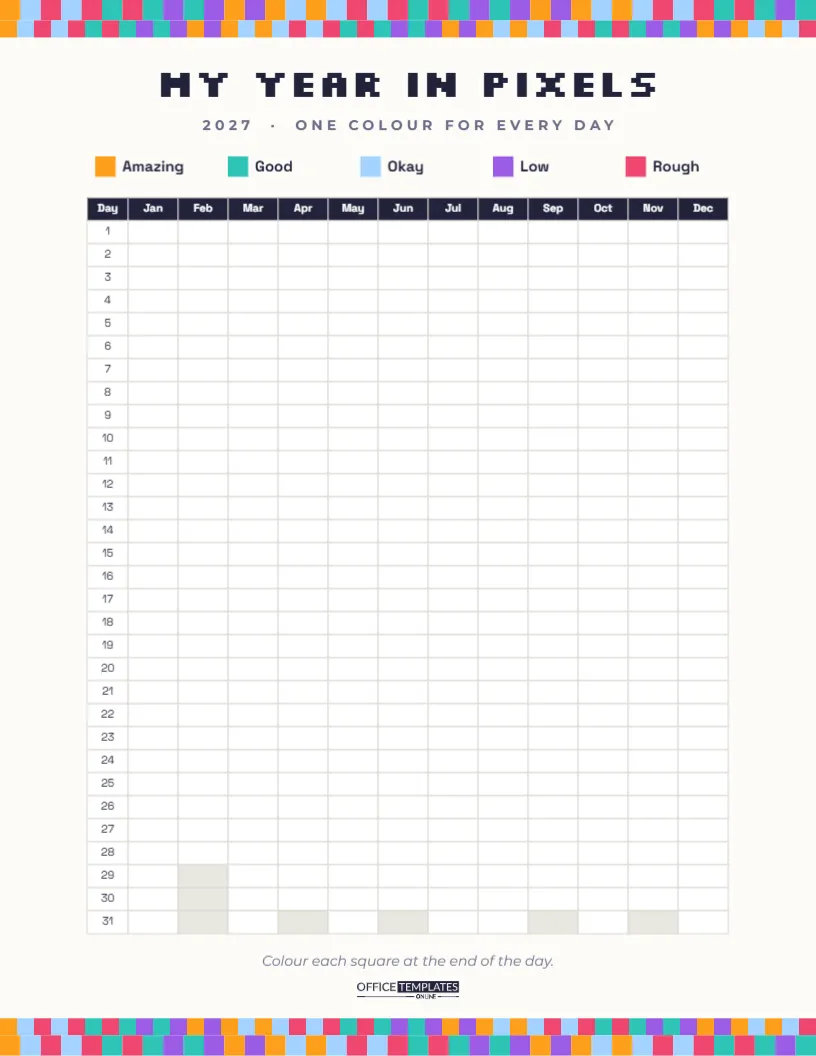
The page is US Letter portrait. Under the title, a grid made with the editor’s Table object runs down the page: a Day column numbered 1 to 31, then twelve columns from Jan to Dec, each square sized for a quick fill with a pen or pencil. Dates that do not exist, such as February 30 or April 31, are shaded grey so you never colour the wrong box. There are 365 squares to fill in 2027.
3. The Five-Colour Mood Key Is Ready to Use
Above the grid, a key shows five colours and labels: orange for Amazing, teal for Good, light blue for Okay, purple for Low, and pink-red for Rough. Use matching pens or pencils, or change the key to your own colour set. Some people prefer a simple three-colour scale; others track energy, sleep quality or anxiety instead of mood. Rename the labels to whatever you want to measure.
| Key colour | Default label | Example alternative |
|---|---|---|
| Orange | Amazing | Slept 8+ hours |
| Teal | Good | Slept 7 hours |
| Light blue | Okay | Slept 6 hours |
| Purple | Low | Slept 5 hours |
| Pink-red | Rough | Under 5 hours |
4. The Pixel Design Makes You Want to Fill It In
The page looks like a retro video game. Two rows of multicoloured pixel blocks run across the top edge, using the same five mood colours, and two more rows close the bottom edge, so the borders preview what your finished grid will look like. MY YEAR IN PIXELS is set in Silkscreen, a blocky pixel font, with 2027 · ONE COLOUR FOR EVERY DAY in small capitals below. The grid itself is clean and minimal in Space Grotesk, with a dark navy header row, so your colours are the stars of the page.
5. You Will Spot Patterns You Never Noticed
After a month or two, patterns appear. Maybe Mondays are always blue, the week before a deadline turns purple, or every weekend with friends glows orange. Seeing the pattern is the first step to changing it: more of what makes good days, less of what drags you down. Many people find the tracker more useful than they expected precisely because colours show trends that words hide.
6. It Works for Any Kind of Tracking
- Mood: the classic use, one feeling per day.
- Habits: colour the days you exercised, meditated or read.
- Health: track pain levels, migraines or energy for your doctor.
- Weather: a fun project for children, with sunny, cloudy and rainy colours.
- Productivity: rate each workday from great to unproductive.
Print one page per thing you want to track, and change the title and key on each.
7. It Becomes a Keepsake
A finished Year in Pixels is surprisingly beautiful. People frame them, photograph them for social media, or keep them in a journal as a record of the year. Looking back at a whole year of colour can be moving: you see the hard stretches, but also how many good days surrounded them. Write a few words on the back about the year’s big moments to remember why certain weeks look the way they do.
8. It Is Easy to Customise in the Editor
Every part of the page can be changed. Click the title to retype it (Sophie’s 2027 in Pixels), click a key label to rename it, and select a key square to change its colour. The grid is a Table object, so you can change its font, header colour, and border colour in the Table options. The pixel borders are grouped shapes, so recolour or delete them in one click. Fonts are Silkscreen and Space Grotesk, both Google Fonts.
Bonus Tips for a Year in Pixels That Lasts
Keep the page somewhere you see every night, such as your bedside table or inside a journal, with the pens beside it. If you miss a day, fill it in the next morning; do not leave gaps, because they break the habit. Use pencils or fine felt-tip pens rather than markers, which can bleed through thin paper. Print on 120 gsm paper or card if you plan to frame it.
If you track something sensitive, such as mental health, the tracker can be a helpful thing to bring to an appointment with a doctor or counsellor. It is not a diagnosis, but it gives a clear picture of how things have been over weeks and months.
Printing Your Pixel Tracker
Download the PDF and print at 100% on letter paper. It also scales to A4. The coloured borders print well on any home printer. For a journal, reduce the print scale to 90%, and the page fits comfortably on a notebook spread. Many people print two copies: one to fill in and one spare in case of a mistake in the first week.
Pairing the Pixel Grid with a Few Words
Colour alone tells you how a day felt, but not why. Many people keep a tiny notebook beside the tracker and write one line for each day, or just for the very good and very bad ones: Lunch with Mia, Bad news at work, First swim of summer. When you look back at a purple week in March, that line explains it. The two together, a colour and a sentence, make a far richer record than either on its own, and still take less than a minute a day.
One square a day, 365 days. Start on January 1 and watch your year take shape in colour.