A Reliable Starting Point for Creating a Clear Certificate of Incumbency
When you need a straightforward document to identify a current company officer or representative, a standard format can make the process much easier. This Standard Certificate of Incumbency Template provides a clean, professional layout that can be adapted to different companies, positions, and business needs.
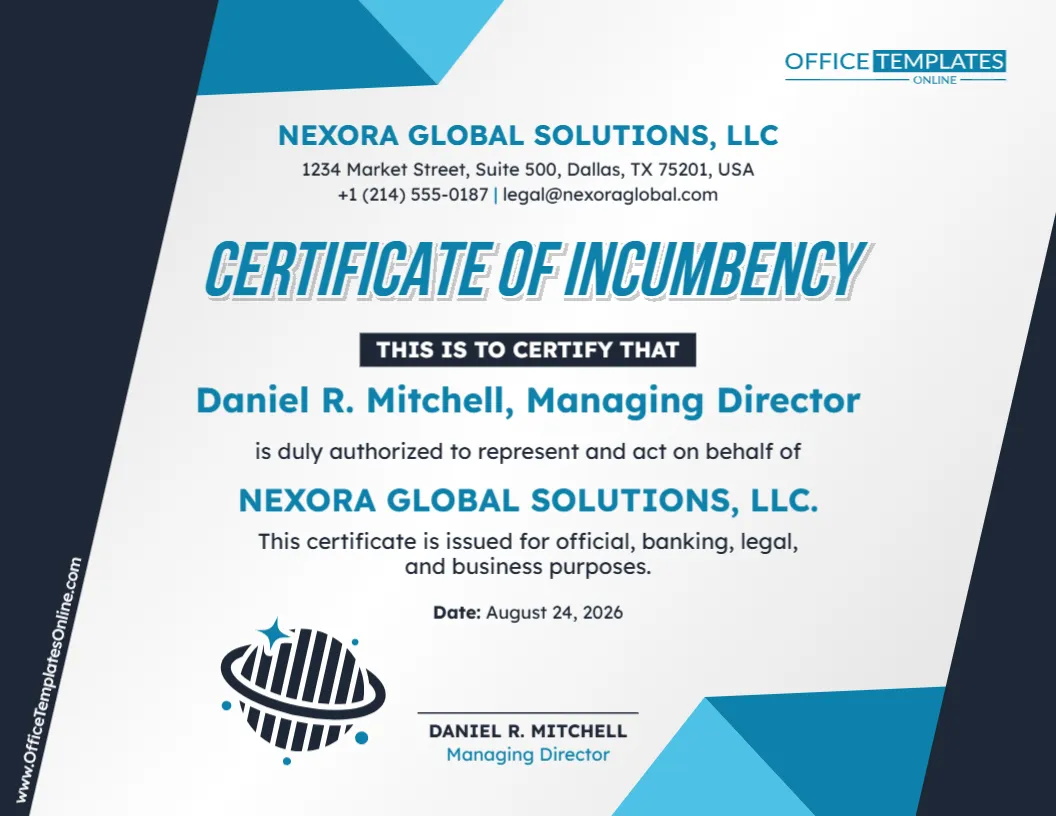
The sample certificate identifies a Managing Director and states that the named person is duly authorized to represent and act on behalf of the company. It also includes useful company contact information, the certificate date, a signature area, and a short statement explaining the intended purpose of the document.
Rather than creating the certificate from an empty page, you can customize this ready-made design using our online editor directly in your browser. No login is required. Replace the sample information with your own details, adjust the wording where necessary, and download the completed certificate in PDF, PNG, or JPG format.
Why Is This Called a “Standard” Certificate of Incumbency?
This template follows a simple, general-purpose approach rather than being designed around a highly specialized corporate situation.
Its purpose is easy to understand: identify a person connected with the company and certify the position or authority stated in the document.
The design does not depend on lengthy tables, multiple officer listings, specimen signatures, or detailed corporate resolutions. Instead, it brings the essential information together on one professional page.
That makes it a practical starting point when you need a clean Certificate of Incumbency that can be adapted to your particular requirements.
What Information Is Included in the Template?
The design gives each important piece of information a clear place. The sample version includes:
- Company name
- Company address
- Telephone number
- Email address
- Name of the incumbent
- Corporate position or title
- Statement of authorization
- Company name within the certification
- Purpose statement
- Certificate date
- Signature or certification area
- Name and title of the signer
Because the content is editable, you can replace the examples with information that accurately reflects your organization.
Company Details Appear Right at the Top
Unlike some certificates that display only a company name, this template provides room for additional business contact information.
The upper section can show the company name, street address, telephone number, and email address. This gives the document a business-letterhead feel and helps clearly associate the certificate with the organization concerned.
When editing these fields, use current and accurate information. If your company does not need a telephone number or email address on the certificate, you can adjust the available content accordingly.
Also consider whether the address should be the company’s registered office, principal place of business, mailing address, or another address required by the recipient.
Make the Incumbent Easy to Identify
The central section gives strong visual emphasis to the name and title of the incumbent.
In the sample certificate, the individual is identified as a Managing Director. This is only an example and can be changed when another corporate position needs to be shown.
Depending on the circumstances, you may need to identify a President, Secretary, Treasurer, Chief Executive Officer, Director, Manager, or another officer or representative.
Use the exact title that applies to the individual rather than choosing a title simply because it fits the available space.
Review the Authorization Statement Carefully
This template does more than state a person’s job title. Its sample wording also says that the individual is duly authorized to represent and act on behalf of the company.
That statement should receive careful attention when you personalize the document.
A person’s title does not necessarily mean that they have unlimited authority to perform every action for a company. The actual scope of authority may depend on the company’s governing documents, resolutions, appointments, delegations, internal policies, applicable law, or transaction-specific approvals.
If the individual’s authority is limited, consider changing the wording so that the certificate accurately describes what is being certified.
For example, the authorization may apply only to a particular transaction, type of document, account, department, or business activity.
Customize the Certificate Online—No Login Required
You do not need professional design software to personalize this certificate.
Open the template in our browser-based online editor and begin replacing the sample information with your own. No login is required to customize it, so you can start working on the certificate without creating an account.
Change the company name and contact information, enter the correct person’s name and title, revise the authorization statement, and update the date.
You can also modify other available text and design elements to make the certificate more appropriate for your organization.
The existing layout handles the visual arrangement for you, leaving you free to focus on the accuracy of the information.
A Simple Way to Customize It from Top to Bottom
For an easier editing process, work through the certificate in the same order in which a reader would see it.
Start at the top with the company name and contact details. Check the spelling of the business name and make sure the address, telephone number, and email address are current.
Next, replace the sample incumbent’s name and corporate title.
Then review the central certification language. Make sure any statement about representing or acting for the company is correct for the individual being identified.
After that, edit the sentence explaining why the certificate is being issued, if you want to include a purpose.
Finally, enter the correct date and review the name, title, and signature area at the bottom.
Adapt the Purpose Statement to Your Situation
The sample certificate states that it is issued for official, banking, legal, and business purposes.
This provides a general example, but you do not have to keep that exact wording.
If the certificate is being prepared for one specific purpose, you may prefer to state that purpose more precisely. Alternatively, if there is no need to explain why the certificate is being issued, you may decide that a broader statement—or no purpose statement at all—is more suitable.
The key is to avoid implying that the certificate is automatically acceptable for every banking, legal, or official use simply because those words appear in the template.
Different recipients can require different forms of evidence.
Where Might a Standard Incumbency Certificate Be Used?
A Certificate of Incumbency may be requested when another party needs information about a company’s current officers, representatives, or authorized persons.
Depending on the situation, such a document may be relevant during business transactions, banking procedures, due diligence, contractual matters, account administration, financing, corporate verification, or other organizational processes.
A standard template can be useful when the information needed is relatively simple.
However, some situations call for a more detailed certificate. A recipient may ask for several officers and directors, specimen signatures, registration details, board resolutions, specific signing powers, notarization, a corporate seal, or supporting documents.
Always find out what the receiving party requires before submitting your finished certificate.
Does the Template Itself Give Someone Authority?
No.
This is an important distinction when preparing an incumbency document.
Editing a person’s name into the template or stating that they are authorized to represent a company does not itself appoint that person or grant them corporate authority.
The certificate should reflect authority or status that already exists and can properly be certified.
Before making an authorization statement, confirm that it is supported by the company’s appropriate records or other valid source of authority.
A Clean Business Design with Strong Visual Hierarchy
The template uses a modern blue, teal, dark navy, and white visual style that gives the certificate a professional business appearance.
The company information is positioned prominently near the top, followed by the large “Certificate of Incumbency” heading. A dark highlighted certification label separates the title from the incumbent’s information.
The person’s name and title receive strong emphasis in the center, making it immediately clear who the certificate concerns.
The company name is repeated in the authorization section, while the purpose and date appear underneath. The signature area is positioned near the bottom, completing the document without making the page feel crowded.
The result is a certificate that looks polished while keeping the important information easy to locate.
What About the Signature Section?
A dedicated area near the bottom of the template provides room for the relevant name, title, and signature or certification.
Make sure the person signing the certificate is appropriate for the type of certification being made.
Depending on the organization and intended use, the certifying person might be a Corporate Secretary, President, another officer, or another properly authorized individual.
In some situations, it may be preferable for the person certifying the incumbent to be different from the person whose position or authority is being certified. If the same individual appears in both roles, confirm that this is appropriate for the intended purpose and recipient.
The template can be adjusted to reflect the certification arrangement you actually need.
Before You Download, Check Every Important Detail
A short final review can prevent simple mistakes from appearing in an otherwise professional certificate.
Check the company name, address, telephone number, and email address first. Then verify the incumbent’s full name and exact corporate title.
Read the authorization statement carefully and make sure it does not overstate the person’s powers.
Confirm the purpose statement, date, and signer information. Remove all sample company details, names, addresses, dates, and other placeholder content.
If another organization requested the certificate, compare your completed version with any instructions they provided.
Download Your Finished Certificate in PDF, PNG, or JPG
When your customization is complete, you can save the finished certificate in the format that works best for you.
PDF is a convenient choice when you want to print, archive, email, or submit the certificate as a document.
PNG is useful when you want a high-quality image version.
JPG provides a widely supported image format that is convenient for many digital uses.
This gives you the flexibility to prepare the certificate once and choose the most appropriate download format afterward.
Start with a Standard Format and Make It Your Own
A good template should save time without forcing you to use information or wording that does not fit your situation.
That is the idea behind this Standard Certificate of Incumbency Template. The professional layout is already prepared, but the important company and incumbent information remains customizable.
Open the template in the online editor, replace the sample company and contact details, identify the correct incumbent, update the corporate title, review the authority statement, enter the correct date, and make any other necessary changes.
You can do it all directly in your browser with no login required. When everything looks right, download your customized Certificate of Incumbency as a PDF, PNG, or JPG.
Important note: This template is an editable document resource and does not constitute legal advice, appoint an officer, or independently grant authority to act for a company. Incumbency certificate requirements, signing authority, certification procedures, signatures, notarization, supporting documents, and acceptance standards can vary by organization, transaction, jurisdiction, and recipient. For an official or legally significant use, confirm the required content and formalities with the requesting organization or an appropriately qualified professional.