A Round Couple Photo Under a Crimson Header
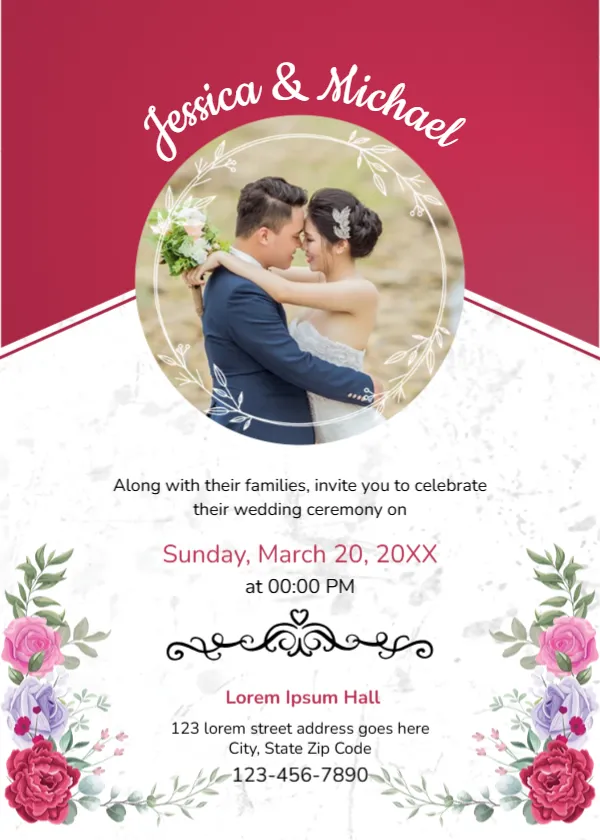
A deep crimson header with a white diagonal edge carries the couple’s names, Jessica and Michael in the sample, curving in a white script over a round photo of an embracing couple framed with a thin white leaf wreath. The lower half is a soft white marble texture with red, pink and lilac roses in the bottom corners. The invitation line, a pink date, a time, a black scroll ornament, a crimson venue name, an address and a phone sit between the flowers.
Photo at the Centre
The card is 5 x 7 inches, portrait. The photo sits where the crimson header meets the white panel, which draws the eye straight to the couple. The text below is centred and evenly spaced.
Your Own Photo and Details
Replace the sample photo with an engagement photo of your own, cropped so both faces sit in the middle of the circle. Type your names along the curve, keeping them short so the arc stays even. The date reads Sunday, March 20, 20XX at 00:00 PM, and the venue reads Lorem Ipsum Hall, so replace both.
Personalising the Photo Invitation
- Add your engagement photo.
- Type your names on the curve.
- Set the date and time.
- Type the venue and address.
- Add an RSVP line.
Picking an Engagement Photo for the Circle
A close, warm photo with good light works best in a small circle. Avoid busy backgrounds, which distract from your faces. A professional engagement shoot gives you plenty of choice.
Editing Curved Names
Curved text spreads to fill the arc. Short names look balanced, while long names may need a smaller font. Check the curve after typing.
Printing Photo Invitations
Photos print best on satin or gloss card. Make sure your photo is high resolution so faces stay sharp.
Crimson for Autumn and Winter Weddings
Deep crimson suits autumn and winter weddings and pairs well with burgundy flowers and gold details.
Digital Invitations
A photo invitation also works well as a digital card sent by email or message.
Sending the Photo Invitations
Send them with an RSVP card.
Step by Step Editing of the Jessica Michael Photo Circle Design
- On the jessica michael photo circle design, click the main headline and type your own words, keeping a similar length.
- Retype every name, date and contact line on the jessica michael photo circle design, checking each against a trusted source.
- Search the jessica michael photo circle design for the words Lorem and Company so that no placeholder remains.
- Click any logo or photo on the jessica michael photo circle design, choose Replace Image and resize the new picture to fit.
- Zoom the jessica michael photo circle design to full size and read each line aloud before you save it.
- Keep a clean master of the jessica michael photo circle design without private details, so later versions start tidy.
A related layout is the floral wreath invitation. Also worth a look: black and white wedding invitation. Next to try is the rustic wedding invitation. Every jessica michael photo circle style alternative sits in invitation templates.