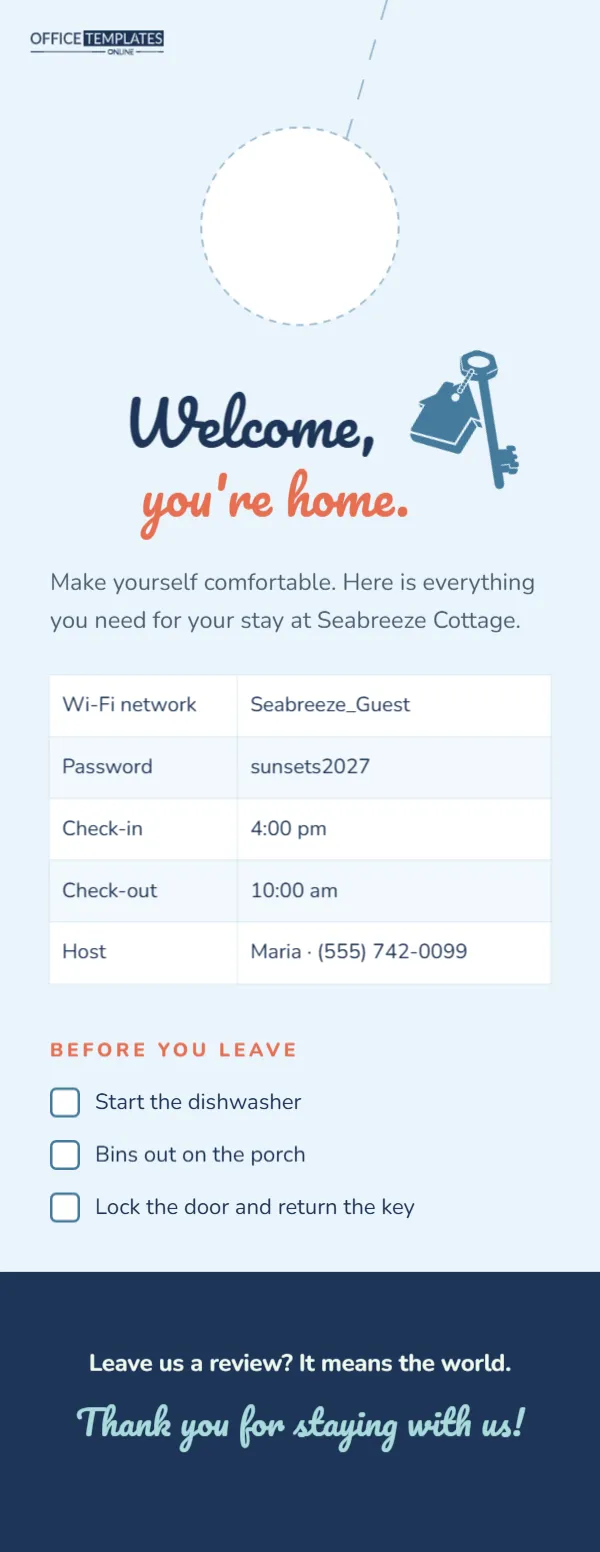
The first thing most guests at a vacation rental ask is What’s the Wi-Fi password?, and the last thing hosts want is a list of messages about check-out times and bins. A welcome door hanger, hung on the inside handle of the front door, answers the most common questions in one place, right where guests see it as they walk in and as they leave. This template is warm and coastal: Welcome, you’re home. In a cheerful script, a house key, a neat table of essential information, and a simple before-you-leave checklist.
What Guests See When They Arrive
This single-sided hanger measures 4.25 x 11 inches. The background is soft sky blue. Under the door hole, Welcome, is written in navy Pacifico, and you’re home. In coral, with a blue house key icon tilted beside them. A short line invites guests to make themselves comfortable. A table lists the Wi-Fi network, password, check-in time, check-out time, and the host’s name and phone. Before you leave introduces three tick boxes: start the dishwasher, bins out on the porch, lock the door, and return the key. A navy footer asks for a review and thanks guests for staying in script.
The House Info Table
The information sits in a real table. Select it and use Edit Table Data to enter your Wi-Fi details, times, and contact. Use Add Row for extras such as Parking: driveway, 2 cars, Quiet hours: 10 pm – 8 am, Pool hours, or Nearest supermarket. Keep it short; detailed house manuals belong in a binder or digital guide.
What to Put on a Welcome Hanger
| Information | Why guests need it |
|---|---|
| Wi-Fi network and password | Most-asked question on arrival |
| Check-out time | Prevents late departures before cleaners arrive |
| Host contact | For problems or questions |
| Parking | Avoids neighbour complaints |
| Quiet hours | Keeps the neighbourhood happy |
| Emergency information | Local emergency number and address of the property |
The Check-Out Checklist
A short checklist makes departures smoother for guests and cleaners. Keep requests reasonable; guests dislike long lists of chores. Three or four items, such as starting the dishwasher, taking out bins and locking up, are plenty. The tick boxes are simple shapes with labels; change them to fit your property, for example, Turn off the AC, or Leave keys in the lockbox.
Asking for Reviews Gracefully
Reviews are the lifeblood of vacation rentals. The footer’s friendly request, Leave us a review?It means the world, is gentle and personal. Avoid offering incentives for reviews, which many booking platforms prohibit. A sincere thank-you and a great stay are the best way to earn five stars.
Personalising for Your Property
Change Seabreeze Cottage in the introduction to your property’s name, and update the host’s name and phone. If you have a logo or a photo of the property, add it near the key icon. The house key is an editable vector that you can recolour or swap for a palm tree, mountain, or anchor to match your location.
Recolouring for Your Location
Sky blue and coral feel coastal and relaxed. A mountain cabin might use forest green and cream, a city apartment charcoal and mustard, a desert retreat terracotta and sand. Change the background, script colours, and footer band together.
Where to Hang It
Hang the welcome card on the inside handle of the front door, or on the door of the main bedroom. Some hosts hang a second copy in the kitchen. Because it is a door hanger, it stays in place better than a loose card on a table and is easy for cleaners to check between stays.
Durability Between Guests
Print on heavy card and consider laminating it, since it will be handled by many guests. Laminated hangers can be wiped clean between stays. Download as a PDF and print at a local shop with lamination, or at home on heavy card for a quick start.
Updating Wi-Fi Passwords
Some hosts change the Wi-Fi password regularly for security. Because the hanger is easy to edit, simply update the table and print a new copy when the password changes. Keep the old one out of sight to avoid confusion.
Multiple Properties
Hosts with several rentals can keep one template and duplicate it for each property, changing the name, colours and table details. A consistent look across properties builds a recognisable brand for your rental business.
Welcoming International Guests
If many guests come from abroad, add translations of the key lines, such as the Wi-Fi details and check-out time, on a second page. Large, clear type helps all guests, including those reading without their glasses after a long journey.
Hanger Hole Placement
A dashed circle at the top marks the hole and a dashed slit marks the cut, so the card slips over the inside door handle. For lever handles, cut the slit a little longer.
Local Recommendations That Delight Guests
A few personal tips make a stay memorable: the best breakfast spot, a hidden beach, a sunset viewpoint or a family-friendly hike. Add three favourites to a second page of the hanger, with a short sentence for each. Guests love insider advice, and it often appears in glowing reviews.
House Rules Without the Lecture
Every rental has rules, but a long list of don’ts makes guests feel unwelcome. Keep rules on the hanger to the essentials, phrased positively: Please keep music low after 10 pm; our neighbours thank you reads better than No noise after 10 pm. Put detailed rules in the full house manual.
Vacation Rental Hanger FAQ
Can I add a QR code for the house manual?
Yes. Add a QR code image near the table linking to your digital guidebook.
Is it single-sided?
Yes. Add a second page for local recommendations if you like.
What size is it?
4.25 x 11 inches.
Can I list the address for emergencies?
Yes. Add an Address row to the table so guests can tell emergency services where they are.
Should I laminate it?
Lamination keeps it clean between guests and is recommended.
Does it fit a lever handle?
Yes, with the slit cut.