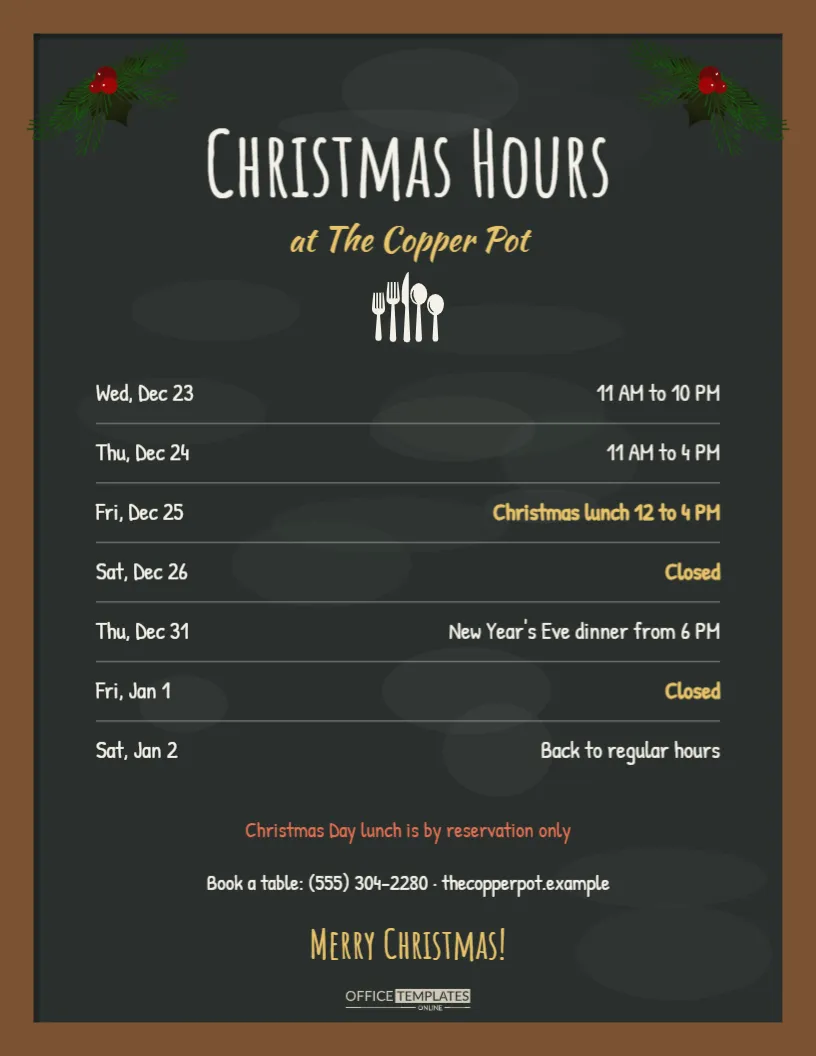
Restaurants, cafes, bistros, and pubs live by their chalkboards, so a chalkboard-style holiday hours sign feels right at home on the door or beside the host stand. This US Letter template recreates a wooden-framed blackboard with soft chalk dust, two pine and berry sprigs in the top corners, and a tall hand-lettered title, Christmas Hours, with the restaurant name in golden script underneath. A row of cutlery separates the header from a list of dates and times written in Patrick Hand, a friendly handwriting font, with the special days highlighted in gold. At the bottom, a coral line explains that Christmas Day lunch is by reservation only, followed by the booking phone number and a warm Merry Christmas.
Why Restaurants Need Holiday Hours Signs
Hospitality schedules change more than almost any other business during the holidays. Many restaurants open longer for office parties in mid-December, serve a special Christmas Day lunch, close on Boxing Day to rest the team, then open for a New Year’s Eve dinner. Without a clear sign, guests turn up on the wrong day or assume you are closed when you are actually serving. A sign at the entrance, plus the same information online, protects bookings and reduces phone calls during the busiest service weeks of the year.
The Chalkboard Restaurant Style
The board has a warm brown wooden frame, a deep charcoal surface, and very faint chalk smudges that make it feel like a real board wiped clean many times. The Amatic SC title mimics tall chalk lettering, Kaushan Script adds a hand-painted flourish for the restaurant name, and Patrick Hand keeps the hours easy to read. Thin dotted lines between rows look like chalk guides. The result has the charm of a hand-drawn board but never smudges or fades.
Reading the Christmas Restaurant Schedule
The sample lists seven days. Wednesday, December 23 runs from 11 AM to 10 PM, Christmas Eve closes at 4 PM, Christmas Day offers a set lunch from 12 to 4 PM, Boxing Day and New Year’s Day are closed, New Year’s Eve has a dinner from 6 PM, and January 2 returns to regular hours. Special days use gold lettering so they stand out against the white chalk text.
Editing the Chalkboard Hours
Each day and its hours are separate text boxes, so you can click any line to change it. Keep the day labels short, such as Thu, Dec 24, so they fit on the left side. For a longer note, such as Christmas Day lunch, three courses, put the extra detail in the coral line at the bottom rather than squeezing it into the row. To add a row, duplicate the last day and its hours and move them down, then move the dotted guide line as well.
Christmas Day Lunch Reservations
If you serve a Christmas Day meal, reservations are almost always required, and many restaurants take a deposit. Use the coral line to say so clearly, and add the booking deadline if you have one, for example, bookings close December 18. Mention dietary options in your booking confirmation rather than on the sign, so the board stays clean and readable.
New Year’s Eve Dinner Service
A New Year’s Eve dinner is a big event for many restaurants, often with a set menu, live music, or a midnight toast. The sample row simply says New Year’s Eve dinner from 6 PM, but you can expand it with a second sign. Our holiday hours category also includes a black and gold New Year design that pairs well with this board.
Recolouring the Board and Frame
The charcoal board and walnut frame can be changed to suit your interior. Select the board group to change the surface to a green slate or a lighter grey, and change the frame to a paler oak or a painted colour. Keep the chalk text white or cream for contrast, and choose gold or coral for highlights so they read like coloured chalk.
Displaying the Sign in Your Restaurant
Put a printed copy on the entrance door facing out, another beside the host stand, and a small one in each menu cover during December. If you use an A-frame sidewalk board, print the sign at 11 x 17 inches and slide it into the frame’s poster holder. Guests reading it while waiting for a table may book their Christmas lunch on the spot.
Printing the Restaurant Chalkboard Sign
Download a PDF and print on US Letter card. Because the board is dark, a laser printer or print shop produces the cleanest result. A matte finish looks more like a real chalkboard than glossy paper. If you need many copies for tables, print two per sheet at half size and trim them.
Sharing Restaurant Holiday Hours Online
Post the board as an image on Instagram and Facebook, and update your Google Business Profile and any booking platforms with special hours for each date. Many diners check Google Maps before leaving home, and incorrect hours there are a common source of complaints over the holidays.
Restaurant Staff and the Holiday Schedule
Share the board with your kitchen and floor teams before printing it for guests. Confirm who works each special service, when deliveries arrive before closed days, and when the walk-in fridges will be cleared before a long closure. A staff copy pinned in the kitchen keeps everyone working from the same schedule.
Using the Board for Other Seasons
The chalkboard layout works for Thanksgiving dinner hours, Easter brunch, Mother’s Day bookings, and summer patio hours. Replace the pine sprigs with seasonal stickers from the Elements panel, change the title, and update the rows. Keeping one board style throughout the year gives your restaurant a recognisable look.
Chalkboard Hours Sign Questions
Can I change the handwriting font?
Yes. Select any text and choose another Google font, such as Caveat or Amatic SC.
Can I remove the cutlery icon?
Yes. Select it and delete it, or replace it with a coffee cup for a cafe.
Will the dark board print well at home?
It will, though a laser printer gives a more even black and uses less ink per page.
Serve Up Clear Christmas Hours
Write in your dates, add your booking number, and print the board. A charming chalkboard sign tells guests exactly when to visit, helps fill your Christmas services, and keeps your team’s holiday plans on track.