Drive-by buyers are curious, but they rarely call a number from a moving car. They slow down, take a photo of the sign, and look up the house later, if they remember. A QR code on the yard sign gives them what they want right away: photos, price, floor plan, and a way to book a viewing, all from the pavement. This 24 x 18 inch sign is designed to turn that curiosity into enquiries for you.
Reading the Sign From the Street
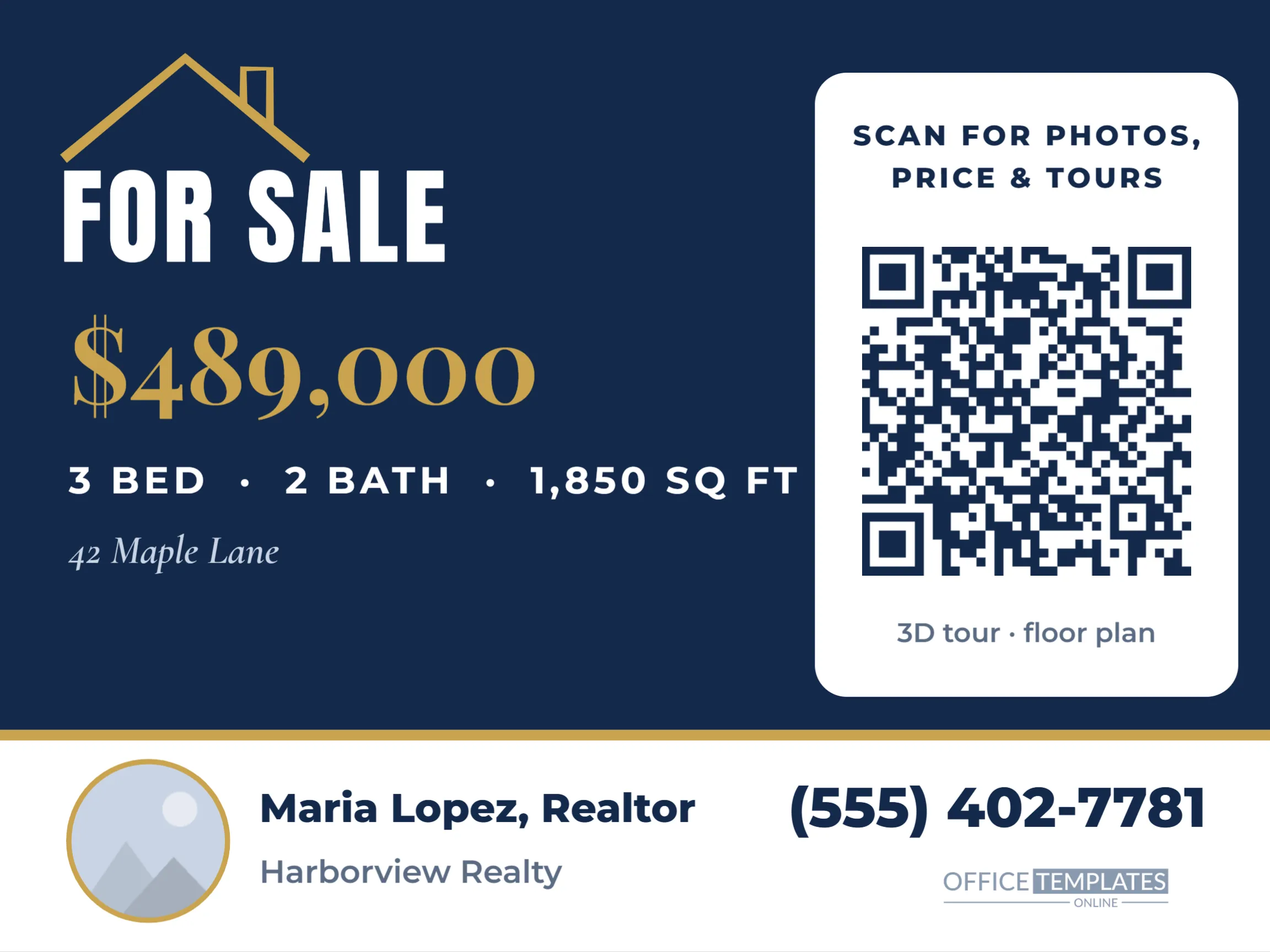
The sign is landscape, the standard size for corrugated plastic yard signs and frame stakes. Most of the face is deep navy. A gold roofline outline with a small chimney sits at the top left, followed by FOR SALE in tall white Anton capitals. Below, the price, $489,000, is set large in gold Playfair Display, then the key facts, 3 bed, 2 bath and 1,850 square feet, in spaced white capitals, and the street name in italics.
On the right, a tall white panel holds the QR code with a short call to action above it, Scan for photos, price, and tours, and a note underneath about the 3D tour and floor plan. Across the bottom, a white agent strip with a thin gold top rule shows a round headshot slot, the agent’s name, brokerage, and a large phone number.
What Buyers Want After the Scan
The QR code should open the listing page that answers a buyer’s first questions in seconds. Think about what someone standing on the kerb wants to know.
| Buyer question | Where the answer should be |
|---|---|
| What does the inside look like? | Photo gallery at the top of the page |
| Can I afford it? | Price and estimated monthly payment |
| Is the layout right for us? | Floor plan and room sizes |
| Can I see it this week? | Open house dates and a booking button |
| Who do I talk to? | Agent contact with call and text buttons |
A dedicated single-property page usually works better than a search portal, where competing listings sit beside yours.
Check how the page loads on a phone with a weak signal, because many buyers scan while standing outside on mobile data. Large photo galleries that take ten seconds to appear lose people. Put the best exterior and kitchen photos first, keep the description short and scannable, and make sure the call and text buttons sit near the top rather than at the very bottom of a long page. If you run an open house, a booking form with a few time slots saves everyone a phone call and gives you the visitor’s contact details before they arrive.
Updating the Listing Details
- Double-click the price, the beds, baths, and square footage line, and the street name to type your listing details.
- Select the QR code, click Edit Code, and paste your listing page address into URL/Website. Press Update QR Code.
- Select the round agent photo and use Replace Image to add your headshot; it stays round and keeps its gold ring.
- Change the name, brokerage, and phone number in the agent strip.
- Scan the code from your screen at arm’s length, then again from a printed proof.
Sizing the Code for Kerbside Scanning
Phones need a QR code to be large enough for the distance. A rough rule is that people can scan a code from about ten times its width. On this sign, the code prints at around six inches wide, so buyers can scan from the pavement without walking onto the lawn. Do not shrink the white panel to make room for more text; a smaller code means people have to come closer, and many will not bother.
Contrast matters outdoors, where sunlight and shadows change through the day. The code is dark navy on white, the most reliable combination. The editor checks every code it builds and shows a QR Code May Not Scan warning if a colour change makes it harder to read.
Variations for Rentals and Open Houses
The layout adapts quickly to other signs agents use every week. For a rental, change FOR SALE to FOR RENT and the price to a monthly amount, and link the code to an application page. For an open house, replace the street name with Open Sunday 1-4 pm. For a sold sign, change the headline to SOLD in gold and point the code to your agent profile or a what’s my home worth page, so the sign keeps generating leads after the sale.
Brand Colours and Brokerage Rules
Many brokerages have strict sign standards for colours, logos and layout. Navy and gold suit a wide range of brands, but you can recolour the background, roofline and gold accents to match yours. Add your brokerage logo to the agent strip or the top corner. Check your local advertising rules as well; some areas require the brokerage name to appear in a minimum size on every sign, and the strip has room for it.
Producing the Physical Sign
Download the design as a high-resolution PDF and send it to a sign printer. Common materials are 4 mm corrugated plastic for frame stakes and aluminium composite for long listings or hanging post signs. Ask for UV-resistant inks so the navy and gold do not fade in the sun. Order a few smaller riders too, such as Scan for 3D tour or Open House, which can hang below the main sign.
Agent Questions
Can one sign serve several listings?
The price and details are listing-specific, so most agents print one per property. To reuse the sign, point the code to your listings page instead and cover the details with a rider.
How do I know if people scan it?
Use a trackable link that forwards to the listing page, and you will see how many visits came from the yard sign.
Should the agent photo stay?
A friendly headshot builds trust and recognition. If your brokerage does not allow photos, replace the slot with your logo.
Add the price, details, and listing link, drop in your headshot, and send it to the printer. The next car that slows down outside the house can become a booked viewing before it reaches the end of the street.