Give Clients and Visitors the Holiday Closure Information They Need at a Glance
A planned office closure should never leave customers wondering when you will be available again. This Labor Day Office Closure Notice Template provides a clear, ready-made format for announcing that your office will be closed for Labor Day and explaining when regular business hours will resume.
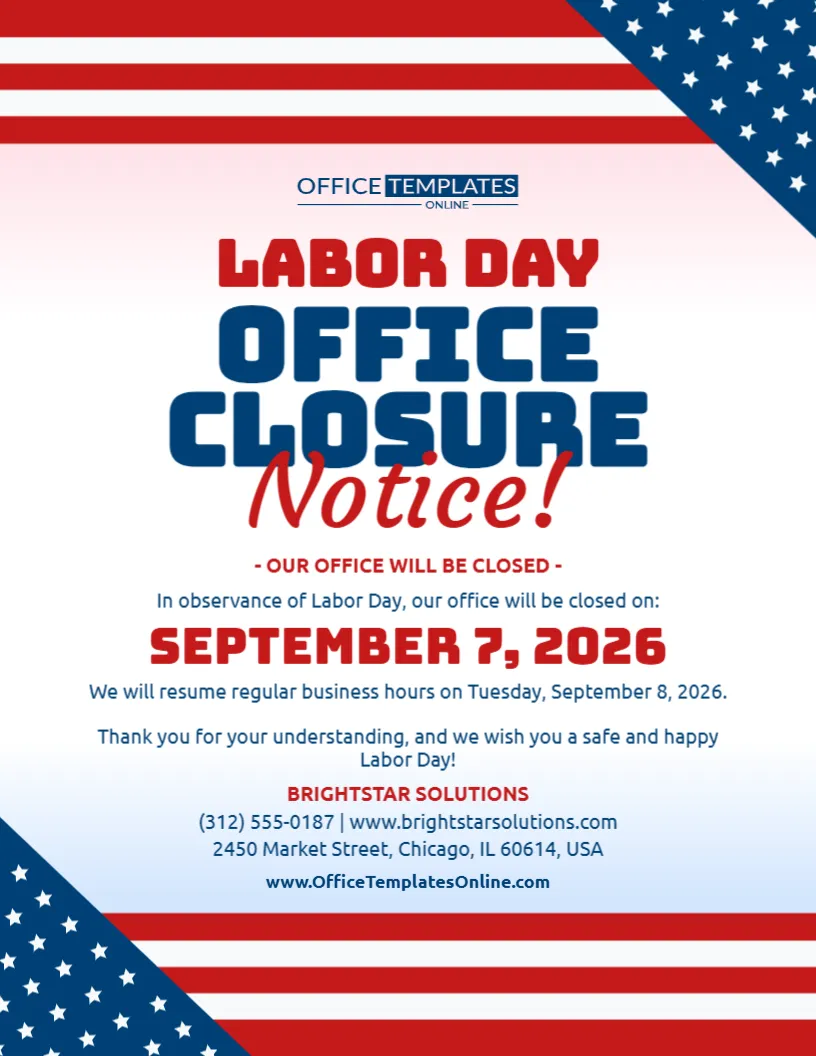
The design puts practical information first. Its large “Labor Day Office Closure Notice!” heading immediately explains the purpose of the announcement. Below it, separate areas are provided for the closure date, reopening information, a short customer message, company name, phone number, website, and address.
A clean white center keeps the announcement easy to read, while bold red, white, and blue American flag-inspired borders give the notice an appropriate Labor Day appearance.
You can personalize this template directly in our easy-to-use online editor that works in your browser. No login is required to start editing. After replacing the sample details with your own, download the completed office closure notice in PDF, PNG, or JPG format.
Built Around a Complete Office Closure Announcement
Some holiday signs simply say “Closed.” This template goes further by providing room for the information visitors are likely to need next.
The sample layout communicates:
- The holiday responsible for the closure
- That the office will be closed
- The exact closure date
- When regular business hours will resume
- A short thank-you message
- A Labor Day greeting
- Business or organization name
- Phone number
- Website
- Street address
This makes the template useful when you want to give customers a more complete update instead of placing a basic “Closed” sign on the door.
A Clear Headline Explains the Notice Immediately
The central headline reads:
Labor Day Office Closure Notice!
The words “Labor Day” appear in red, while “Office Closure” is displayed in large dark-blue lettering. The handwritten-style red “Notice!” adds another visual layer without making the purpose difficult to understand.
Immediately below the headline is a smaller statement confirming:
Our Office Will Be Closed
This repetition is useful in a practical notice because visitors can understand the message even if they only scan the upper half of the design.
Replace the Sample Details with Your Own
The business information shown in the template is placeholder content intended to demonstrate the finished layout.
Before using the notice, customize it with the information that applies to your own office.
Depending on the available editable elements, you can change the:
- Main heading
- Closure statement
- Labor Day date
- Reopening date
- Regular-hours message
- Customer thank-you note
- Holiday greeting
- Company or organization name
- Phone number
- Website
- Address
- Text and colors
- Other available design elements
This allows you to keep the overall professional layout while making the announcement specific to your workplace.
Edit Everything Online – No Login Required
You do not need desktop publishing or professional graphic design software to prepare your holiday notice.
Open the template in our browser-based online editor and customize the available elements directly online. No account or login is required, so you can begin editing without going through a registration process.
The major design decisions have already been made for you. The headline, closure date, reopening information, contact details, and decorative elements are already positioned within the layout.
Your main task is to replace the sample information with accurate details for your office.
Make the Labor Day Closure Date Easy to Spot
The sample template displays the closure date in large red lettering:
September 7, 2026
The date is deliberately more prominent than the surrounding explanatory text. This helps someone viewing the notice quickly determine which day your office will be unavailable.
For 2026, Labor Day falls on Monday, September 7.
If you are customizing the notice for another year, update this date before publishing or printing the design. Labor Day is observed on the first Monday of September, so the numerical date changes from year to year.
Tell Visitors Exactly When You Will Be Back
One of the most useful parts of this template appears immediately below the closure date.
The sample wording states:
We will resume regular business hours on Tuesday, September 8, 2026.
This answers the natural question that follows any closure announcement: When will the office reopen?
You can change the sentence to match your own schedule.
For example:
Regular Business Hours Resume Tuesday
Our Office Will Reopen Tuesday, September 8
We Will Return to Normal Hours on Wednesday
Regular Office Hours Resume at 9:00 AM Tuesday
We Look Forward to Serving You Again After the Holiday
Providing a reopening date can be especially helpful for clients who need to schedule a visit, make an appointment, deliver documents, or contact your staff.
Adapt the Notice for a Longer Labor Day Weekend Closure
Your office does not have to be closed for only one day to use this template.
If you plan to close for the full holiday weekend or for several days around Labor Day, update the wording and date information accordingly.
You might write:
Our Office Will Be Closed September 5–7
Closed for Labor Day Weekend
Office Closure: Saturday Through Monday
Closed September 4–7 – Regular Hours Resume Tuesday
Make sure the reopening statement agrees with the closure dates shown above it.
For multi-day closures, displaying both the closed period and reopening day can make the announcement much easier to understand.
Use the Thank-You Message to Keep the Tone Friendly
A closure notice is practical, but it does not have to sound unfriendly.
The sample design includes a short message thanking customers for their understanding and wishing them a safe and happy Labor Day.
You can keep that wording or personalize it to fit your organization.
Possible alternatives include:
Thank You for Your Understanding and Have a Happy Labor Day!
We Appreciate Your Business and Wish You a Safe Holiday Weekend.
Thank You for Planning Around Our Holiday Closure.
Have a Safe and Enjoyable Labor Day from Our Team.
We Look Forward to Serving You When We Return.
A short message like this helps balance the formal closure information with a warmer holiday greeting.
Add Your Company Name Prominently
The template provides a separate area for your company or organization name below the holiday message.
This is useful because an office closure notice should clearly identify which office is closed, especially when it is displayed in a shared commercial building.
You can replace the sample company name with your:
- Business name
- Organization name
- Practice name
- Agency name
- Department name
- Office name
Keep the name recognizable and consistent with the branding your clients already know.
Include Contact Information for People Who Need More Details
Underneath the business name, the sample design provides space for a phone number and website.
A street address appears on the next line.
You can replace these details with your own:
Phone Number | Website
Street Address, City, State, ZIP
This information gives the notice a more complete and professional appearance while helping customers verify that the announcement applies to the correct location.
A website can also give visitors somewhere to look for additional information while your office is closed.
Tell Customers About Online Options When Appropriate
Your physical office may be closed while certain digital services remain available.
For example, customers may still be able to use your website, submit a form, access an online account, place an order, or request an appointment.
If that applies to your business, you can use an editable text area to add a short message such as:
Our Website Remains Available During the Holiday
Online Services Are Available 24/7
Visit Our Website to Request an Appointment
Online Orders Can Still Be Placed While Our Office Is Closed
Avoid promising online availability unless the service will genuinely remain accessible during the closure.
Patriotic Borders Frame the Information Without Crowding It
The template uses an interesting border-based approach to its Labor Day theme.
Across the top are horizontal red and white stripes, with a dark-blue triangular corner filled with white stars. The lower section mirrors the idea in reverse, with additional red and white stripes and another blue star-filled corner.
These flag-inspired elements create a strong patriotic frame around the notice.
Importantly, most of the center remains uncluttered.
That open space allows the office closure headline, date, reopening details, and company information to remain the primary focus.
Red, White, and Blue Create a Clear Reading Order
The design uses color to separate different types of information.
Red is used for the Labor Day wording, “Notice!” script, closure date, and company name.
Dark blue is used for the large Office Closure text and most supporting information.
The background remains mostly white.
This combination gives the template a recognizable patriotic appearance while also creating enough contrast for the information to remain easy to distinguish.
The closure date in particular stands out because of its large red lettering and central position.
Designed for Professional Offices and Business Locations
This template is especially suitable for organizations that want a more informative holiday announcement than a simple door sign.
It can be adapted for workplaces such as:
- Corporate offices
- Law firms
- Accounting offices
- Consulting firms
- Real estate agencies
- Insurance offices
- Medical practices
- Dental offices
- Financial service businesses
- Property management companies
- Administrative offices
- Schools and educational offices
- Nonprofit organizations
- Local government offices
- Community organizations
- Small business offices
Because the company information and closure message can be personalized, the design can be adapted to different professional settings.
Use It as an Advance Notice, Not Only on Labor Day
Consider displaying your office closure notice before the holiday arrives.
Advance notice gives regular visitors and clients time to adjust their plans. Someone who intended to visit your office on Monday may choose to come earlier or wait until the office reopens.
The same design can remain displayed on the day of the closure so anyone arriving at your location understands why the office is unavailable.
This makes the template useful both before and during the Labor Day holiday.
Place the Notice Where Visitors Will Actually See It
Visibility matters just as much as design.
Depending on your office, suitable locations may include:
- Front entrance
- Office door
- Reception area
- Lobby
- Waiting room
- Building noticeboard
- Front window
- Customer service counter
- Visitor check-in area
- Employee information area
Choose a position where people are likely to see the notice before trying to enter or complete a transaction.
For digital use, make sure the dimensions and format are suitable for the platform where you plan to publish the design.
Keep Your Labor Day Schedule Consistent Across Customer Channels
After creating your office closure notice, check whether your Labor Day schedule appears elsewhere.
Customers may also look at your:
- Website
- Business-hours page
- Appointment system
- Email auto-response
- Phone greeting
- Customer portal
- Relevant online business listings
Where appropriate, update these sources so they do not conflict with the information displayed on your office closure notice.
A customer who sees “open” online but arrives to find a closure sign may become confused or frustrated.
Using the same dates and reopening information across your communications can create a smoother experience.
Make the Notice More Specific When Your Situation Requires It
The template can also be adapted for special circumstances.
For example, instead of simply saying that the office is closed, you could specify:
Main Office Closed for Labor Day
Customer Service Office Closed September 7
Administrative Office Closed – Emergency Services Remain Available
Office Closed to Walk-In Visitors
Labor Day Holiday Closure – Online Services Remain Available
The wording you choose should accurately represent your operations.
If only one department or location is closed, make that clear so customers do not assume the closure applies to your entire organization.
Keep Essential Information Short and Scannable
Although this template provides room for several details, avoid filling every available space with lengthy explanations.
A useful office closure notice should answer a few basic questions:
What is happening?
The office is closed.
Why?
In observance of Labor Day.
When?
The displayed closure date or date range.
When will normal hours return?
The reopening date.
Which office does this apply to?
Your company or organization name.
Where can visitors find more information?
Your phone number or website.
If those answers are clear, the notice has done its job.
Download the Finished Notice as PDF, PNG, or JPG
After completing your customization, you can download the finished Labor Day Office Closure Notice in PDF, PNG, or JPG format.
PNG and JPG provide convenient image options for digital use. PDF gives you another useful format when you need the completed design in document form.
Choose the file type that best matches how you plan to use the notice, and check the requirements of your intended printing method or digital platform.
Customize Your Labor Day Closure Notice in a Few Steps
You can turn the sample design into a notice for your own office by following a simple process:
- Open the Labor Day Office Closure Notice Template in the online editor.
- Review the main closure wording and change it if necessary.
- Replace the sample Labor Day date with the correct date for your closure.
- Add or update the date when regular business hours will resume.
- Personalize the thank-you and Labor Day message.
- Replace the sample company name.
- Enter your correct phone number and website.
- Update the office address.
- Customize other available text, colors, or design elements as desired.
- Proofread everything carefully.
- Download the completed notice as PDF, PNG, or JPG.
The editor requires no login, so you can begin personalizing the template without first creating an account.
Check the Closure and Reopening Dates Together
Before you publish or display the final notice, read the closure date and reopening date as a pair.
For the sample shown here:
Office closed: Monday, September 7, 2026
Regular hours resume: Tuesday, September 8, 2026
That sequence is appropriate for an office closing on Labor Day and reopening the following day.
If your office remains closed longer, both parts of the notice need to be updated.
Also double-check the company name, phone number, website, address, and any remaining placeholder information before downloading the final version.
Turn a Routine Holiday Closure into a Clear Customer Communication
An office closure may be routine for your team, but it can disrupt a customer’s plans if it is not communicated clearly.
This Labor Day Office Closure Notice Template helps you provide the important details in one organized design. The prominent closure headline, visible holiday date, reopening information, customer message, company details, and patriotic border elements work together to create a notice that is both useful and appropriate for the occasion.
Instead of designing an announcement from the beginning, open the template in the online editor, customize it in your browser without logging in, add your actual office closure and reopening details, and download the finished notice as PDF, PNG, or JPG.
It is an easy way to help customers understand when your office will be closed, why it is closed, and when they can expect regular business hours to resume.