Gold Stars and Hanging Baubles for the Office Christmas Party
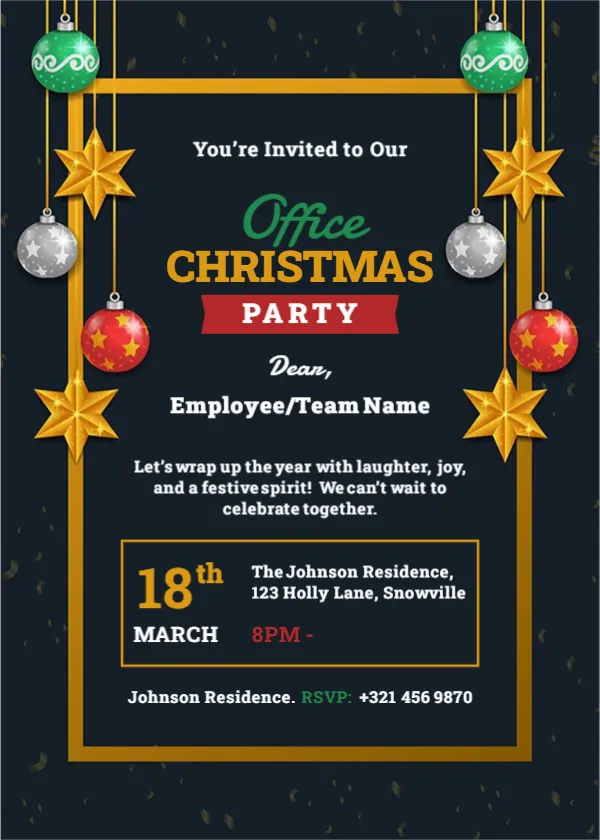
Green, silver and red baubles hang on gold strings over a dark charcoal page, mixed with large golden stars. A gold frame encloses the text. At the top, You’re Invited to Our runs in white, then Office in a green script, CHRISTMAS in gold capitals and PARTY in a red band. A Dear line and an Employee or Team Name field let you address each card, and a short line invites everyone to wrap up the year with laughter and joy. It is a smart, festive card for a company or department party.
Gold Frame, Greeting Paragraph and Date Box
The card is 5 x 7 inches, portrait, one page. The gold frame sits inside the page border. A second, smaller gold box near the foot holds the date on the left and the venue and time on the right. A final line under the box gives the venue name again and an RSVP number in green.
A March Date and an Unfinished Time
The date box in the sample reads 18th March, which does not suit a Christmas party, so change it to a December date. The time reads 8PM followed by a dash and nothing else, so either add an end time or remove the dash. The venue is The Johnson Residence, 123 Holly Lane, Snowville, which reads like a private home. For an office party, swap it for the restaurant, hall or office address.
Filling In the Office Party Card
- Change the month to December.
- Finish or trim the time line.
- Replace the residence with your venue.
- Type each team or employee name.
- Set the RSVP number or email.
Addressing the Card to a Team
The Employee or Team Name field works two ways. For a small office, type each person’s name and export one card per person. For a large company, type the department name, such as Dear Sales Team, and send one card to each group.
Notes on Plus Ones and Dress
Staff will ask whether partners are welcome. Answer that in the greeting paragraph, for example Partners welcome, smart casual. A clear line saves the organiser many emails.
Reading Gold Type on a Dark Page
The gold text looks rich on screen but can print darker than expected. Make a test print and, if the date looks dull, lighten the gold colour a little or print on bright white card.
Sending the Card Through Work Email
Most offices share invitations by email. Export a PNG and paste it into the message body, then repeat the date, time and venue in plain text below it so people can read them on any device and search for them later.
Getting the Office Invitation Out
Send it three to four weeks ahead, because December calendars fill quickly.
Step by Step Editing of the Office Christmas Gold Stars Design
- On the office christmas gold stars design, click the main headline and type your own words, keeping a similar length.
- Retype every name, date and contact line on the office christmas gold stars design, checking each against a trusted source.
- Search the office christmas gold stars design for the words Lorem and Company so that no placeholder remains.
- Click any logo or photo on the office christmas gold stars design, choose Replace Image and resize the new picture to fit.
- Zoom the office christmas gold stars design to full size and read each line aloud before you save it.
- Keep a clean master of the office christmas gold stars design without private details, so later versions start tidy.
Next to try is the red jumper ugly sweater card. Have a look at the business cocktail party invitation. Another option is the gold ornament Christmas dinner card. Find more designs next to the office christmas gold stars design in party invitation templates.