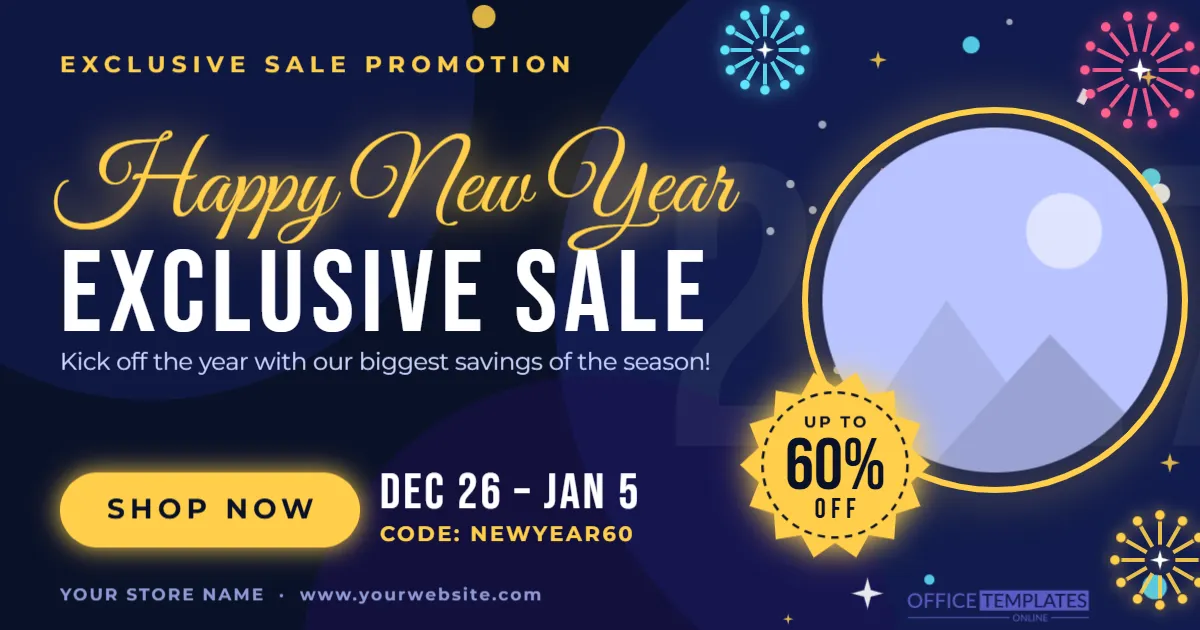
Start the year with a bang and give your biggest sale of the season the promotion it deserves. This Happy New Year exclusive sale promotion banner template combines a deep midnight-blue background, golden lettering and bursting fireworks for an instantly festive, celebratory look. A large “Up to 60% off” starburst, a round product photo frame and a glowing “Shop Now” button make the offer impossible to miss, whether the banner appears on your website, in a social media feed or at the top of an email.
Everything is editable online in your browser, so you can change the wording, the discount, the dates and the promo code, drop in your own product picture and download the finished banner in minutes, with no design software and no design experience needed.
What’s included in this New Year sale banner
- A flowing gold “Happy New Year” script headline with a bold white “Exclusive Sale” title beneath it
- An “Exclusive Sale Promotion” kicker line in spaced gold capitals
- A large golden starburst badge reading “Up to 60% off”, which you can change to any discount
- A round, replaceable product photo frame with a glowing gold ring
- A glowing gold “Shop Now” call-to-action button
- A sale-dates line and a promo code line, ready for your own dates and code
- A footer line for your store name and website
- Colorful fireworks, sparkles, stars and confetti, plus a faint “2027” year watermark that you can edit or delete
Design details and size
The banner is 1200 x 630 pixels in landscape orientation. That is the standard size for link images on Facebook and LinkedIn and for social sharing previews, and it also works well as a website hero image, a blog header or a promotional image in an email newsletter. The color palette combines midnight navy and royal blue with warm gold, a pop of pink and a touch of cyan, so the offer stands out on both light and dark web pages. Headlines use Great Vibes for the elegant script and Bebas Neue for the strong sale title, while the small print uses Montserrat. All are free Google Fonts, and every shape and decoration can be recolored, resized, moved or deleted.
Why choose this template?
A sale banner has only a moment to catch attention. This design puts the three things shoppers care about in a clear order: the celebration (“Happy New Year”), the offer (“Exclusive Sale, up to 60% off”) and the action (“Shop Now”, with dates and a code). Text sits on the left, the product image and discount badge on the right, so the eye travels naturally across the banner. The festive fireworks and gold accents set the mood without crowding the message, and the layout leaves generous space around every element so it remains readable when the banner is shown small on a phone.
Who is this template for?
- Online shops and e-commerce stores running a New Year or January sale
- Fashion, beauty and jewelry brands announcing a clearance or a “new year, new look” offer
- Electronics, furniture and home-goods retailers promoting post-holiday deals
- Restaurants, cafes and bars promoting New Year’s Eve menus or January specials
- Gyms, studios and wellness businesses selling New Year membership offers
- Travel agencies, online courses and software companies with New Year discounts
- Social media managers and freelancers who need a quick, professional promotional graphic
Headline and offer ideas
- “Happy New Year! Exclusive sale, up to 60% off everything.”
- “New year, new deals. Save big from December 26 to January 5.”
- “Ring in the savings. Use code NEWYEAR60 at checkout.”
- “Our biggest sale of the year starts now. Shop now while stock lasts.”
How to customize your banner
- Open the template in the editor and click any text to change it. Replace “Exclusive Sale”, the sub-headline, the dates, the promo code and the store name and website with your own details.
- Click the round product photo, choose Replace Image and upload your own product picture. The circular frame keeps its size and your photo is cropped to fit, so the layout never breaks.
- Click the “Up to 60% off” starburst and type your own discount, for example “30%” or “50%”, or replace the wording with an offer such as “Buy 1 Get 1 Free”.
- Change colors and fonts from the toolbar to match your brand, or keep the ready-made midnight blue and gold palette.
- Edit or delete the “2027” watermark so it shows the correct year, and move, resize or delete any firework, sparkle or confetti piece until the balance feels right.
- Add your logo from the editor toolbar if you would like your brand in the corner, then download the banner as a PNG, JPG or PDF.
Tips for a New Year sale banner that converts
- Lead with one clear offer. A single strong discount, such as “Up to 60% off”, is easier to remember than several small deals.
- Show a deadline. A visible date range creates urgency; update the “Dec 26 to Jan 5” line to match your real sale period.
- Use a strong product photo. Choose a bright, sharp image on a simple background so it looks good inside the small round frame.
- Keep the promo code short. A memorable code, such as NEWYEAR60, is easy to type and easy to track in your reports.
- Make the button obvious. If the banner will be clickable on your site, make sure the “Shop Now” area lines up with the link you set up.
- Test it small. Preview the banner at phone size before publishing, since most shoppers will see it on a mobile screen.
Download and use your banner
When you are happy with your design, download it as a PNG for the sharpest text and shapes, as a JPG for a smaller file that loads faster, or as a PDF if you need a print-ready copy. Upload the PNG or JPG to your website’s homepage banner area, a product collection page, your email marketing tool or your social media accounts. Because the banner is 1200 x 630 pixels, it is also a good choice for the featured image of a sale announcement post on your blog. If you plan to print it as a poster for a shop window, use the PDF and print at a size that suits your window display.
Share it across your channels
A single banner can support your whole New Year campaign. Pin the image to the top of your Facebook page or LinkedIn company page, use it as the header of your sale newsletter, add it to your online store’s announcement bar or homepage slider, and post it on Instagram, Pinterest or X with your promo code in the caption. Reusing the same design across channels helps customers recognize your offer wherever they see it.
Frequently asked questions
What size is this New Year sale banner template?
The template is 1200 x 630 pixels in landscape orientation, the standard size for Facebook and LinkedIn link images and a popular size for website hero banners and email headers.
Can I use my own product photo?
Yes. Click the round photo frame and choose Replace Image to upload your own picture. The frame keeps its size and your image is cropped to fit.
Can I change the discount, dates and promo code?
Yes. Every piece of text is editable, including the “Up to 60% off” badge, the sale dates and the promo code, so you can promote any offer you like.
Can I change the colors and fonts?
Yes. All text uses Google Fonts and can be restyled from the toolbar, and every shape can be recolored. You can keep the midnight blue and gold look or match your own brand colors.
Which file formats can I download?
You can download your finished banner as a PNG, JPG or PDF. Use PNG or JPG for websites, email and social media, and PDF for printing.
Do I need design software or design experience?
No. The template opens in your web browser, and you edit it by clicking text and photos, just like a simple document. There is nothing to install.
Can I edit the banner again later?
Yes. You can reopen the template at any time, change the dates or the offer and download a fresh copy, which makes it easy to reuse the design for future sales.
Ready to launch your New Year sale? Open the template, add your product photo and offer, and download your Happy New Year exclusive sale banner in minutes.