Most unhappy customers never complain. They simply do not come back. A feedback card gives them a quiet, private way to tell you what went wrong, and gives happy customers a chance to tell you what to keep doing. This small landscape card makes asking feel friendly and quick, with a QR code that opens your survey in one scan.
A Question, Five Faces and a Code
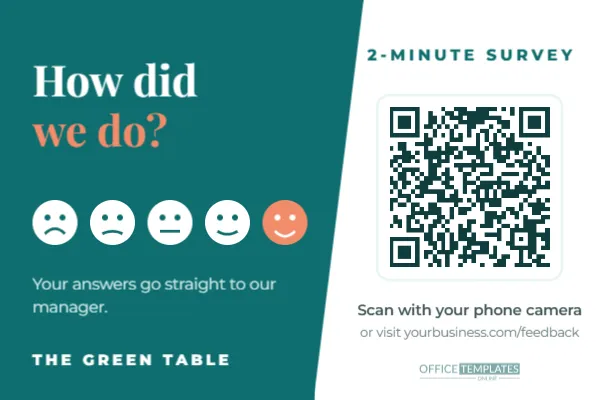
The card is 6 x 4 inches, landscape. The left side is a deep teal panel with an angled edge. How did is set in white Playfair Display, with we do? in coral beneath. Five round faces sit in a row, from a frown to a big smile, with the happiest face filled in coral. A short line explains that answers go straight to the manager, and your business name sits at the bottom in spaced capitals.
The right side is white. 2-MINUTE SURVEY is set in small teal capitals above the QR code, which sits on a white plate with a soft teal outline. Underneath, a line tells people to scan with their phone camera and gives the web address for anyone who prefers to type.
Writing a Survey People Finish
The card promises two minutes, so the survey must keep that promise. Long surveys get abandoned halfway, and half-finished answers tell you little. A simple structure works for most small businesses:
- One rating question: Overall, how was your visit today? On a five-point scale, matching the faces on the card.
- One open question: What is one thing we could do better?
- One positive question: What did you enjoy most?
- An optional contact field for people who would like a reply.
Free online form tools can build this in minutes. Copy the survey’s share link, select the QR code, click Edit Code, paste the link into URL/Website, and press Update QR Code. Then update the printed web address on the card so it matches.
Turning Answers Into Improvements
Feedback is only valuable if someone reads it and acts. A simple weekly routine keeps it useful.
| When | What to do | Why it matters |
|---|---|---|
| Every day | Skim new responses for urgent problems | Fix a broken machine or rude moment quickly |
| Every week | Count ratings and note repeated comments | Spot patterns rather than one-off complaints |
| Every month | Share top praise and top fixes with the team | Staff see the impact of their work |
| Every quarter | Compare average ratings with last quarter | Check whether changes actually helped |
When someone leaves contact details with a complaint, reply personally within a day or two. A thoughtful response often turns a disappointed customer into a loyal one.
Close the loop in public too. A small note by the till, such as You told us the queue was slow at lunch, so we added a second till shows customers that their answers are read. It also encourages more people to scan the card, because they can see that it leads to real change. Keep a short log of what you changed and when, so you can match each improvement with the ratings that follow it and see which changes customers actually noticed.
Where to Hand Out the Card
Timing matters as much as placement. Ask for feedback when the experience has just ended, not while someone is waiting or paying in a hurry.
- Restaurants: tuck the card into the bill folder.
- Salons and spas: hand it over with the receipt at checkout.
- Clinics: give it at the check-out window after the appointment.
- Hotels: leave it on the desk in each room.
- Delivery and repair services: leave it with the invoice or on the job sheet.
- Retail: drop it in the shopping bag at the till.
Feedback Versus Public Reviews
A private survey and a public review site do different jobs. The survey gives you honest detail you can act on; reviews help new customers find you. Many businesses use both: this card for private feedback, and a separate review sign at the counter. Be careful not to use the survey to filter who gets asked for a public review. Review platforms generally ask businesses to invite every customer, not only happy ones, so keep the two requests separate and fair.
Restyling the Card
Teal and coral feel calm and friendly, which suits clinics, cafés and service businesses. Select the teal panel to change it to your brand colour, and recolour the happiest face to match your accent. The faces are simple shapes, so you can recolour each one, for example from red through amber to green. Replace The Green Table with your business name. Headings use Playfair Display and body text uses Montserrat, both Google Fonts in the editor.
Keep the QR code on its white panel. A code printed on the teal side would be harder for phones to read, and the editor will warn you if a colour change affects scanning.
Printing the Cards
Six by four inches is a standard postcard and photo size, so it prints easily at home, at a photo kiosk or at any print shop. Use matte card stock so customers can also write a note on the back if you like. The QR code prints at about one and a half inches wide, ideal for a card held in the hand. Print a few hundred at a time; feedback cards get used up quickly in busy weeks.
Feedback Card FAQs
Should the survey be anonymous?
Make contact details optional. Anonymous feedback is often more honest, and people who want a reply can leave an email.
Can I offer an incentive?
A small thank-you, such as a prize draw, can raise responses. Make it available to everyone who responds, whatever their rating.
How many responses should I expect?
It varies by business, but handing the card over personally, with a sentence of explanation, always beats leaving a stack on the counter.
Build your two-minute survey, add the link to the code, and print a stack. Every answer is a small chance to make the next visit better.