Plan Every Lesson, Break, and Subject with One Colorful Weekly Timetable
Knowing exactly what class comes next and when it begins can make the school week much easier to manage. This Class Timetable template turns the Monday-to-Friday routine into one clear weekly view, giving teachers and students a convenient place to organize subjects, lesson periods, breaks, and other scheduled activities.
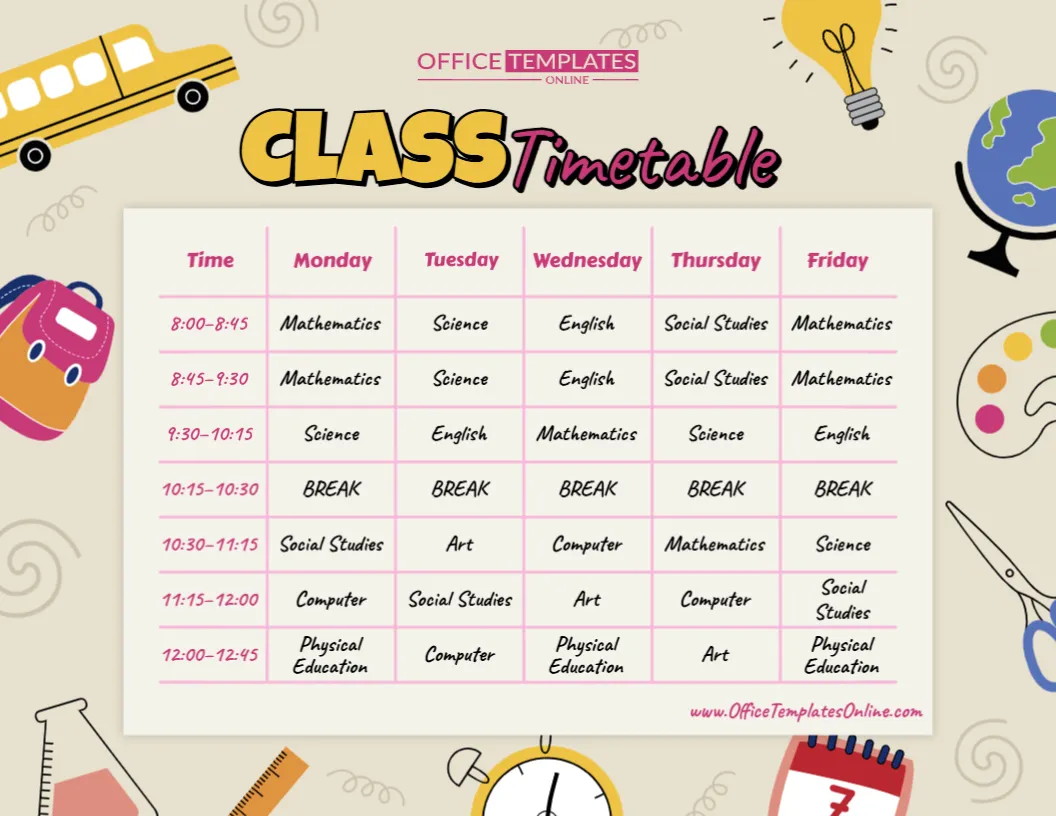
The design uses a familiar timetable grid: times run down the left side, while Monday through Friday appear across the top. This is a practical format for weekly school timetables because it lets readers match a particular time with the correct subject and day at a glance.
The sample timetable is already filled with subjects such as Mathematics, Science, English, Social Studies, Art, Computer, and Physical Education, along with a scheduled break. These entries are there to show how the finished timetable can look. You can replace them with your own subjects, times, breaks, and activities.
Customization takes place directly in the browser using the online editor, and no login is required. When your timetable is ready, you can download the finished design as a PDF, PNG, or JPG.
What Does This Class Timetable Template Include?
This template provides a ready-made structure for organizing five school days without requiring you to build a timetable manually.
The main grid contains columns for:
- Time
- Monday
- Tuesday
- Wednesday
- Thursday
- Friday
Each horizontal row represents a different lesson period or time slot. The sample begins at 8:00–8:45 and continues through several periods, including a break, until 12:00–12:45.
You can change these times to match your own school day.
A weekly grid with time slots on one axis and weekdays on the other is a widely used way of presenting class timetables because it makes it easy to see when each subject takes place.
Replace the Sample Subjects with Your Own
The subjects shown in this design are examples rather than a fixed curriculum.
The sample timetable contains a varied selection of academic and activity-based subjects, including:
Mathematics • Science • English • Social Studies • Art • Computer • Physical Education
There is also a dedicated Break period.
When customizing the template, you can replace these entries with whatever your students actually study.
For example, your version could include Mathematics, Language Arts, Reading, Writing, History, Geography, Biology, Chemistry, Music, Library, Technology, Religious Education, Physical Education, or other subjects.
For younger learners, you could use activity-based entries such as story time, creative play, circle time, outdoor activities, snack time, and arts and crafts.
Give Each School Day Its Own Plan
Unlike a basic daily schedule, this template displays the entire Monday-to-Friday school week on one page.
That means Monday does not need to contain the same lessons as Tuesday, and Wednesday can have a completely different combination from Friday.
For example, the sample design places Mathematics in several periods throughout the week while subjects such as Art, Computer, Physical Education, and Social Studies appear at different times on different days.
This arrangement demonstrates one of the main advantages of a weekly timetable: students can check one document to understand how their subjects change throughout the week.
Add Your Actual Class Times
Subjects are only half of a useful timetable. Students also need to know when each period begins and ends.
The dedicated Time column allows you to enter the actual lesson periods followed by your school or classroom.
You might use times such as:
- 8:00–8:45
- 8:45–9:30
- 9:30–10:15
- 10:15–10:30 Break
- 10:30–11:15
- 11:15–12:00
- 12:00–12:45
Or replace them entirely with your school’s own bell times.
If your school does not use exact times on student timetables, you could adapt the available content to represent Period 1, Period 2, Period 3, and so on.
The goal is to make the finished timetable reflect the routine students actually follow.
Breaks Belong on the Timetable Too
A useful school timetable does not have to show lessons only.
Breaks, lunch periods, assemblies, and other non-instructional parts of the school day can also be included in a weekly timetable.
The sample template demonstrates this by including a Break from 10:15 to 10:30 across all five weekdays.
Depending on your routine, you could include:
- Morning break
- Recess
- Lunch
- Assembly
- Homeroom
- Registration
- Independent study
- Club time
- Library period
- Advisory period
- Dismissal preparation
Including these activities provides a more complete picture of the school day instead of showing only academic subjects.
A School-Themed Design That Stays Easy to Read
This template takes a different visual approach from a plain spreadsheet-style timetable.
A warm, light-colored background surrounds the main schedule, while illustrated school objects decorate the outer edges. The artwork includes a school bus, backpack, globe, light bulb, art palette, scissors, ruler, laboratory flask, clock, and calendar.
These elements give the design a playful educational theme without covering the timetable itself.
The main schedule is placed inside a clean rectangular area. Pink grid lines divide the information into clearly defined cells, and the weekday headings are easy to identify across the top.
The result is a timetable that feels appropriate for a classroom while keeping the actual schedule as the main focus.
Edit Your Class Timetable Directly Online
You do not need to create the timetable in a spreadsheet or install specialist design software before using this template.
Simply open it in the online browser-based editor and personalize the available content.
Better still, there is no login required to start customizing.
You can replace the example subjects with your own lessons, update the time periods, change scheduled activities, and make other available adjustments to prepare the timetable for your class.
Starting from a ready-made template can also be more convenient than beginning with an empty grid, especially when the basic weekly structure you need is already in place.
How to Customize This Timetable
Preparing your own version can be done in a few simple steps:
- Open the template in the online editor.
- Check the time column and replace the sample periods with your actual class times.
- Work through Monday to Friday and enter the correct subject for every period.
- Add breaks or other activities where they occur.
- Check the full week for missing subjects or incorrect times.
- Review the text for spelling and accuracy.
- Download the completed timetable as a PDF, PNG, or JPG.
A useful approach when building any weekly class timetable is to map the time periods first and then place subjects into the appropriate day-and-time cells.
Display It Where Students Can Check It Easily
Once completed, the timetable can become an everyday classroom reference.
You could place a printed copy:
On a classroom wall where students can see the entire week.
Near the whiteboard so the day’s lessons are easy to check during class.
On a bulletin board alongside classroom announcements and reminders.
Near the classroom entrance so students can check their day when they arrive.
At a teacher workstation as a quick reference for the week’s lessons.
You can also keep an image or PDF version for digital reference.
Useful for Teachers and Students
This template can serve both sides of the classroom.
For a teacher, it provides an easy visual overview of which subjects are scheduled throughout the week.
For students, it answers common everyday questions such as:
What subject do we have next?
When is our break?
Which day do we have Art?
When is Physical Education?
A weekly timetable can help students and teachers keep track of subjects on particular days and at particular times.
Adapt the Timetable for Different Learning Environments
Although the artwork gives this design a school-focused appearance, the timetable itself is flexible.
An elementary or primary teacher could use it for a single class’s weekly subject rotation.
A homeschool family could turn it into a structured weekly learning plan.
A tutor or learning center could enter lesson subjects and session times for a group of learners.
It could also be adapted for an after-school educational program where different activities take place at set times throughout the week.
The important part is the underlying structure: five weekdays, multiple time periods, and customizable activities.
Keep Subject Names Short for Better Readability
When filling out the timetable, try to keep each entry clear and reasonably short.
A timetable needs to communicate information quickly. Long descriptions can make individual cells crowded and harder to scan. Guidance for timetable layouts similarly recommends keeping subject information compact so the grid remains readable.
For example, “Physical Education” works well because students immediately understand the subject. You probably do not need to add a full description of what will happen during that lesson.
If additional details are necessary, use the shortest wording that still makes sense to the people who will use the timetable.
Update It When the School Routine Changes
A timetable may need adjustments during the school year.
Lesson times can change. A subject may move to another day. A new activity might be introduced, or the timetable may be different in a new term.
Because this is an editable template, you can return to the design, update the relevant information, and prepare a revised version rather than rebuilding the whole layout.
This also makes the template useful when preparing a timetable for a new academic term or school year.
PDF, PNG, or JPG — Choose the Format You Need
After completing your timetable, download the finished design in your preferred format.
PDF is a useful option when you want a document suitable for printing or sharing.
PNG provides a high-quality image version that can be useful for digital displays or sharing.
JPG gives you a widely supported image format that is convenient for many devices and applications.
Having all three choices allows you to decide how you want to use the timetable after customization.
Turn a Busy School Week into One Clear View
A school week can contain many different subjects, periods, and activities. Keeping all of those details in one organized grid makes the routine much easier to understand.
This editable Class Timetable template gives you that structure without requiring you to create the layout yourself. With dedicated columns for Monday through Friday, clearly defined time slots, room for multiple subjects, and a cheerful school-themed design, it provides a practical starting point for building your own weekly timetable.
Replace the sample Mathematics, Science, English, Social Studies, Art, Computer, Physical Education, and break periods with the schedule your class actually follows.
Customize the Class Timetable online with no login required, add your own subjects and times, and download the completed design as a PDF, PNG, or JPG.