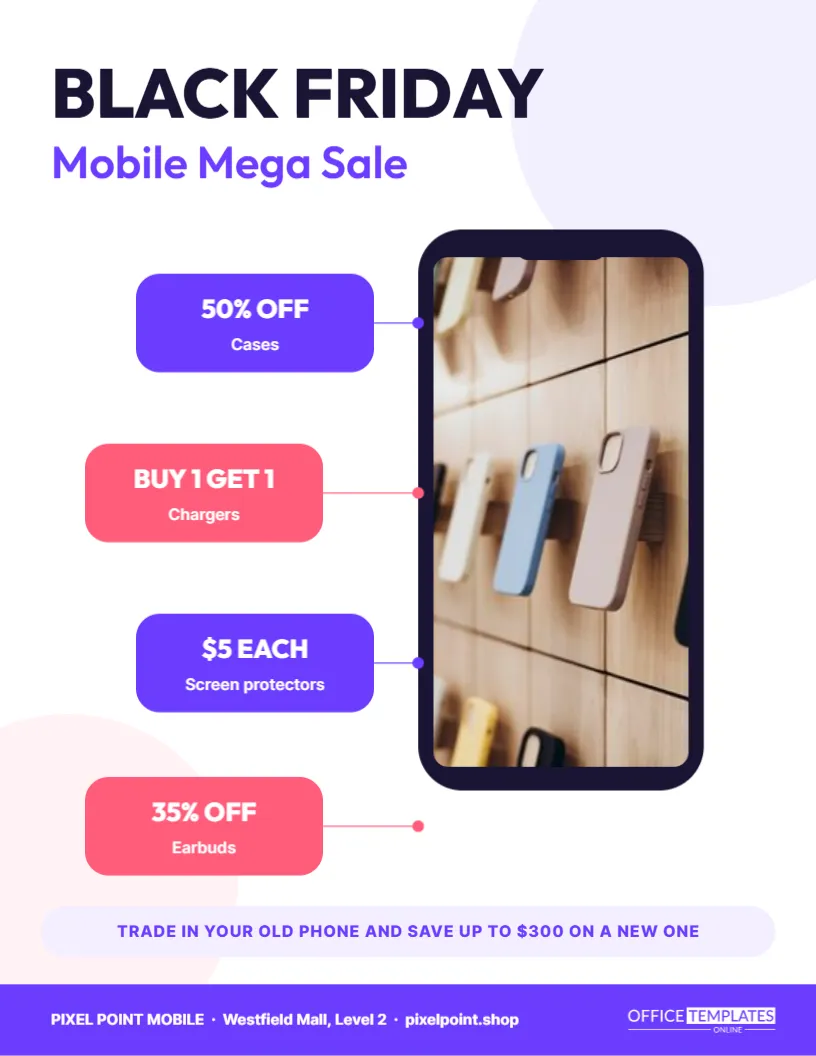
Phones are among the most wanted Black Friday purchases, and every new phone needs a case, a charger, and a screen protector. Mobile stores and accessory shops can make the most of both. This flyer places a large phone outline in the centre of the page, with its screen as a photo slot, and surrounds it with four colourful accessory deals connected by thin lines, like callouts in a product diagram.
A Phone Outline as the Centrepiece
The phone is drawn as a dark rounded rectangle with a small notch at the top. Its screen is a photo slot, so you can show a new phone model, an app screenshot, or a lifestyle image. Because the outline is generic, it works for any brand without showing a specific manufacturer’s design.
Violet and Coral Accents
The page is white with soft violet and coral circles in the corners. The two accent colours alternate on the deal chips, which keeps the page lively and balanced. Outfit, a clean modern typeface, carries the headline, and Inter keeps the smaller text crisp.
The Mobile Mega Sale Headline
BLACK FRIDAY appears in heavy navy Outfit, with Mobile Mega Sale below in violet. A short, friendly headline suits a mobile store, where customers want quick information about the deals they care about.
Four Accessory Deal Chips
| Accessory | Offer |
|---|---|
| Cases | 50% off |
| Chargers | Buy 1 get 1 |
| Screen protectors | $5 each |
| Earbuds | 35% off |
Each chip is a rounded block in violet or coral with the offer in large white text and the accessory name below. A thin line with a dot connects each chip to the phone.
Why Accessories Drive Profit
Accessories often carry better margins than phones themselves, and customers buying a new device are ready to buy them. Discounts on cases, chargers, and protectors are attractive and still profitable. The flyer gives them as much attention as the phone itself.
The Trade-In Strip
A lavender strip near the bottom reads TRADE IN YOUR OLD PHONE AND SAVE UP TO $300 ON A NEW ONE. Trade-in programmes encourage upgrades by lowering the effective price. Adjust the amount to your programme, and mention any conditions in store.
Customising the Phone Flyer
- Replace the phone screen photo.
- Edit the four accessory chips and offers.
- Change the trade-in strip.
- Update the store name, location, and website in the footer.
- Download as PDF or PNG.
Choosing a Screen Image
A colourful wallpaper, a bright camera sample photo, or a happy person video calling all make good screen images. Avoid screenshots with small text that will be unreadable in print. Keep the image vertical to fill the screen properly.
Repositioning the Callout Lines
If you change the number of chips, move the lines so each one still points to the phone edge. The lines and dots are simple shapes. Keeping them evenly spaced makes the diagram look intentional and tidy.
Repair Shops and Service Deals
Phone repair shops can replace accessories with services: screen repair from $79, battery replacement $49, free diagnostics. The callout layout works well for services, especially when paired with a photo of a technician or a repaired phone.
Printing the Phone Flyer
The white background keeps printing simple. Glossy paper makes the screen photo look vibrant. Place copies at the counter and near accessory displays so customers can compare deals while they browse.
Sharing the Phone Deals Flyer on Mobile
Mobile customers live on their phones, so social media and messaging apps are ideal. Post the flyer as an image and share each accessory chip as a separate story. Include a link for online orders or click and collect.
Bundles for New Phone Buyers
Offer a starter bundle with a case, protector, and charger at one price. Mention it near the trade-in strip. Bundles simplify the decision and raise the average sale.
Helping Customers Transfer Their Data
Many people delay upgrading because moving contacts and photos seems difficult. Offering free setup and data transfer is a strong reason to buy in-store. Add it as a line on the flyer if your staff can provide it.
Showing Compatible Accessories
Accessory buyers want to know whether a case or charger fits their phone. A short note, such as cases for the latest models in stock, reassures them. Staff who can quickly check compatibility in store are a strong reason to shop locally rather than online.
Promoting Phone Plans and Upgrades
If you sell phone plans or upgrades, add a line under the headline, such as Ask about our holiday plan deals. Many customers choose a store based on the plan offers as much as the phone price. Keep plan details accurate and follow your carrier’s advertising rules.
Using the Phone Flyer for Tablets and Laptops
The callout layout also works for tablets, laptops, and smartwatches. Replace the phone outline with a tablet shape or a photo slot, and change the accessories to keyboards, sleeves, or straps. The diagram style makes accessory deals easy to understand for any device.
Preparing Stock for Accessory Rush
Popular cases and fast chargers sell quickly on Black Friday. Check stock for the newest phone models and best-selling chargers before the sale. A full accessory wall near the phones encourages impulse buys and reassures customers that you have what they need.
Showing Accessory Prices Clearly at the Counter
Customers often decide on accessories at the last moment, while paying for a phone. Keep a small printed copy of the flyer at every till, with the four chips clearly visible. It reminds staff to mention the deals and helps customers pick up a case or charger before they leave the store.
Phone and Accessories Flyer Questions
Can I show a real phone photo instead of the outline?
Yes. Delete the outline and use the screen slot for a full product photo.
Can I add more chips?
Yes. Make them smaller and add lines to connect them.
Is the trade-in amount fixed?
No. It is sample text. Use your programme’s real figures.