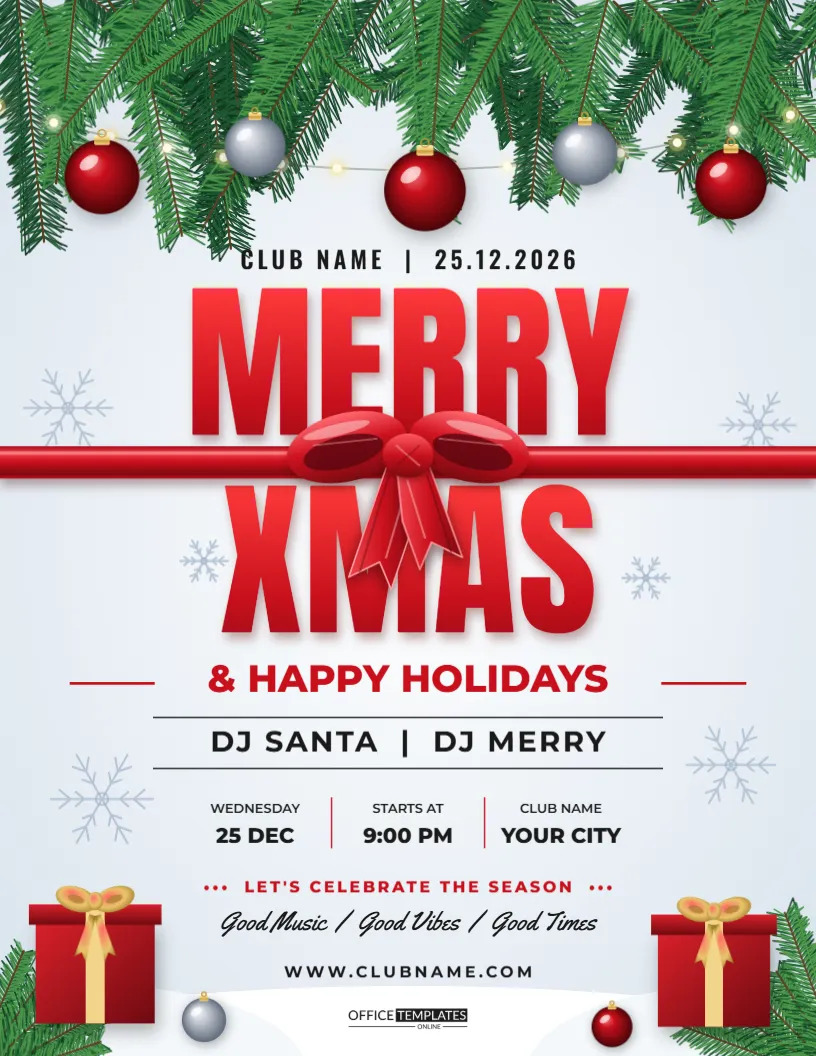
Not every Christmas party wants a dark, moody poster. Some want a clean, bright page that looks like fresh snow and reads like a greeting card. This Merry Xmas flyer starts with a snowy white background, hangs a pine garland across the top with red and silver baubles and warm lights, and sets a huge red MERRY XMAS title tied with a satin ribbon and bow. A details strip carries the date and venue, and gifts and pine fill the bottom corners. It suits family parties, church socials, school events, and neighbourhood gatherings.
The Appeal of a White Christmas Flyer Design
White space makes a poster look calm and professional, and red lettering stands out sharply against it. Printing is easier too, because a light page uses far less ink than a dark one. If you will print many copies at home, this layout is the economical choice.
Editing the Ribbon-Tied MERRY XMAS Title
The title is the heart of the page. A satin ribbon wraps across it and ends in a bow, so the words look like a wrapped present. Replace the text with your own greeting, such as Happy Holidays or Christmas Social, and check that the ribbon still crosses the word in a pleasing place. Shorter titles look best at this size.
Reading the Details Strip
Below the title, a long strip holds the practical facts. It has three slots for date, time, and place. Write them in the order guests need them and leave out anything that is not essential. If the party has a theme, mention it in the line directly beneath the strip.
Red and Silver Baubles on the Pine Garland
The baubles use soft gradients so they look glossy, with silver ones balancing the red. Warm fairy lights loop through the pine. To adapt the page to another colour theme, recolour the baubles first, such as gold and white for an elegant tone or blue and silver for a frosty one.
Gifts and Pine in the Snowy Bottom Corners
Presents with ribbons and short branches of pine sit in the snowy corners. They ground the page and give the eye a place to rest. If you need extra room for text, nudge them outward or remove one.
Writing a Warm Invitation Line Under the Title
A single friendly sentence turns a poster into an invitation. Something like Join us for cocoa, carols, and cake is enough. Keep it to one line so that the details remain the main reading path.
| Event type | Suggested invitation line | Extra detail to add |
|---|---|---|
| Family party | Come and celebrate with us | Bring a dish to share |
| Church social | All are welcome | Childcare available |
| School event | Families invited | Pick up from 3 PM |
| Street party | Neighbours, come and meet | Bring your own chair |
Handling RSVPs and Catering Numbers
If food is provided, add an RSVP date at least a week before the event. A phone number and an email address give people two ways to reply. Remember to note allergies and dietary needs on your reply form.
Using the Merry Xmas Flyer for Neighbourhood Events
Street parties and block gatherings are easier to organise with a flyer posted through doors. Put the poster on the community board and share a photo in your local group. Add a spare line asking neighbours to bring something for the food table.
Printing the White Flyer at Home
A light background suits inkjet and laser printers. Use standard 80 gsm paper for notice boards and a heavier card for invitations that people keep. Print one test page to make sure the red looks bright and not orange.
Keeping Fonts and Colours Consistent Across Your Event
If you also make a ticket, a menu, or a sign, reuse the red from the title and the same two fonts. A consistent look makes the event feel planned and professional, even when it is a small gathering.
Sizing the Flyer for Social Media and Messaging
The portrait ratio fits stories and phone screens. Export the page at full size, then crop slightly if a platform trims the edges. Keep the date in the middle of the image so it is never cut off.
When to Send Out a Merry Xmas Party Flyer
Send invitations at least three weeks ahead, because December calendars fill fast. A short reminder in the final week catches anyone who has not replied. Add a note about parking or public transport in that second message.
Last Look Before You Print or Post
Check the spelling of the venue, the date, and the contact line. Look at the page from across the room. If MERRY XMAS and the date are easy to read, your flyer is ready to go.
Planning Food and Drink for a Snowy White Themed Party
A bright design pairs well with a light, festive menu. Think of mulled cider, hot chocolate, mince pies and a table of sandwiches. If guests are asked to bring a dish, name the types needed on the flyer, such as one savoury and one sweet. That keeps the table balanced and takes pressure off the host.
Activities for Children at a Merry Xmas Gathering
Parents look for family-friendly details. A craft table, a short film, a carol sing-along, or a visit from Santa gives children something to do while adults chat. Add a short line under the title, such as Children welcome, so families know they are invited.
Making the Party Flyer Fit Your Own Style
Small edits transform the template. Change the ribbon colour to gold for a classic look, or to green for a woodland feel. Replace the silver baubles with ones in your team colours if the event belongs to a club or class. Each change takes seconds and gives the page its own personality.
Thanking Helpers and Volunteers on the Flyer
Community events run on volunteers. A small line at the bottom, such as With thanks to our neighbours and local shops, recognises the people who made the day possible. It also encourages others to offer help next year, and it costs nothing to add to the page.