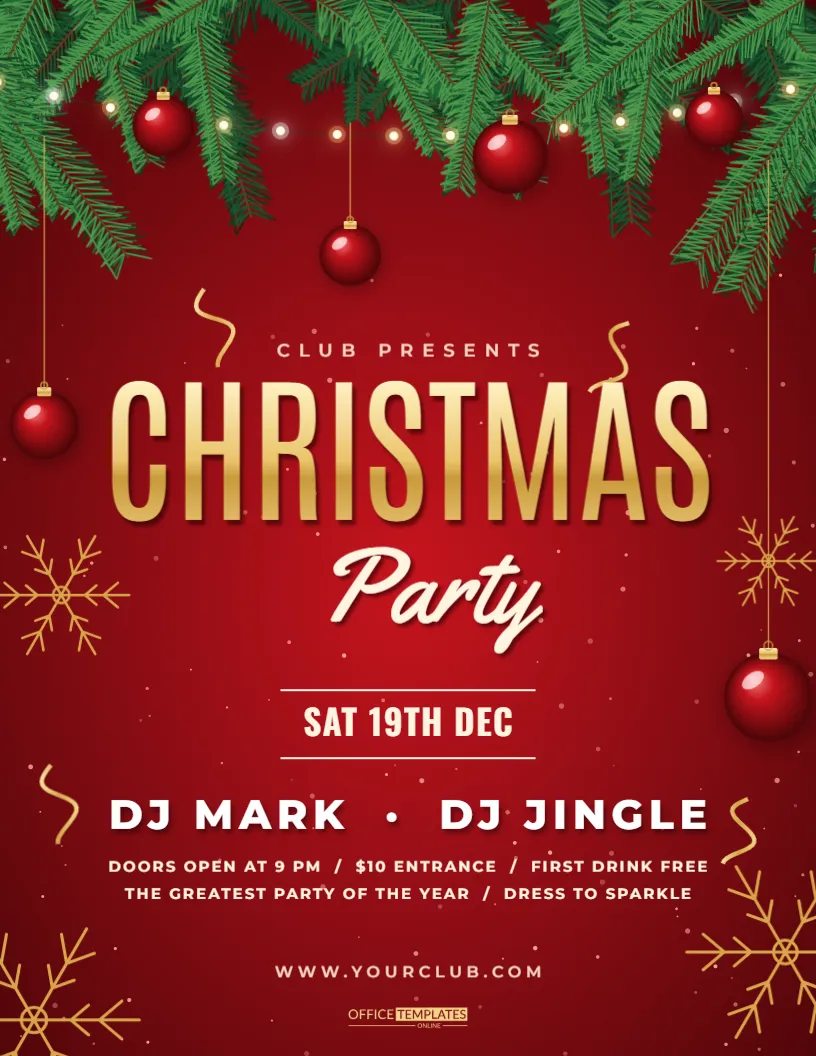
The best party flyers make people want to be there before they read the details. This red Christmas party design does it with warmth: a rich red glow, a deep pine garland lit with tiny warm lights, glossy baubles hanging from gold strings and gold snowflakes drifting across the page. The title pairs a bold gold CHRISTMAS with a cream script Party, and the date sits between two fine rules above a short line up. Use it for office parties, club nights, restaurant events, school socials, or a family gathering at home.
Why a Red Background Works for a Party Invitation Flyer
Red is the colour of energy and celebration, and gold on red has some of the strongest contrast available. People notice this flyer on a crowded notice board because it glows, while paler posters fade. The deep pine garland at the top adds green so the page does not feel like a single flat colour.
Replacing the CHRISTMAS Title and the Party Script
The word CHRISTMAS is large, gold and gradient-filled, while Party is a cream script set slightly across it. You can keep both words, or change the script to Dinner, Social, Night or Celebration. Keep the script short so it stays legible against the heavier capitals.
Setting the Date Between the Two Gold Rules
Dates are the first fact guests look for, so the design gives them a spot with room around it. A thin gold rule sits above and below the line. Write the weekday and date on one line, such as Friday, December 18, and put the start time on the next line. Avoid abbreviations that could confuse an international crowd.
Filling in the Party Lineup
| Slot | Example entry | What guests learn |
|---|---|---|
| Arrival | Welcome drinks at 7 PM | When to turn up |
| Main event | Live DJ and dancing | What the night is about |
| Extras | Photo booth and prizes | Reasons to stay late |
Replace the three placeholders with your own programme. Short phrases work better than full sentences on a poster.
The Glossy Baubles and Gold Strings
Several baubles hang at different heights, each with a highlight and soft shadow so they look round. You can recolour them, move them, or duplicate one to add more. If your event has a colour theme, such as silver and blue, change the bauble colours first and the whole page shifts toward it.
Gold Snowflakes and Sparkles as Light Decoration
The snowflakes are simple vector shapes in gold, set at varied sizes. They fill the empty corners and stop the page from feeling heavy. If you add more text, delete one or two so the layout stays clean.
Adding the Venue, Dress Code and RSVP Details
The lower part of the page has room for the address, dress code, and contact line. Add the nearest car park or station if guests may be unfamiliar with the place. An RSVP date helps hosts plan numbers and catering, so name a deadline and a person to contact.
Using the Flyer for Office and Workplace Parties
For a company event, put the company name in the footer and consider a line about plus ones, food and drink, and transport home. Pin the flyer in the kitchen or send it as a PDF a few weeks ahead. Early notice raises attendance, because December diaries fill quickly.
Using the Flyer for Community Clubs and Societies
Clubs, choirs and sports teams can use the same layout for end-of-season parties. Replace the line-up with awards, raffle, and buffet, and add the ticket price in the footer. A QR code to a booking form can sit in the lower corner if you have space.
Printing Tips for a Dark Red Flyer
Deep reds can print darker than they look on screen. Do a test print and, if the page looks muddy, lighten the background glow a little. A matte paper keeps the gold from reflecting under bright lights, while gloss makes the baubles pop.
Sharing the Party Flyer by Email and Messaging Apps
Export the page as a PNG or PDF and attach it to the invitation message. In group chats, the image preview shows the title and date, so check that both are easy to read at thumbnail size before you send.
Keeping the Text Readable Over the Garland
Do not move text onto the garland at the top, because pine needles and lights create busy detail. Keep copy in the central and lower areas, where the red is smooth. If you must add a line near the top, place it on a small dark panel.
Giving the Party a Theme with Small Colour Edits
A single colour change can create a theme. Switch the gold to silver for a winter wonderland, or the red glow to deep blue for a midnight mood. Keep the contrast between the background and lettering high, and test the result on a phone screen.
Planning a Date Schedule for Party Promotion
Share the flyer three weeks before the event, again one week before, and a final time two days before. Each post can mention a different highlight, such as the DJ, the food, or the prize draw, while the flyer stays the same.
Final Checks Before You Send the Party Flyer
Confirm the date, the start and finish times, the address, and the contact. Ask a friend to read the page once without explanation. If they can say what, when, and where in ten seconds, the flyer is working.
Budgeting Guests, Food and Drink for a Red Christmas Party
Before the flyer goes out, decide how many guests you can host and what you will provide. A sit-down meal, a buffet, and canapes with drinks all have different costs per head. Put the answer on the poster in a short line, such as Food and drink included or Bring a bottle. Clear expectations at the start prevent disappointment and make it easier to plan numbers.
Music, Entertainment and Games Worth Mentioning on the Flyer
A line-up gives people reasons to come. Mention a DJ, a live band, a quiz, a secret Santa swap or karaoke, and name the start time of each if you can. Keep the wording lively but brief. If the party suits all ages, say so, because families check this before they reply.