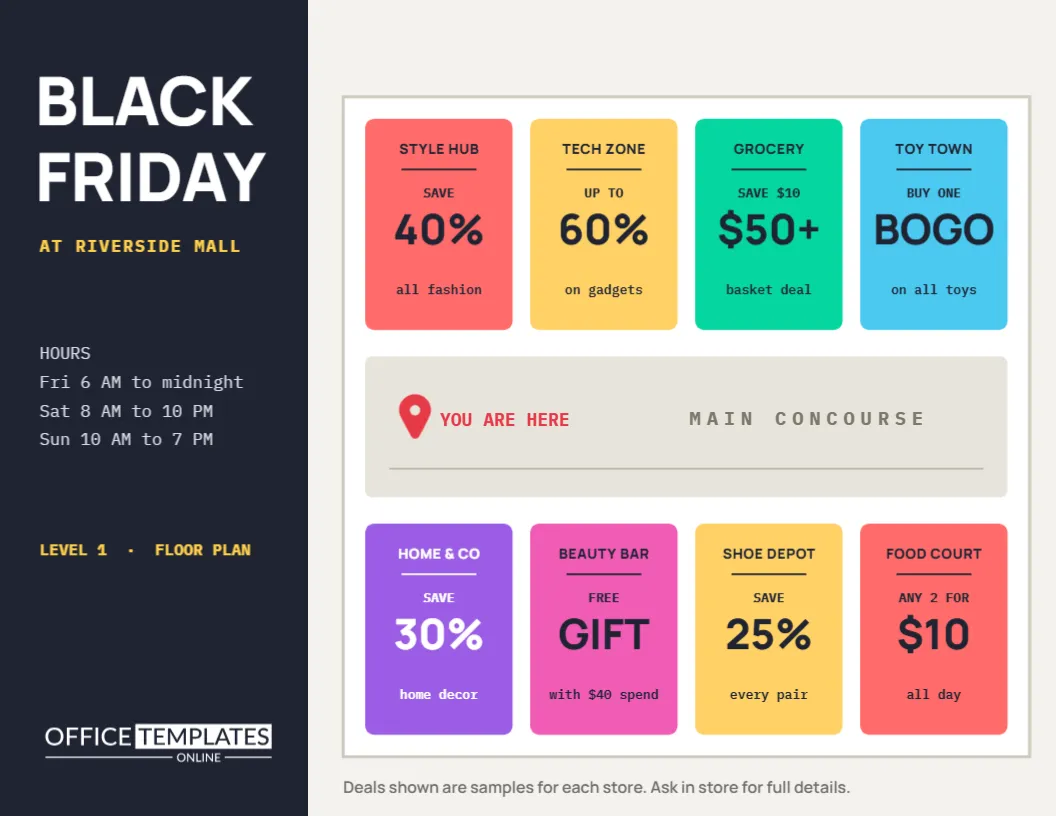
Shopping malls and shopping streets have a special challenge on Black Friday: dozens of stores, dozens of offers, and visitors who want to know where to go first. A directory flyer solves it by showing the deals on a simple floor plan. This landscape design places coloured store units along a main concourse, prints each store’s headline deal on its unit, and marks a You Are Here pin. A dark side panel holds the title and opening hours.
A Floor Plan as a Sales Map
The main area of the flyer is a simplified floor plan with a white border. Eight coloured units sit in two rows above and below a grey MAIN CONCOURSE. Each unit shows a store name and its Black Friday deal. Shoppers can plan a route in seconds, starting with the deals that interest them most.
The Store Units and Deals
| Store | Deal | Row |
|---|---|---|
| Style Hub | 40% off | Top |
| Tech Zone | up to 60% | Top |
| Green Grocer | $10 off $50 | Top |
| Toy Town | BOGO | Top |
| Home and Co | 30% off | Bottom |
| Beauty Bar | gift | Bottom |
| Shoe Depot | 25% off | Bottom |
| Food Court | 2 for $10 | Bottom |
Store names are set in bold Manrope and deals in IBM Plex Mono, which gives the map a clear, technical look.
The You Are Here Pin
A red map pin on the concourse is labelled YOU ARE HERE. Directory maps always include one, and it helps visitors orient themselves when the flyer is displayed on a stand near an entrance. Move it to the right position for each copy if you print versions for different entrances.
The Dark Side Panel
On the left, a dark navy panel carries BLACK FRIDAY in white Manrope, AT RIVERSIDE MALL in yellow mono capitals, and the opening hours for Friday, Saturday, and Sunday. Below, LEVEL 1, FLOOR PLAN tells visitors which floor the map shows. The OTO logo sits at the bottom of the panel.
Why Malls Need a Directory Flyer
Visitors to a busy mall can feel overwhelmed. A clear map with deals helps them spend more time shopping and less time searching. It also gives every tenant fair visibility, which mall managers and store owners both appreciate.
Gathering Deals From Tenants
Ask each store for its headline Black Friday offer a few weeks in advance, with a short deadline. Keep each deal to a few words so it fits the unit. Check the offers with the stores before printing, so the map stays accurate.
Customising the Mall Directory Flyer
- Rename the mall and level in the side panel.
- Update the opening hours.
- Retype each store name and deal.
- Move the You Are Here pin to the right place.
- Adjust unit sizes to match your real layout.
Matching the Map to Your Real Layout
The sample plan is simplified. Resize and move the units to resemble your actual floor plan, keeping them as rectangles for clarity. Add units if you have more stores, or create a second page for another level. Accuracy matters, because visitors will use the map to find stores.
Colour Coding Store Categories
The units use bright, varied colours. You can colour code them by category, such as fashion in coral, food in green, and tech in yellow, and add a small legend in the side panel. Colour coding helps visitors find types of stores quickly.
Printing a Landscape Directory
The flyer is US Letter in landscape. Print it for handouts at entrances, or enlarge it to poster size for directory boards. Bright colours print best on glossy paper. Make sure small store names remain readable at your chosen size.
Sharing the Map Online
Post the directory on the mall website and social pages before Black Friday. Visitors can save it to their phones and plan their route at home. Tag participating stores so they share it with their own followers.
Shopping Streets and Markets
The same layout works for shopping streets, business districts, and markets. Replace the concourse with a street name and arrange the units along it. For markets, units can represent stalls with their offers.
Adding Facilities to the Map
Visitors also look for restrooms, parking, customer service, and cash machines. Add small labels or icons for these on the concourse. A map that helps with practical needs makes the whole visit easier.
Updating the Map Through the Weekend
Some stores change offers on Saturday or Sunday. Keep the file ready to update and reprint quickly, or post daily versions online. An accurate map throughout the weekend avoids disappointed visitors.
Designing Clear Store Labels
Store names should be short and readable at small sizes. Use the name customers know, and avoid long legal names. If a store has a recognisable colour, consider using it for its unit so visitors can match the map to the signs they see in the mall.
Placing Printed Maps Around the Mall
Put copies at every entrance, information desk, and escalator, each with the You Are Here pin in the correct position. Visitors pick up a map when they arrive and use it throughout their visit, which helps spread traffic to every store.
Combining the Map With a Mall-Wide Offer
Many malls run a shared promotion, such as a gift with receipts over a certain amount or free parking for shoppers. Add it to the side panel. A mall-wide offer encourages visitors to shop in several stores rather than just one.
Measuring Visits With the Directory Flyer
Add a small mall-wide coupon to the side panel or the back of the flyer and count how many are redeemed at the information desk. It tells you how many visitors used the map and helps you plan next year’s directory.
Mall Directory Flyer Questions
Can I add a second floor?
Yes. Add a second page in the editor and duplicate the layout.
Can I add store logos?
Yes. Add small logo images to each unit with tenants’ permission.
Are the units editable?
Yes. Each unit and its text can be moved, resized, and recoloured.